AXISC1610-VENetworkSoundProjector
Specifications
Specifications
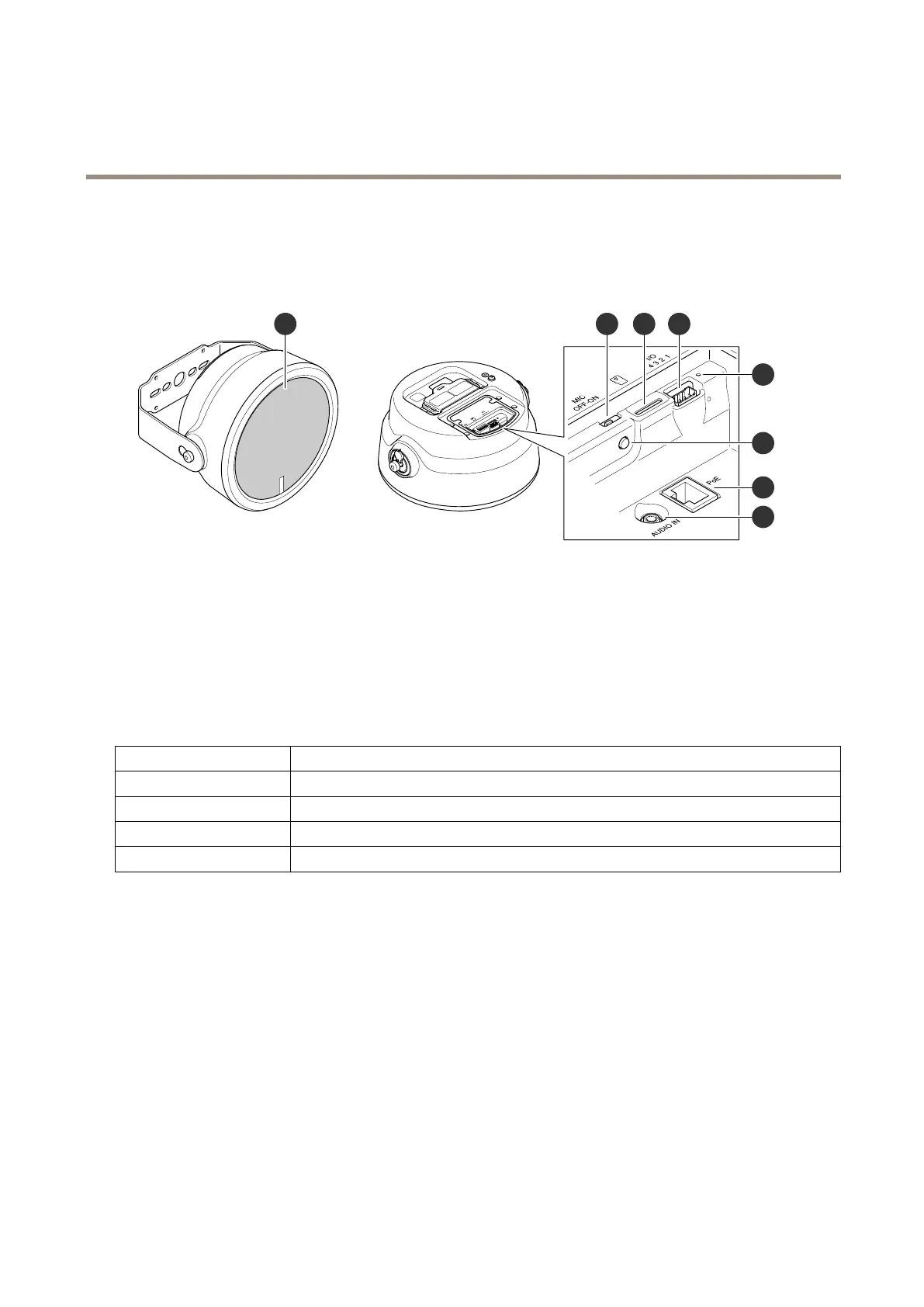
Productoverview
1
Mesh
2
Microphonedisableswitchonpage41
3
SDcardslot
4
I/Oconnectoronpage42
5
StatusLEDindicator,seeLEDindicatorsonpage41
6
Controlbuttononpage41
7
Networkconnectoronpage42
8
Audioin
LEDindicators
StatusLED
Indication
UnlitUnlitfornormaloperation.
GreenSteadygreenfornormaloperation.
Amber
Steadyduringstartupandwhenrestoringsettings.
Red
Slowashforfailedupgrade.
Buttons
Controlbutton
Thecontrolbuttonisusedfor:
•Calibratingthespeakertest.Pressandreleasethecontrolbuttonandatesttoneisplayed.
•Resettingtheproducttofactorydefaultsettings.SeeResettofactorydefaultsettingsonpage38.
Microphonedisableswitch
Forlocationofthemicrophonedisableswitch,seeProductoverviewonpage41.
ThemicrophonedisableswitchisusedtomechanicallyturnthemicrophoneONorOFF.Thefactorydefaultsettingforthisswitch
isON.
41


 To Next Page