EasyManua.ls Logo

Axminster Trade Series - User Manual

Axminster Trade Series
36 pages
Print Icon
To Next Page IconTo Next Page
Loading...
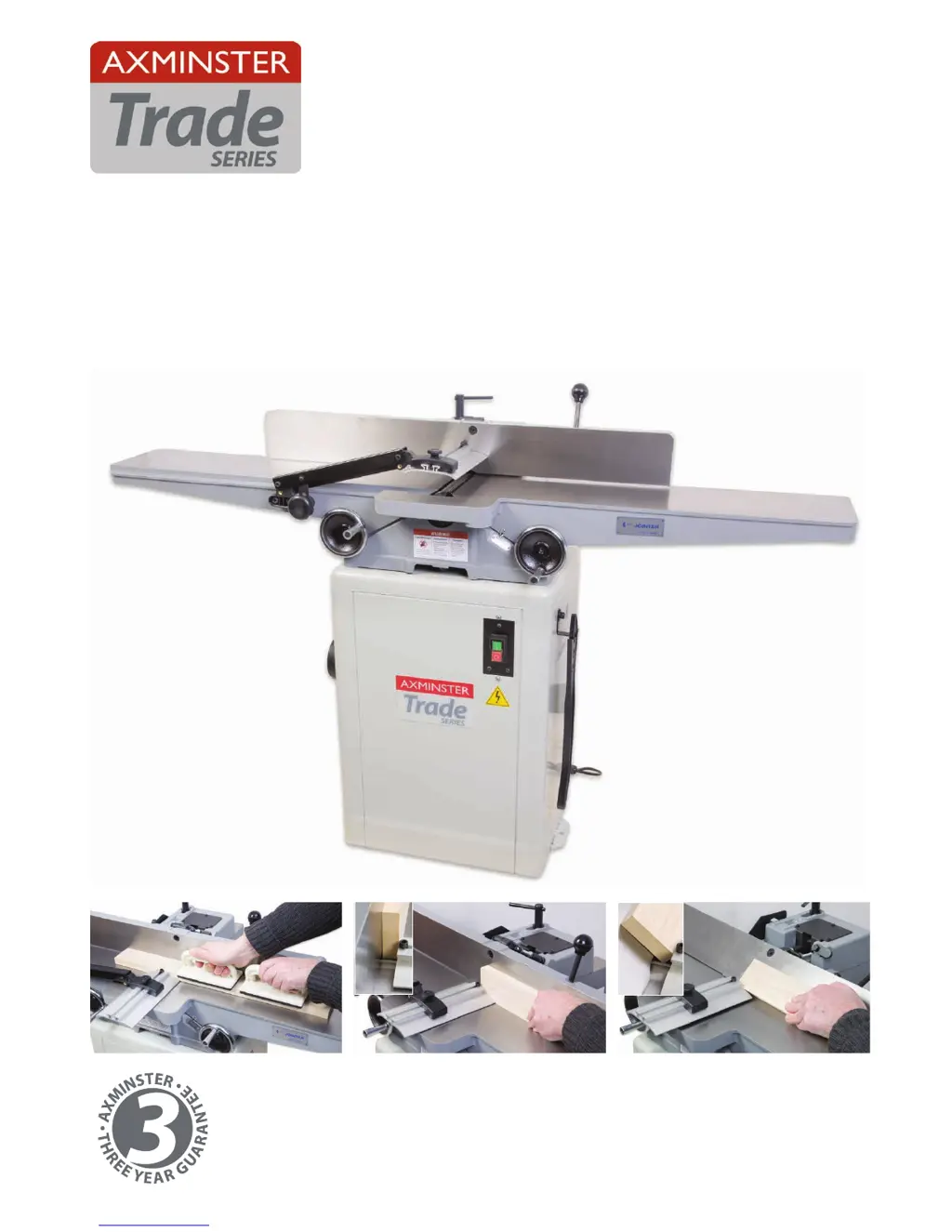
CT1502 (CT-150)
150mm Planer
Code 104349
Original Instructions
AT&M: 18/04/2018
BOOK REF : 104709

Other manuals for Axminster Trade Series

Questions and Answers

  • A
    Anthony SchultzJul 27, 2025
    Why won't my Axminster Industrial Equipment morticer start?
    • C
      Carol JacksonJul 27, 2025
      Your Axminster Industrial Equipment morticer might not start because of a blown fuse or tripped circuit breaker. In this case, replace the fuse or reset the circuit breaker. Another possible cause is a damaged cord. If the cord is damaged, have it replaced by a qualified electrician.
  • S
    Sarah WeaverJul 31, 2025
    How to fix unsatisfactory cuts with my Axminster Industrial Equipment morticer?
    • T
      Tamara WiseJul 31, 2025
      Unsatisfactory cuts from your Axminster Industrial Equipment morticer can be due to several reasons. The hollow square chisel and bit may be dull, in which case you should sharpen or replace them. Gum or pitch on the chisel and bit, or on the worktable or fence, may also be the cause. Clean these using “Axcaliber Blade and Bit Cleaner Code 951145”. Finally, the chisel and bit may not be correctly set; ensure the entire assembly is correctly held with a proper clearance of 2mm-5mm.
  • E
    Eric FoleyAug 4, 2025
    What to do if the overload kicks out frequently on my Axminster Industrial Equipment?
    • R
      Richard RiosAug 4, 2025
      If the overload on your Axminster Industrial Equipment kicks out frequently, it could be due to several reasons: * The extension cord may be too light or too long, so replace it with an adequate size cord. * The chisel and bit may be in poor condition (dull or broken), so clean or replace the chisel and bit. * The timber may be too wet, so dry the timber before cutting.
  • C
    Chad DavisAug 8, 2025
    Why doesn't the bit come up to full speed on my Axminster Trade?
    • Q
      qloganAug 8, 2025
      If the bit on your Axminster Industrial Equipment isn't reaching full speed, the extension cord may be too light or too long. Replace it with an adequate size cord. Alternatively, there may be low current or the motor may not be wired for the correct voltage, in which case you should consult a qualified electrician.
  • R
    Richard SullivanAug 13, 2025
    Why does the work start to burn when using my Axminster Trade?
    • D
      david68Aug 13, 2025
      Burning during use of your Axminster Industrial Equipment can happen if the chisel and bit are dull, so sharpen or replace them. It may also happen if the bit has worn out or is broken, so replace the worn bit with a new one.
  • E
    edwardrodriguezAug 17, 2025
    What to do if the drill bit is down drilling with my Axminster Trade?
    • R
      Richard TateAug 17, 2025
      If the drill bit is down drilling with your Axminster Industrial Equipment, it might be worn out or broken, so replace it. Another reason may be that the bit is not sharp enough, so sharpen the bit. Also, make sure the drill bit has not come loose in the chuck, and if so, tighten the drill chuck with the key provided.
  • J
    Jonathan MayerAug 21, 2025
    Why is my Axminster Trade Industrial Equipment vibrating?
    • H
      Heather WhiteAug 21, 2025
      If your Axminster Industrial Equipment is vibrating, it could be due to a damaged chisel bit, so replace it with a new one. Another reason might be that the stand is on an uneven floor. If this is the case, reposition it on a flat level surface and fasten it to the floor if possible.

Summary

EU Declaration of Conformity

Whats Included

General Instructions for 230 V Machines

Specific Safety Instructions for Planers

Assembly

Cabinet Assembly

Steps for assembling the machine cabinet.

Planer Assembly

Steps for assembling the planer unit.

Illustration & Parts Description

NVR On;Off Switch

Description of the NVR On/Off switch.

Fence Tilt and Clamping Assembly

Details of the fence tilt and clamping mechanism.

Fence Positions

Illustrations showing the fence at 90 and 45 degrees.

Cutterblock Guard Assembly

Details of the cutterblock guard assembly.

Setting Up;Adjustment

Fence Adjustment

Steps for adjusting the fence to 90 and 45 degrees.

Table and Cutterblock Adjustment

Procedure for adjusting tables, cutterblock, and table gibs.

Infeed Table Preset Stop

Details on setting the infeed table preset stop.

Dust Extraction

Information on dust collection methods.

Setting and Changing the Blades

Setting the Blades

Instructions for setting planer blades using a gauge.

Changing the Blade

Step-by-step guide to changing planer blades.

Operating Instructions

Planing Operation

Basic guide to planing operations and techniques.

90° Planing

Steps for performing 90-degree planing.

45° Bevel Planing

Steps for performing 45-degree bevel planing.

Direction of Grain

Guidance on feeding timber with the grain.

Changing the Drive Belt

Maintenance

Exploded Diagrams & Parts Lists

Wiring Diagram

CE Certificate

Notes

Axminster Trade Series Specifications

General IconGeneral
BrandAxminster
ModelTrade Series
CategoryIndustrial Equipment
LanguageEnglish

Related product manuals