Hand Strap
2
3
4
5
P
R
O
T
E
C
T
I
O
N
Water-resistant
IP65
Cable is not
included in the
package.
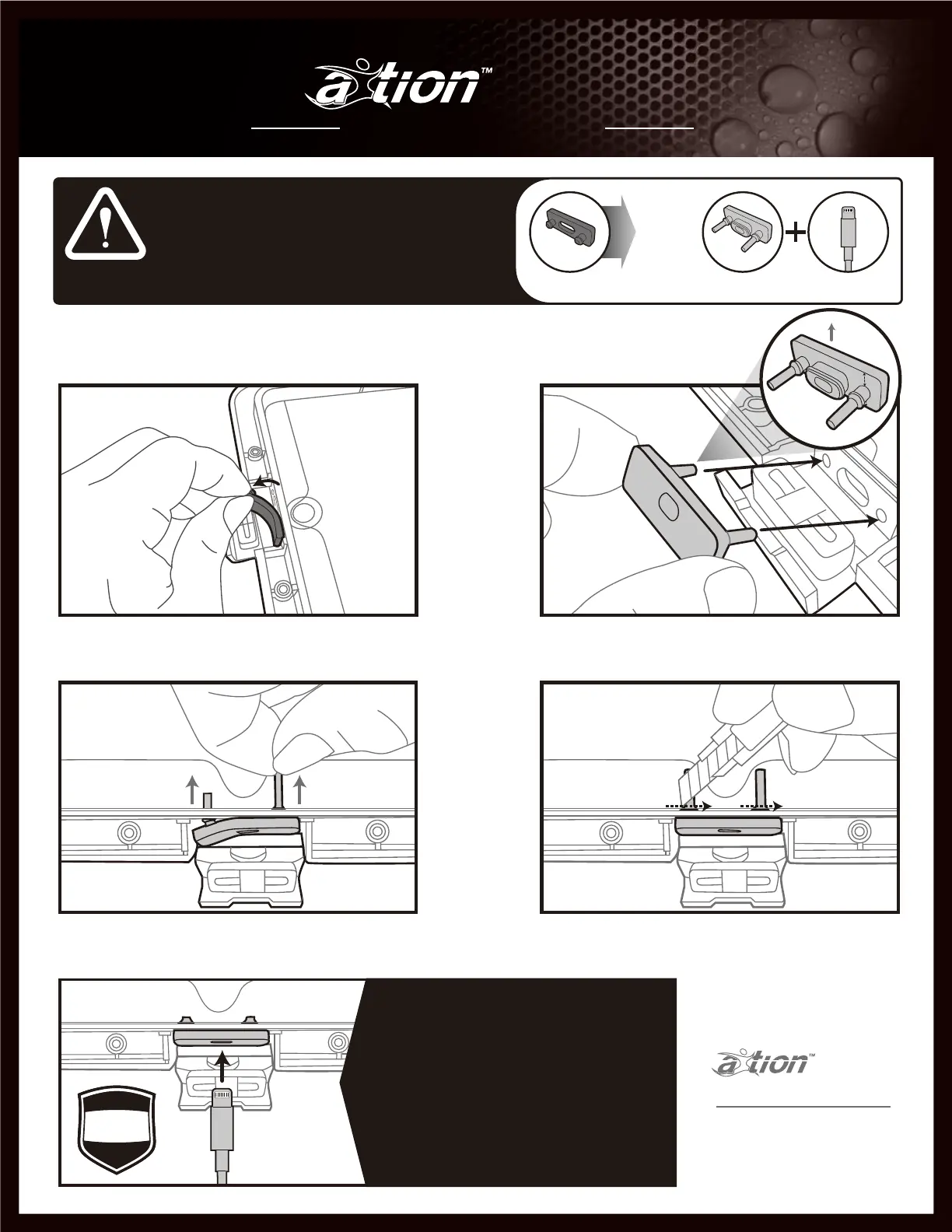
Grasp one side of blue rubber stopper and pull to
remove
Align stopper with holes and ensure proper orienta-
tion (refer to photo), apply firm pressure to the
charging port until the stopper sits into place
Pull each of the two rubber fingers through the holes
until they are seated properly
Using a utility knife carefully cut the excess rubber
Water Stopper
Replacing
Installation
1
pro M
C
a
b
l
e
i
s
n
o
t
i
n
c
l
u
d
e
d
i
n
t
h
e
p
a
c
k
a
g
e
.
If water-resistant (IP65) is required while charging, replace the blue water stopper with the gray one
by following directions below. Call us to get the Gray Water Stopper.
support@thejoyfactory.com
(949) 216-8888
Monday through Friday,
9:00 a.m. to 5:00 p.m. ( PST)
Contact us:
* CAUTION: WATER-RESISTANCE WHILE
CHARGING - Removing of the included
charging cable from the GRAY water
stopper will interrupt the water-resistant
feature. We do not recommend constant
removal of the cable to increase the
longevity of the products and to ensure
proper protection.
Charging
@IP65
Water-
resistant*
Call us to get the Gray Water Stopper.
Installation Guide ご 利 用 ガイド
pro M



 To Next Page