EasyManua.ls Logo

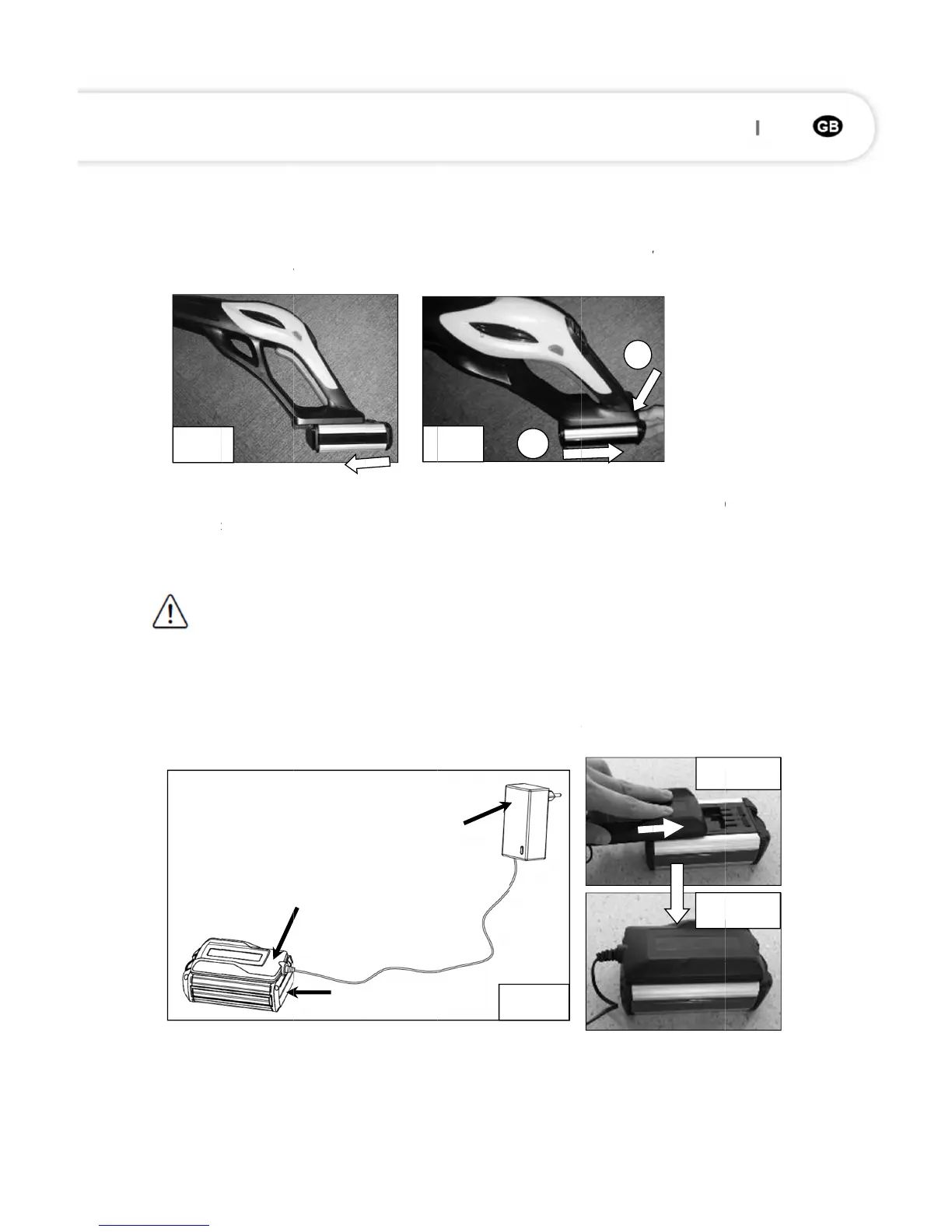
Ayce RTA30 - Battery Management; Connect and Disconnect Battery; Charge the Battery

Ayce RTA30
Print Icon
To Next Page IconTo Next Page
To Previous Page IconTo Previous Page
Loading...
Battery
Connect /
1. To con
n
locks i
n
2. To dis
c
produ
c
Charge t
h
Atte
n
Before fir
s
Use only t
1. Remov
e
2. Align t
h
locks i
n
3. Conne
c
the LE
D
4. After a
Fig. 8
Disconne
c
n
ect, align
n
place. (
F
c
onnect,
p
c
t. (Fig.9)
h
e batter
y
ntion!
Onl
y
s
t use, the
he origina
e
the batt
e
h
e sliding
s
n
place. (F
i
c
t the char
g
D
on batte
r
sufficient
1
c
t
and slide
F
ig.8)
p
ress the
y
(Fig.10)
y
use char
battery n
e
l charger.
e
ry from t
h
s
lots with
i
g.10-a, b)
g
er to the
r
y lights u
p
charging
t
1
5
2
the batte
r
release
b
ger in dry
e
eds to be
h
e device.
the batte
r
power su
p
p
green an
t
ime (abo
u
1
F
r
y onto th
e
b
utton
places, a
w
charged f
o
r
y and slid
e
p
ply. (LED
o
d blink)
u
t 2.5 hou
r
1
6
F
ig. 9
e
slots of t
h
and rem
w
ay from
m
o
r about 1
-
e
the cha
r
o
n charge
r
r
s, LED on
2
Fig. 10
h
e batter
y
ove the
b
m
oisture a
n
-
2 hours.
r
ger conne
r
lights up
charger li
1
y
docking
p
b
attery
n
d heat so
u
ctor onto
i
red, and
m
ghts up g
r
Fi
g
Fi
g
p
ort until i
t
from th
e
u
rces.
i
t until it
m
eanwhil
e
r
een),
g
. 10-a
. 10-b
t
e
e
82 83

Related product manuals