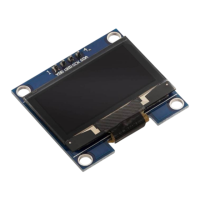
Use an an-stac cleaning cloth or special electronics cleaner to carefully clean the display. Although the display complies with
the requirements of the RoHS Direcve (2011/65/EU) and does not contain any hazardous substances in quanes above the
permied limits, residual chemical hazards may sll exist. Please note the following safety instrucons: Aenon: The back of
the display and the circuit board can release chemical residues from manufacturing or during operaon. Note: Wear protecve
gloves when handling or installing the display for a long me to avoid skin irritaon. Cauon: Electronic components can emit
small amounts of volale organic compounds (VOCs), especially if the display is new. Note: Make sure you work in a well-ven-
lated area to minimize the concentraon of fumes in the air. Cauon: Do not use harsh chemicals or solvents to clean the
display as they may damage the protecve coang or electronics. Note: Use an an-stac cleaning cloth or special electronics
cleaner to carefully clean the display. The display contains sensive electronic components and a top layer. Improper handling
or excessive pressure can cause damage to the display or injury. Observe the following safety instrucons to avoid mechanical
hazards: Aenon: The cover of the display is fragile and can break if handled improperly. Note: Avoid applying strong pres-
sure or bending the display. Handle the display carefully and only by the circuit board to avoid breakages. Cauon: Drops or
impacts can crack the surface of the display and damage the electronic components on the back. Note: Avoid dropping the
display and protect it from impacts. Use a so surface when working to avoid scratches. Aenon: If the display breaks, sharp
pieces of glass can cause injuries. Note: If the display breaks, handle the fragments carefully and wear protecve gloves to
avoid cuts. Dispose of the glass pieces safely. Note: Improper aachment can lead to mechanical stress and breakage of the
display. Acon: Aach the display securely and without excessive pressure. Use appropriate brackets or housings to mount the
display stably. Cauon: Improper cleaning methods may scratch or damage the surface. Note: Only use so, an-stac cloths
to clean the display. Avoid aggressive cleaning agents and strong fricon. The display operates with electrical voltages and
currents that, if used improperly, can cause electric shocks, short circuits or res. Please note the following safety instrucons:
Aenon: Use the product only with the specied voltages. Note: The performance limits of the product can be found in the
associated data sheet Note: Improper voltage sources can damage the display or cause dangerous situaons. Acon: Only use
tested and suitable power supplies or baeries to power your circuits. Make sure the voltage source meets the requirements
of the display. Cauon: Avoid short circuits between the connectors and components of the product Note: Make sure that no
conducve objects touch or bridge the circuit board. Use insulated tools and pay aenon to the arrangement of connecons.
Cauon: Do not perform any work on the product when it is connected to a power source. Note: Disconnect the product from
power before making any circuit changes or connecng or removing components. Note: Look for signs of electrical damage
such as smoke, unusual odors, or discoloraon. Acon: If such signs occur, turn o the power immediately and inspect the
circuit thoroughly for errors. The display can generate heat during operaon, which could lead to overheang, burns or re
if handled improperly. Please note the following safety instrucons: Aenon: Some components of the display can heat up
during operaon or in the event of an error. Measure: Aer switching o, allow the display to cool down suciently before
touching the individual components on the back directly. Avoid direct contact with hot components. Cauon: Overloading can
cause excessive heang of the electronic components. Note: Make sure the power and voltage supply meets the specicaons
of the display and does not cause overload.


 To Next Page