
 Need help?
Do you have a question about the az-instrument 7530-US and is the answer not in the manual?
Distinguishes between USA piggyback plug and EU/UK separated power coil types.
Instructions for positioning the external CO2 sensing probe and meter away from water.
Details on the 3kA@300VAC fuse and where to purchase replacements.
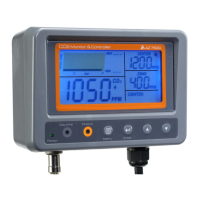
Explanation of keypad buttons (MENU, ENTER) and LED indicators (Power, Day time, Output).
Defines terms like CO2 Chart, Max, MIN, Buzzer, Zone, Center, RE-CALI, ADV.
Instructions for powering the controller on and off, and warm-up behavior.
How the meter measures CO2, its response time, and factors affecting accuracy.
Details on available time scales (1min, 1hour, 1day, 1week, Auto) for trend charts.
How to activate the display backlight for operation in dark environments.
How the Photo-Cell sensor detects light levels to control the CO2 generator.
Explanation of how CO2 value determines output power on/off based on Set Center and Set Zone.
How to read the chart for controlling target zone status using triangle icons.
How to enable and understand the buzzer alarm for CO2 concentration thresholds.
How to access the setup menu using the MENU key.
Procedure to set the Center CO2 value, with default and step increments.
Procedure to set the Zone CO2 value, with default and step increments.
Steps to calibrate the device using outdoor fresh air for accuracy.
Customizing buzzer, altitude compensation, and output modes (Human/Plant).
How to toggle the buzzer alarm on or off in advanced settings.
Adjusting altitude compensation for pressure variations (50M to 5000M).
Selecting Human or Plant mode to control relay output based on CO2 levels.
How to reset all settings to factory default values.
Solutions for 'Can't power on' and 'Slow response' error messages.
Interpreting 'CO2 reading is Hi' and error codes Err4, Err5, Err6.
Information on the one-year warranty covering defects in material and workmanship.
Procedure for obtaining authorization before returning items for any reason.
Details on fuse dimensions, amp code, voltage, and breaking capacity.
Instructions on how to locate and identify the fuse on the device's PCB.
Recommended target CO2 zones (ppm) for various plant types.
NIOSH and EPA Taiwan recommendations for indoor CO2 concentrations.
Exposure limits from ASHRAE, UK, OSHA, and other international standards.
 General
| Brand | az-instrument |
|---|---|
| Model | 7530-US |
| Category | Controller |
| Language | English |

 To Next Page