Need help?
Do you have a question about the Azden FMX-42 and is the answer not in the manual?
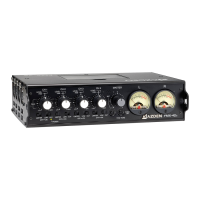
Details frequency response, output impedance, signal-to-noise ratio, and THD for the FMX-42 mixer.
Details output connector types, levels, impedance, and tone generator specifications for the FMX-42.
Details balanced and line input levels, impedance, and connector types for the FMX-42 mixer.
Connect microphones or line-level components to input channels CH 1, CH 2, CH 3, and CH 4 via XLR connectors.
Select input level for microphones or line-level audio components (-30, -50 dBu, or +4 dBu).
Enable or disable 48VDC phantom power for condenser microphones on each input channel.
Adjust the input volume for each channel using the inner "LEVEL" control.
Monitor input signal levels to prevent overload distortion using dual peak LEDs per channel.
Adjust the stereo balance for each input channel, sending sound to left or right outputs.
Engage the limiter to reduce overload distortion from loud sounds without affecting normal volume.
Activate the low-cut filter to remove unwanted low frequencies like wind noise.
Adjust the overall volume of all connected sources (microphones and line-level).
Monitor the 'L' and 'R' audio levels, adjusting channel levels to peak at 0 dB.
Engage the slate mic to pick up audio at the mixer's location for notes or documentation.
Generate a 1 kHz tone to set optimum recording levels for audio recorders.
 General
| Channels | 4 |
|---|---|
| Phantom Power | Yes |
| Frequency Response | 20 Hz - 20 kHz |
| Maximum Output Level | +20 dBu |
| Gain | 60 dB |
| Signal-to-Noise Ratio | 90 dB |
| Input Connectors | XLR, 1/4" TRS |
| Output Connectors | XLR, 1/4" TRS |
| Input Impedance | 10 kΩ |
| Power Requirements | Battery or AC adapter |

 To Next Page