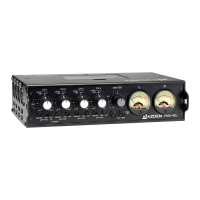
The Azden FMX-42a and FMX-42u are 4-channel portable mixers designed for professional audio recording, particularly in conjunction with video cameras, audio recorders, computers, smartphones, and tablet devices. Both models are built to work with low-impedance XLR microphones and line-level devices, offering versatile input and output options for various recording scenarios.
Function Description:
The core function of the FMX-42a and FMX-42u is to mix up to four audio input channels, control their levels, panning, and apply basic audio processing before outputting a stereo signal. This allows users to combine multiple microphones or audio sources into a single, balanced stereo track for recording.
Key Features and Usage:
- 4-Channel Input: Both models feature four independent XLR inputs (CH 1-4) for connecting microphones, wireless receivers, or line-level audio components. Each input has a push-tab locking mechanism for secure connections.
- Input Level Selection: Each channel offers a 3-position INPUT LEVEL selector (14) to match various source types:
- +4 dBu (LINE): For line-level audio inputs.
- -30 dBu (MIC 1): For standard microphone levels.
- -55 dBu (MIC 2): For lower-level microphone signals.
- Phantom Power (DC48V): Each XLR input (13) is equipped with an individual PHANTOM DC48V switch (15). This allows users to provide 48V phantom power to condenser microphones that require it. It's crucial to ensure microphones are compatible with 48V DC before activating this feature to prevent damage. Phantom power only operates when the INPUT LEVEL is set to -30 dBu or -55 dBu.
- Input Level Controls (2): Each channel has a dedicated LEVEL knob to adjust the input volume from 0 (quietest) to 10 (loudest). For optimal sound and minimal noise, users should adjust these controls so the corresponding VU Meter (8) peaks at 0 dB.
- Pan Controls (3): An adjustable PAN control (the outer ring of the LEVEL knob) is available for each channel. This allows users to position the audio signal within the stereo field, directing more sound to the Left (L) or Right (R) output. A center position provides an equal amount of sound to both outputs.
- LIMITER Switch (5): Each input channel includes a switchable LIMITER. When activated, this circuit helps prevent overload distortion from very loud sounds without significantly affecting normal volume. It acts as a safety measure for dynamic audio.
- High Pass Filter (HPF) Switch (6): Each input channel also features a switchable High Pass Filter (Low Cut). When turned on, it cuts frequencies below 100Hz, which is useful for removing unwanted low-frequency noise like wind or air conditioning.
- Input PEAK Level Indicators (7): Two LEDs per channel provide precise input level feedback. The lower LED indicates the level electronically before the LEVEL control, lighting RED if the input signal is too high and needs reduction at the source or via the INPUT LEVEL selector. The upper LED indicates the level after the LEVEL control and should only light RED occasionally, signaling potential overload if it stays continuously lit.
- MASTER Level Control (4): This knob controls the overall output volume of all mixed sources. For best results, it's recommended to keep this control at its midpoint while using the individual channel LEVEL controls (2) to maintain VU Meter (8) readings in the 0 dB range.
- VU Meters L and R (8): Two analog VU meters display the output volume level. By default, they show either the LINE OUT (17&18) or CAMERA RETURN (20) volume, selectable via the Monitor SELECT switch (22). Users can also reconfigure the meters to always show LINE OUT levels or be disconnected entirely by adjusting an internal switch (SW2).
- OUTPUT PEAK Indicators (9): These LEDs monitor the LINE OUT (17&18) outputs, lighting RED if overall levels are too high, indicating a need to adjust INPUT LEVEL controls (2) and/or the MASTER level control (4).
- SLATE MIC (10): A push-and-hold button activates an internal slate microphone. This is useful for on-location documentation, scene notation, or quick voice memos, though not intended for high-quality audio recording.
- 1 kHz TONE (11): A push-and-hold button generates a 1 kHz tone at +4 dBu. This tone is used to set optimal recording levels on connected video cameras or audio recorders according to their manufacturers' specifications.
- OUTPUT Connectors L and R (17&18): Two 3-pin female XLR outputs provide balanced stereo audio to video cameras or audio recorders. These outputs lock securely and are released by a tab.
- STEREO Mini-Connector Output (19): A 3.5mm unbalanced stereo output is provided for devices with mini-connector microphone level inputs, such as mini DV cameras. The output level is fixed at -36 dBu.
- LEVEL Selector (20): This switch allows selection of the output level for the OUTPUT (17&18) and CAMERA RTN (26) connectors: +4 dBu for line-level inputs or -36 dBu for microphone-level inputs.
- Monitor PHONES Output Jack (21): A 6.3mm (1/4") jack for connecting headphones to monitor the audio.
- Monitor SELECT Switch (22): This switch determines whether the PHONES output (21) monitors the LINE OUT (17&18) signals or the CAMERA (RTN) (26) input signals.
- LEVEL Volume Control (23): Controls the volume level of the PHONES output (21) from 0 (quietest) to 10 (loudest).
- METER ILLUM(ination) Switch (24): Turns on backlighting for the VU Meters (8).
- DC IN Connector (25): A 4-pin Hirose connector for external power using an optional 12V AC adapter.
FMX-42a Specific Features:
- CAMERA(RTN) Input/Output Connector (26): A 10-pin Hirose connector allows simultaneous sending of LINE OUT signals to a video camera and receiving RETURN input signals from it. This requires a specialty 10-pin Hirose plug (RM15TD-10P) and does not cancel out the XLR OUTPUT L & R (17&18). This connector can also be used as an auxiliary stereo output to a second camera or external audio recorder with a special Hirose-to-dual-XLR male cable.
- RTN Mini-Jack (27): A 3.5mm unbalanced stereo input jack for return signals. Plugging a cable into this jack will cancel out the CAMERA(RTN) (26) input.
- RTN LEVEL Volume Control (28): Controls the volume level of the RETURN input.
FMX-42u Specific Features:
- USB OUT mini-B (female) Digital Signal Output (29): This output allows the FMX-42u to connect to a computer, smartphone, or tablet with USB compatibility. It provides a line-level, stereo (Left & Right) digital audio signal for recording.
- USB Cable (Not Included): Requires a USB 2.0 compatible cable with a USB mini-B male connector (for the mixer) and a USB A male connector (for a computer).
- USB Adapters: For smartphones and tablets, USB A female to USB micro-B male adapters (for Android) or Apple® 30-pin/Lightning Camera Connectors (for iOS) may be required.
- Compatibility Note: The connected device must be USB OTG (On The Go) compatible. Additional software or apps may be needed for recording. The FMX-42u acts as a digital output only; monitoring playback from the recording device is not possible through the mixer. Connecting USB devices significantly reduces battery life.
Important Technical Specifications:
- Frequency Response:
- Balanced/Unbalanced Output: 20 Hz - 30 kHz (+0/-1.5 dB)
- Monitor Output: 30 Hz - 30 kHz (+0/-2 dB)
- Signal-to-Noise (Balanced Output): -120 dBu (A weighted, input equivalent level)
- T.H.D. (Balanced Output): < 0.005% @ 1 kHz (at LINE position +19 dBu output)
- Phantom Power Voltage: 48V (±1.5V)
- Sample Tone Frequency: 1 kHz
- Battery Requirement: 6 Alkaline "AA" batteries
- External Power: 10.5 ~ 17V DC @ 200mA (via optional AC adapter)
- Dimensions: 220mmW x 160mmD x 56mmH (without protrusions) / 9"W x 6 1/2"D x 2 1/4"H (without protrusions)
- Weight: 1.3 kg / 2.9 lbs (without batteries)
- Input Impedance:
- LINE: 20 kΩ
- MIC HI: 2 kΩ
- MIC LO: 2 kΩ
- Output Impedance:
- Balanced Output: 600 Ω
- Unbalanced Output: 1200 Ω
- Digital Signal Output (FMX-42u Only):
- Interface Format: USB 2.0 Full Speed
- Audio Data Format: Isochronous Data Format
- Sampling Frequencies: 16 / 22.05 / 32 / 44.1 / 48 kHz Compatible
- Bit Depth: 8 / 16 bit Compatible
- Channels: 2
- Device Name: USB AUDIO CODEC
Maintenance Features:
- Battery Installation: The mixer uses 6 "AA" alkaline batteries. The POWER indicator LED (1) turns green when power is on and red when battery voltage is low, signaling a need for replacement. Users should only use "AA" alkaline batteries, avoid mixing fresh and used batteries, and remove batteries if the mixer will not be used for extended periods to prevent fluid leaks.
- External Power: The mixer can be powered by an optional 12V AC adapter (not included). When connected to an active AC adapter and the POWER switch (16) is ON, the batteries are automatically disconnected, preserving battery life.
- Ballistic Nylon Case: The mixer comes with a ballistic nylon case with a neck strap for portability and protection. Metal rings on the case allow for securing an optional back harness for additional support.
- VU Meter Configuration: The VU Meters (8) can be reconfigured by removing the bottom plate and adjusting an internal SW2 switch. This allows users to choose between monitoring LINE OUT, CAMERA RTN, or disconnecting the meters entirely.
- Safety Instructions:
- Always turn input LEVEL controls to zero or turn the POWER switch OFF when connecting/disconnecting cables or changing PHANTOM power/INPUT LEVEL settings.
- Ensure PHANTOM DC48V is OFF when not needed.
- Verify microphone compatibility with 48V DC before turning PHANTOM DC48V ON to prevent damage.
The Azden FMX-42a and FMX-42u are robust, feature-rich portable mixers designed to provide high-quality audio solutions for a variety of professional and semi-professional recording applications, with specific models catering to camera return functionality or digital USB output.

 Need help?
 General

 To Next Page