C
!
NOTE: Before proceeding, kindly turn OFF/disable
any wireless adapter in your computer.
The following items are included in your WL580E package.
Please contact your Dealer if any of the following items
below are missing from your package.
FONT SIZE : 10 for content || 12 for Title
TRACKING: -30
LEADING : 20 (Double Spacing)
Kindly follow any of the setup options provided in setting
up your device.
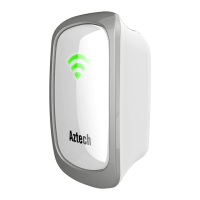
A Package Contents B Device Overview
WPS Button
SMART LED
Indicator
5.0GHz LED
2.4GHz LED
Power LED
Reset
Ethernet
Port
WL580E Repeater Resource CD
Ethernet Cable
(RJ45)
Easy Start
Guide
2.4GHz / 5.0GHz LED Behaviors
OFF
No wireless device is connected.
Blinking
Wireless devices are currently connected and is actively
transmitting/ receiving data.
Easy Start Guide
WL580E |
Dual Band 300Mbps
Wireless-N Repeater
Plug in the WL580E Repeater to a power outlet.
Switch on the power outlet (if applicable).
Connect one end of the Ethernet cable to the WL580E
Repeater and the other end to the Ethernet port of
your computer.
1.
2.
3.
1
2
3
B. Web Browser Setup
A. Wi-Fi Protected Setup (WPS)
Plug in the WL580E Repeater to a power outlet.
Press the WPS button of your WL580E for five (5)
seconds.
Press the WPS button of your router for two (2)
seconds.
1.
2.
3.
Press for 5
seconds
Reposition ypour WL580E for optimal signal quality
and range extension
4.
1
2
Launch a Web browser (e.g. Internet Explorer, Google
Chrome) from your computer. You will be redirected
to the WL580E Repeater’s Web User Interface. If in
any case it doesn’t, type http://10.0.10.254 in the
address bar and then press Enter.
4.
Choose a Wireless SSID (Wireless Network Name)
from the list and click to connect.
Input the Wireless Password of the chosen Wireless
SSID and click the Apply button.
Reposition your WL580E for optimal signal quality
and range extension.
5.
6.
7.
Connecting the WL580E Repeater to
the Wireless Network

 Need help?

 To Next Page
 General