Need help?
Do you have a question about the Azumi L4G and is the answer not in the manual?
Covers keypad, navigation, call, and hang-up buttons for interaction.
Includes the screen, receiver speaker, and main speaker for output.
Details left/right function keys, OK button, flashlight, and silent mode.
Covers the earphones connector and USB connector ports.
Guide for inserting SIM and memory cards into the phone.
Instructions for turning the phone on and off.
Recommendations for initial and ongoing battery charging.
Managing text messages and storing contact information.
Organizing files and reviewing call history.
Covers camera, video, audio, and FM radio features.
Using the FM radio and playing video files.
Details alarm, calendar, calculator, and converter functions.
Using Bluetooth and playing phone games.
Configuring call features, time, date, and language.
Customizing screen display, wallpaper, and user profiles.
Managing PIN codes, phone passwords, and keypad lock.
Details electrical power, voltage, and charger specifications.
Important precautions for using the mobile phone safely.
Information regarding adherence to FCC rules for device operation.
Details government requirements for radio wave exposure.
Requirements for maintaining safe distance during body-worn use.
This document describes the features and specifications of the Azumi L4G mobile phone.
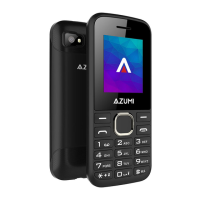
The Azumi L4G is a basic mobile phone with a keypad, a screen, and essential communication and multimedia functions. It is designed for ease of use and includes features such as a camera, flashlight, and FM radio.
The phone's physical layout includes:
To insert the SIM card, locate the SIM card slot (SIM 1 and SIM 2 are indicated) and slide the SIM card into the slot with the gold contacts facing down until it fits correctly. For additional storage, a memory card can be installed in the designated slot, also with the gold contacts facing down.
To turn the phone on or off, press and hold the Power key (6) until the screen activates or deactivates.
New batteries are partially charged. A full charge is recommended before initial use. Battery performance may improve after several charge/discharge cycles.
The phone supports Short Message Service (SMS) for sending and managing text messages. Access the message center from the main menu using the left function key to view and operate available options.
The File Manager helps organize files in folders. Files on the phone memory and memory card are managed separately. Options include opening, copying, deleting, and moving files such as images, audio, e-books, and photos.
The phone can store up to 300 names and phone numbers in its memory. SIM card storage capacity depends on the SIM card type.
This function allows users to view missed, made, and received calls, and to delete call records.
STK (SIM Toolkit) service provides tools from the SIM card. Specific options depend on the SIM card and network operator.
Allows taking pictures and recording dynamic images. The OK key (7) takes photos, the left function key accesses settings, and the right function key exits the capture interface.
Enables video recording. The OK key starts recording, the left function key stops, and the right function key cancels.
Users can view stored images.
Plays audio files. The OK key controls playback/pause, the right direction key advances, and the left direction key rewinds.
The phone includes an FM radio with automatic tuning and saved stations. It can be used while other applications are running.
Plays video files. The OK key plays/pauses, arrow keys control volume (up for volume+, down for volume-), and right/left arrow keys advance/rewind the video.
Features three programmable alarms.
Allows scheduling tasks and verifying dates.
Provides basic arithmetic functions.
Records audio. The OK key starts recording, the left function key pauses, and the right function key saves.
Allows adding world clocks.
Converts units for weight (e.g., kg to pounds).
Allows users to record notes.
Enables checking electronic files stored on the phone or T card.
Allows connecting to other Bluetooth devices for file transfer or using Bluetooth headsets for music. A memory card may be required for large file transfers.
The phone includes pre-installed games.
Users can switch between different modes (Normal, Silent, Meeting, Indoor, Outdoor) based on occasion. Modes can be customized.
Allows setting various network parameters.
This device complies with Part 15 of the FCC Rules, ensuring it does not cause harmful interference. Any unauthorized modifications could void the user's authority to operate the equipment. The device has been tested and complies with Class B digital device limits.
The phone meets government requirements for exposure to radio waves. The SAR limit in the USA (FCC) is 1.6 W/kg averaged over one gram of tissue. For the Azumi L4G (FCC ID: QRP-FP-011), the highest SAR value reported at the ear is 0.796W/kg, and when properly worn on the body, it is 1.064W/kg.
For body-worn operations, a minimum separation distance of 10mm must be maintained between the user's body and the handset (including the antenna). Third-party belt clips, holsters, and similar accessories should not contain metallic components and must meet RF exposure requirements. Only supplied or approved antennas should be used.
 General
| Brand | Azumi |
|---|---|
| Model | L4G |
| Category | Cell Phone |
| Language | English |

 To Next Page