7
SCREEN AND CONTROL ELEMENTS
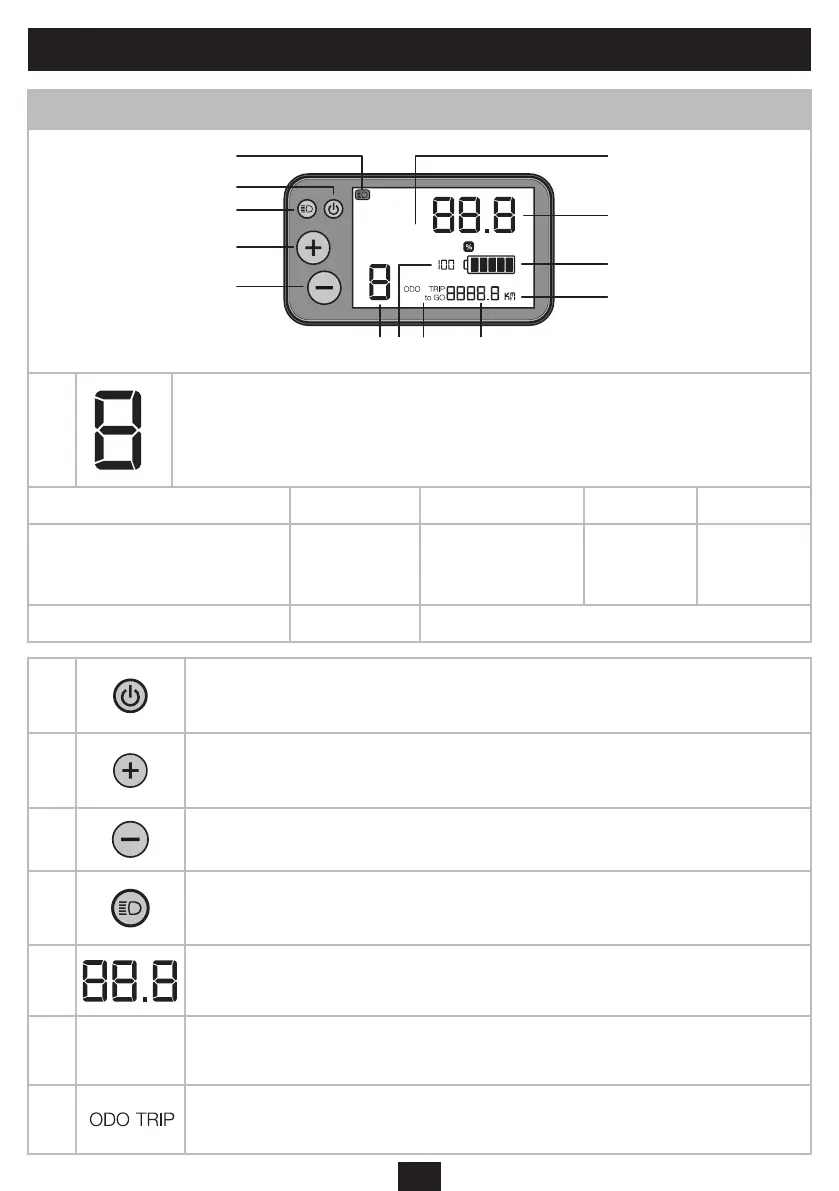
Screen data and function
6
12
10
2
5
3
4
6KM
1
Power assiance mode (0-1-2-3):
»0» no power assiance.
»1» is the default power assiance mode.
Each mode corresponds to the maximum assiance speeds set out below:
Mode 0 1 2 3
Maximum assiance speeds**
No assian-
ce
+50% assiance
+120% as-
siance
+190% as-
siance
Average autonomous range*** / 50 - 90 km
2
ON/OFF button:
Switch the electrically-assied bicycle on and o by holding the button down for a few seconds.
Scroll through the route information (TRIP, ODO, TRIPtoGO) with a short press.
3
«+» button:
Step up to the higher power assiance mode by briey pressing the button
Switch to «walk assi» mode by holding the button down for a few seconds.
4
»-» button:
Step down to the lower assiance mode
5
Lighting button
The lighting on the bicycle can be switched on and o by briey pressing the button
Go to the settings by holding the button down for a few seconds
6 Speed indicator**
7
«Walk assi» mode:
For walking beside the bicycle in walk assi mode, up to 6 km/h, without pedalling. Please note that this mode should not be used when
riding the bicycle
8
ODO: Records the total diance travelled. It cannot be reset to zero.
TRIP: Records the partial diance travelled.
TRIPtoGO: Remaining diance that may be covered with the power assiance mode.


 To Next Page