ENGLISHDEUTS CHFRANÇAIS NEDERLANDS
3.3 Operations
• Power button
Turn on the system by short pressing the power button for 1 second. The system will then go through the
following turn on sequence:
a. Full screen illuminates (1 second)
b. Software version displayed (C1)
c. Wheel diameter displayed
To turn off the system, press and hold the power button for 2 seconds.
NOTICE
• Keep your feet off the pedals when turning on the display when using the Max-E (torque sensor) system.
This is the right procedure to help pre-riding torque force calibration. If you put your feet on the pedal during
the system turn-on operation, it may cause the display to show error 7. If that happens, please turn off and on
the display and follow the correct procedures.
• The display and system will automatically shut down if the speed is 0 km/h and not in use for 10 min or more.
• ‘SET’ button
Pressing the ‘SET’ button for 1 second allows you to rotate between the following options: Distance to go (TRIP to
GO), Time to go (TIME to GO), odometer (ODO), Trip distance (TRIP) and Time (TIME)
- TRIP to GO
The approximate distance your Babboe-E cargo bike can go before
running out of battery, based on the current battery capacity level
and current motor assistance mode.
- TIME to GO
The approximate time remaining on your Babboe-E cargo
bike before running out of battery, based on the current battery
capacity level and current motor assistance mode.
0.0
02:15
1
SET
SET
TIME
TIMEto GO
TRIP
ODO
KM
KM
KM/H
TRIP
TRIP
0:00
2
35.3
30.3
ODO
KM
17.00
33.1
FontsVoorbeelden Contouren
0.0
02:15
1
SET
SET
TIME
TIMEto GO
TRIP
ODO
KM
KM
KM/H
TRIP
TRIP
0:00
2
35.3
30.3
ODO
KM
17.00
33.1
FontsVoorbeelden Contouren
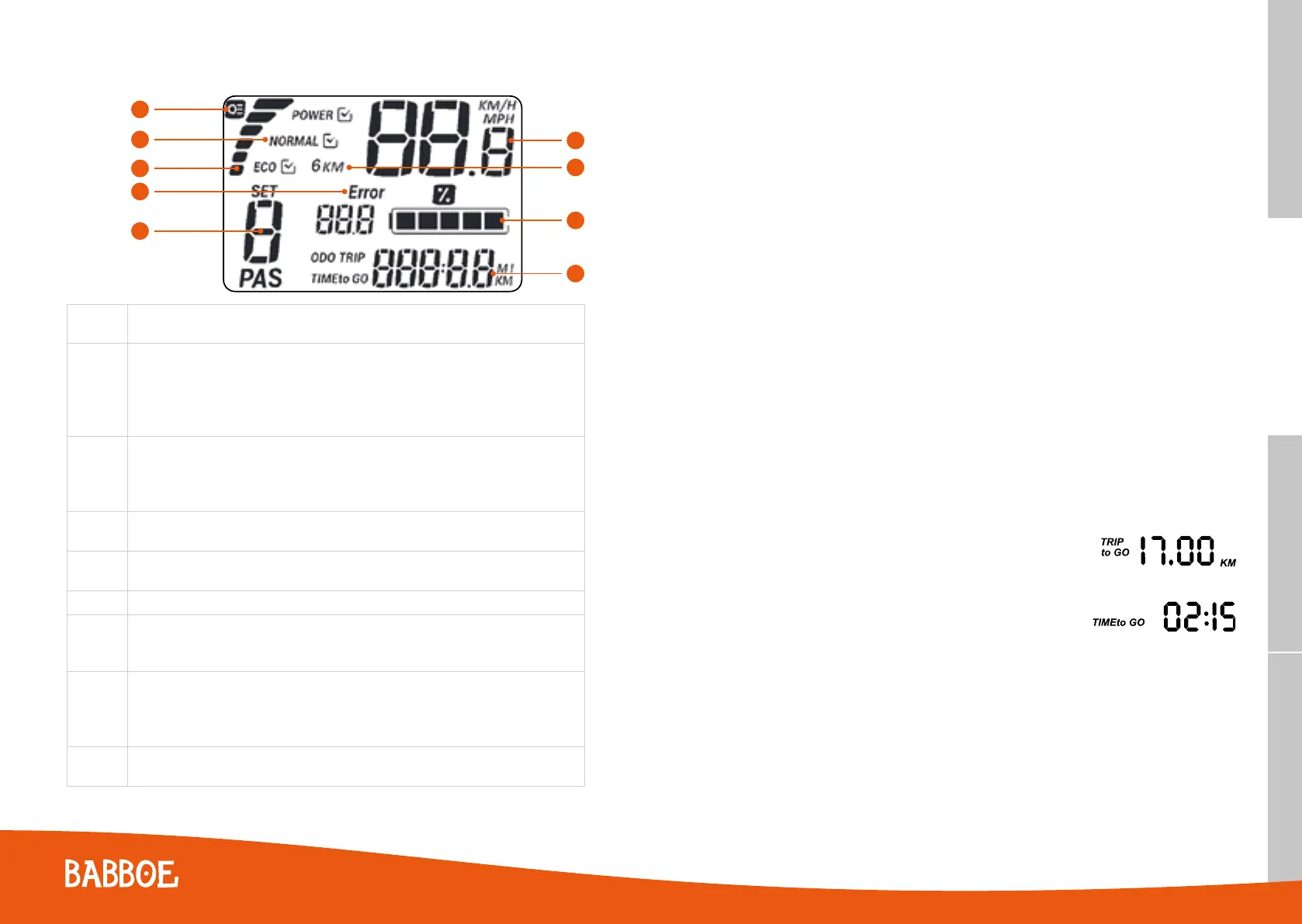
3.2 Panel information
A
B
C
D
E
F
G
H
I
A
LCD Backlight Indicator
LCD Backlight & front and rear lights
B
Additional Mode Display
Mode 1 - 3 = Eco
Mode 4 - 5 = Normal
Mode 6 – 7 = Power
Mode 8 = Boost
C
Energy Consumption Meter
Normal mode = 2A discharge (2A per bar, in total 6 bars to12A)
Charge Meter (only for the Max-E)
Quick charge = 2A charge current (2A per bar, in total 6 bars to 12A)
D
Error Indicator
Lights up with Error Code if there’s an error
E
Assistance Mode Level
(0 - 8) Modes, 0 = No Assistance
F
Speed (KM/H or MPH)
G
Walk Assist Indicator
Forward : solid icon
Backward: flashing icon
H
Battery Capacity Indicator
Shows the remaining percentage of battery capacity. Five bars per cell & 20% per bar. When the total
remaining capacity is less than 20%, the battery symbol will start flashing and the value (19%) will
disappear.
I
Odometer/Trip Distance/Trip Time
Shows the corresponding values of the odometer, trip distance, and trip time
Only the Babboe Max-E cargo bike is equipped with a reverse walk assist mode.
5150



 To Next Page