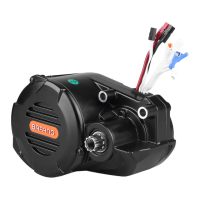
The BAFANG H610 Drive System is an electrically powered pedelec drive system designed for city roads, off-road gravel, or sand use. It is not suitable for sport competitions. The system includes a motor (FM G070.250/350/500.D) and a display (DP C171.CAN).
Function Description:
The H610 Drive System provides electric assistance for pedelecs. The motor assists the rider when pedaling, and the display allows for control and monitoring of various system parameters. Key functions include speed display (real-time, top, and average), distance tracking (single-trip and total), battery capacity indication, walk assistance, and error code display. The system also offers settings for light sensitivity, display brightness, and unit selection (km/miles). Advanced features include a USB charging function for external devices and Bluetooth connectivity to the Bafang Go APP for viewing system information and firmware updates. It can also connect to a SEGMA heart rate monitor to display real-time heart rate.
Important Technical Specifications:
Motor (FM G070.250/350/500.D):
- Rated Power (W): 250 / 350 / 500
- Rated Voltage (V): 36 / 43 / 48
- Waterproof: IPX5
- Certification: CE-EMC
- Outdoor Temperatures: -20 °C ~ 45 °C
- Surface: Shockproof black and silver coating
- Storage: Store in a ventilated dry room, away from strong magnetic objects.
Display (DP C171.CAN):
- Model: DP C171.CAN BUS
- Housing Material: PC and Acrylic
- Button Material: Silicone
- Rated Voltage: 36V/43V/48V DC
- Operating Temperature: -20 °C ~ 45 °C
- Storage Temperature: -20 °C ~ 50 °C
- Waterproof: IP65
- Bearing Humidity: 30%-70% RH
- USB Charging: Maximum charging voltage 5V, maximum charging current 500mA.
- Bluetooth: Connects to Bafang Go APP for system information and firmware updates.
Usage Features:
Quick Start:
- Perform all safety checks, including ensuring the battery is fully charged and securely locked, and the pedelec is adapted to your needs.
- To start the system, press and hold the power button on the control panel for 3 seconds.
- Select the desired support level.
- Always press the brakes before placing your foot on the pedal to prevent sudden starts.
Before Each Ride:
- Ensure the pedelec is not defective.
- Have the complete bike checked by a retailer before the first ride and regularly thereafter.
- Check the pedelec after any accident or fall.
- Familiarize yourself with applicable laws and regulations regarding pedelec use on public roads.
- Ensure the light sensor and braking system are operational.
Normal Operation:
- Switching ON/OFF: Press and hold the power button (>2S) to turn the system on or off. The display will automatically turn off after a set time (e.g., 5 minutes) if inactive.
- Support Levels: Press the '+' or '-' buttons (<0.5S) to switch between 5 support levels (1 being lowest, 5 highest). Level null provides no support.
- Selection Mode: Briefly press the 'i' button (<0.5S) to cycle through trip modes: daily kilometers (TRIP), total kilometers (TOTAL), maximum speed (MAXS), average speed (AVG), remaining distance (RANGE), output power (W), and energy consumption (C, with torque sensor).
- Headlights / Backlighting: Hold the '+' button (>2S) to activate/deactivate headlights and backlight. Backlight brightness can be adjusted in settings. Automatic sensor function for lighting is deactivated if manually switched off.
- Walk Assistance: With the pedelec standing, press the '-' button until level null, then briefly press the 'i' button. Hold the 'i' button to activate walk assistance (approx. 6 km/h). Releasing the button stops the motor.
- Battery Capacity Indication: Displayed in ten bars. A blinking frame indicates charging is needed.
- USB Charge Function: Connect an external USB device to the display for charging.
- Bluetooth Function: Connects to the Bafang Go APP for viewing system information and updating firmware.
- Reset Mileage (tC): Choose 'y' (YES) or 'n' (NO) to reset daily kilometers, max speed, and average speed.
- Selection of Unit (S7): Choose between "km/h" or "mile/h".
- Set Light Sensitivity (bLO): Adjust sensitivity from 0-5 (0 turns off sensitivity).
- Set Display Brightness (bL1): Adjust brightness from 1-5.
- Set Auto Off (OFF): Set the automatic shutdown time (1-9 minutes).
- Service Tip (nnA): Choose "0" or "1" to turn off/on service notifications. "SERVICE" indicator appears every 5000 km if enabled.
- Wheel Size (LUd)
- Speed Limit (SPL)
- Controller Hardware Info (CHc)
- Controller Software Info (CSc)
- Display Hardware Info (dHc)
- Display Software Info (dSc)
- BMS Hardware Info (bHc)
- BMS Software Info (bSc)
- Sensor Hardware Info (SHc)
- Sensor Software Info (SSc)
- Battery Information: Includes current temperature, voltage, discharge, remaining capacity, total capacity, relative SOC, absolute SOC, charging cycles, maximum not charging time, recently not charging time, number of battery cells, and voltage of individual cells.
- Message of Error Code (E00-E09): Displays last ten error codes. "00" indicates no error.
Error Code Definition:
The display shows a wrench icon and an error code if a problem is detected. Common errors include:
- 04: Throttle not in correct position.
- 05: Throttle fault.
- 07: Overvoltage protection.
- 08: Hall sensor signal error in motor.
- 09: Engine phase error.
- 10: Motor temperature protection.
- 11: Motor temperature sensor error.
- 12: Controller current sensor error.
- 13: Battery temperature sensor error.
- 14: Controller temperature protection.
- 15: Controller temperature sensor error.
- 21: Speed sensor error.
- 25: Torque signal error.
- 26: Torque sensor speed signal error.
- 27: Overcurrent from controller.
- 30: Communication problem.
- 33: Brake signal error (if brake sensors fitted).
- 35: Detection circuit for 15V error.
- 36: Detection circuit on keypad error.
- 37: WDT circuit faulty.
- 41: Total battery voltage too high.
- 42: Total battery voltage too low.
- 43: Total power from battery cells too high.
- 44: Single cell voltage too high.
- 45: Battery temperature too high.
- 46: Battery temperature too low.
- 47: SOC of battery too high.
- 48: SOC of battery too low.
- 61: Switching detection defect.
- 62: Electronic derailleur cannot release.
- 71: Electronic lock jammed.
- 81: Bluetooth module error.
Maintenance Features:
General Maintenance:
- Follow instructions in the manual carefully.
- If lending the pedelec, provide the instruction manual.
- Keep the instruction manual for future reference.
- Regularly check the battery charger for damage.
- Do not change the system without authorization to avoid voiding the warranty.
- The product is waterproof but avoid intentional submersion or cleaning with a steam jet.
- Dispose of the pedelec/battery according to local regulations.
- Regularly treat the chain with suitable chain spray; avoid alkaline or acidic detergents.
- Only trained personnel should maintain or repair the product.
- Remove the battery during transport and store it in a safe, dry place.
- Use the product carefully for a long service life.
- Write down the battery key number and keep it safe.
- Natural wear and aging are common over time.
Motor Maintenance:
- Maintenance must be carried out by authorized personnel with correct equipment.
- Do not disassemble the motor.
- Do not use thinners or other solvents to clean components.
- Avoid water submerging to protect components.
- Avoid using high-pressure cleaning jets.
- For prolonged storage, turn off the battery and avoid storing near heat sources.
Display Maintenance:
- If error information cannot be corrected, contact your retailer.
- Avoid submerging the display in water.
- Do not clean the display with a steam jet, high-pressure cleaner, or water hose.
- Use the product with care.
- Do not use thinners or other solvents to clean the display.
- Warranty does not cover wear and normal aging.

 Need help?

 To Next Page

 General