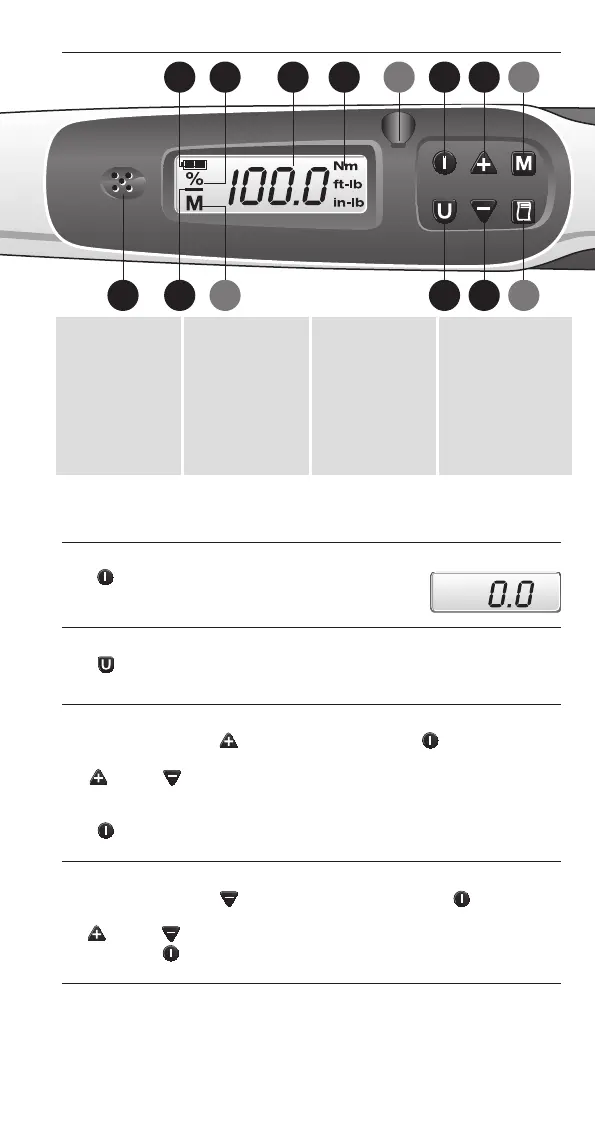
1 Battery
Indicator
2 Tolerance
setup flag
3 Torque
reading
4 Units of
measure
5 CCW
indicator
6 Data in
memory
7 RS232 serial
output jack
8 ON/ZERO
enter key
9 Units select
key
10 Increment
scroll key
11 Decrement
scroll key
12 Memory store
recall/clear key
13 Print RS232
setup key
14 Audible Alert
(6, 7, 12, 13 optional)
6
The BAHCO IZO torque wrench is a robust replacement for the traditional
“click” wrench, providing better accuracy, easy preset adjustments, tolerance
adjustments and improved user friendly design.
Power On
Push “ON/ZERO” key – the torque wrench will
self-test, show the torque preset value for two seconds
and then show “0.0”.
Units Select
Push “UNITS” key – to select “Nm”, “ft lb” or “in lb”.
Preset Adjust
While holding down the (UP) key momentarily push ON/ZERO key
until display flashes preset value.
Use (UP) or (DOWN) keys to change the preset value.
(Display will roll-over at each end). Torque preset is adjustable between
10 % and 100 % of torque wrench full-scale.
Push ON/ZERO key to enter new preset value and you will
automatically return to measurement mode.
Tolerance Adjust
While holding down the (DOWN) key momentarily push ON/ZERO
key until display flashes tolerance percent.
Use (UP) or (DOWN) keys to change the tolerance value between 1 %
and 16 %. Push ON/ZERO key to enter new tolerance value and you will
automatically return to measurement mode.
BAHCO IZO TORQUE WRENCH USER GUIDE
Nm
14
1 2 3 4 8 10
9 1165
7 12
13
MS7054_UserGuide_IZO-DM_2008.qxd:MS7054_UserGuide_IZO-DM.qxd 15.10.2008 9:22 Uhr Seite 6



 To Next Page