Need help?
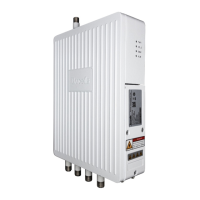
Do you have a question about the Baicells Neutrino-224 and is the answer not in the manual?
Critical safety warnings, including electrical hazards and RF exposure limits.
Steps to connect power, turn on the eNB, and verify initial power status.
Steps for preparing the installation and mounting the eNB on a ceiling.
Instructions for installing the eNB unit on a wall.
Verifying the eNB's operational status via software after basic setup.
Accessing the eNB Graphical User Interface (GUI) and logging in.
Basic configuration of key eNB parameters like frequency, PCI, and Cell ID.
Procedures for upgrading eNB firmware and performing version rollbacks.
Step-by-step instructions for upgrading the eNB firmware.
Guide on how to downgrade the eNB firmware to a previous version.
Managing configuration backups, logs, and restoring default settings.
Configuring neighboring cells and managing User Equipment (UE) mobility.
Configuring parameters for LTE neighbor frequencies and cell identification.
Adding and managing the list of neighboring LTE cells.
Configuring parameters for User Equipment (UE) mobility and cell handovers.
Advanced configuration options for fine-tuning LTE network performance.
Configuring transmit power and related settings for optimal signal performance.
Configuring Self-Organizing Network (SON) features for automated network management.
Selecting MAC scheduling algorithms for efficient resource allocation and QoS.
 General
| Model | Neutrino-224 |
|---|---|
| Category | Wireless Access Point |
| Antenna Type | Internal |
| Ethernet Ports | 1 x 10/100/1000 Mbps |
| Max Users | 64 |
| IP Rating | IP67 |
| MIMO | 2x2 |
| Power Supply | PoE (Power over Ethernet) |
| Operating Temperature | 55°C |
| Management | TR069 |
| Duplex Mode | TDD |

 To Next Page