TP700 USER GUIDE 42370 Rev A
25
24
Balboa Water Group | Your Single Source Solution
A
B
C
D
M8 is artificial intelligence software
contained in your spa’s BP control
system. M8 looks for opportunities to
decrease device usage by evaluating
water temperature readings. Stable
water temperatures equal less device
usage and less wear and tear.
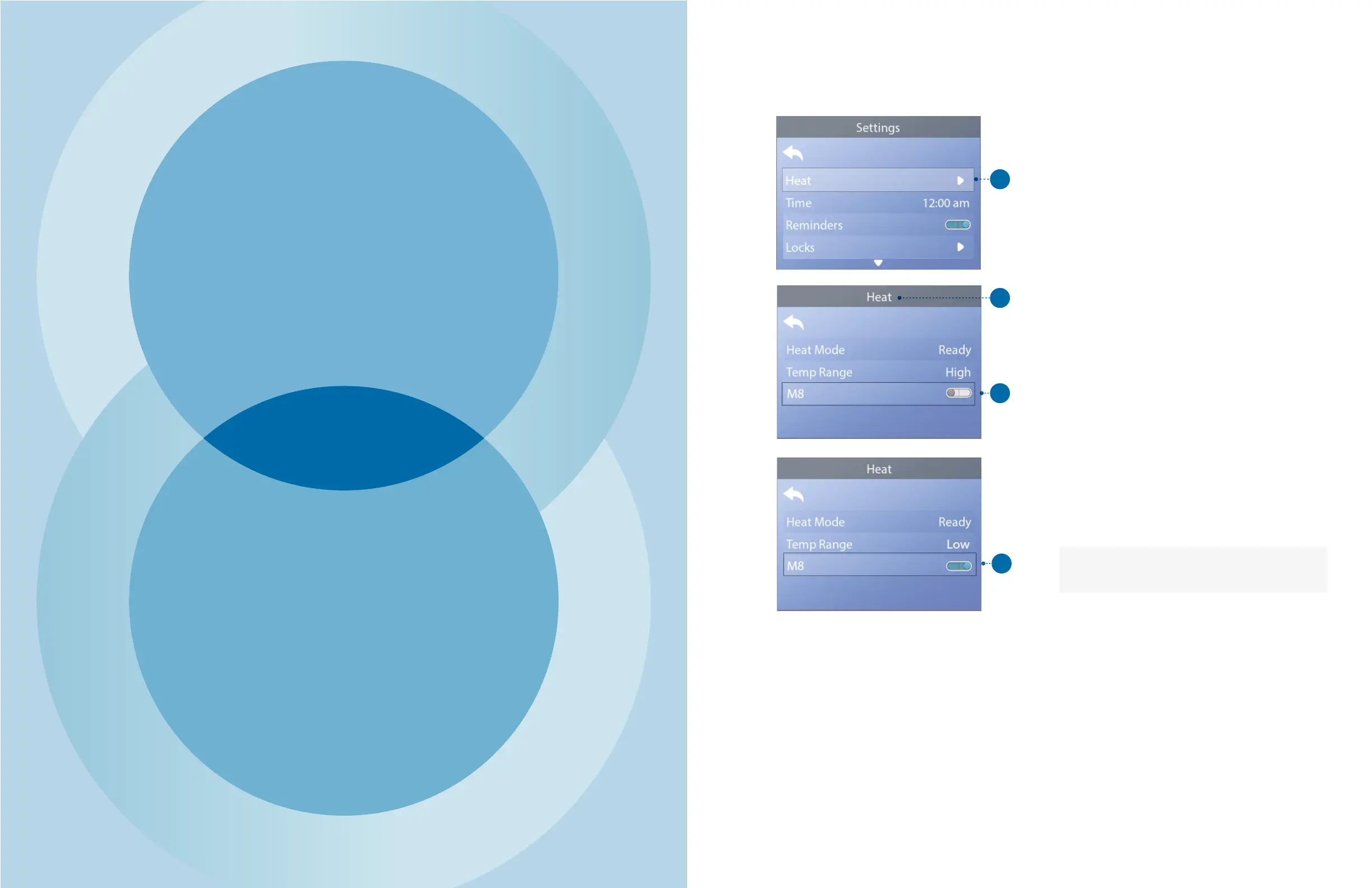
Follow these steps to view the current M8 setting
and/or turn it On/O.
1 - Navigate to Heat (A).*
2 - Press the SELECT navigation button to view the
Heat screen (B). The current M8 will appear here (C). In
this example the current M8 setting is O.
3 - Press the SELECT navigation button to change the
M8 setting from O to On (D).
M8 is turned On.
The change takes eect immediately. No need to press
a Save button.
Note: M8 is not available on all control systems.
* View page 10 for information on navigating the Settings menu.
HEAT SETTINGS
M
TIME
TEMPERATURE
M8


 To Next Page