SELFTUNING
AUTOTUNING
2 sec.
Hold for
"OFF"
"rEG"
"OPLO"
381
vai a
pag.4
Out2
PV
SV
SET
TUN
Out1 Out3 Out4 Out5
7
3
2
8
12
9
6
4
1
13
14
5
11
Out6
10
4 / 16
0006160005_201502
ENGLISH
SELECTION OF PARAMETER SETTING
AND PROGRAMMING MENUS
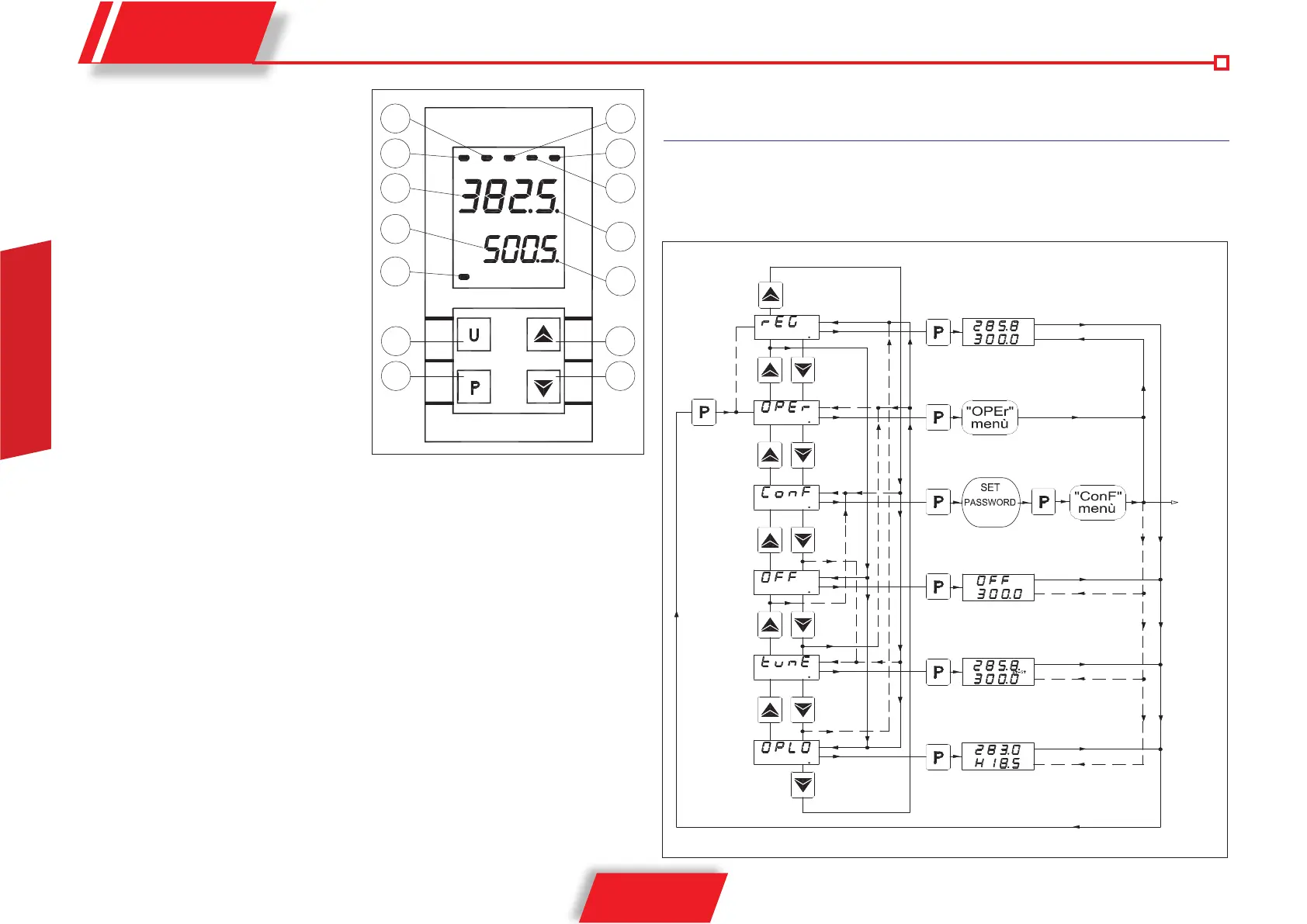
By pressing and holding key “P” for about 2 seconds, it is possible to access the main setting menu.
FRONT PANEL
1 Key P: It is used to access the operating
parameter programming and to confirm the
selection.
2 Key DOWN: It is used to set (decrease the
values) and to select the parameters.
3 Key UP: It is used to set (increase the
values) and to select the parameters.
4 - Key U: Key whose functioning can be
programmed by means of par. “USrb”. It can
be set to: Activate Autotuning or Selftuning
to set the manual regulation, to Switch off
the alarm, to Change the enabled Set Point.
5 Led OUT1 : It indicates the status of the
output OUT1
6 Led OUT2 : It indicates the status of the
output OUT2
7 Led OUT3 : It indicates the status of the
output OUT3
8 Led OUT4 : not enabled
9 Led OUT5 : not enabled
10 Led OUT6 : not enabled
11 Led SET : It indicates the input for the parameter programming mode and level
12 Led TUN : It indicates that Selftuning is enabled (on) or that Autotuning is in progress (flashing).
13 PV display: It normally indicates the process value.
14 SV display: It normally indicates that Set is enabled, however it can be set by means of par. “diSP”
to display other sizes.


 To Next Page
 Loading...