IT5000-C / IT6000-C
3/8” IT Tool
www.BAND-IT-IDEX.com
Document # P48850 Rev. C
© Copyright
BAND-IT-IDEX, Inc. 2015
All rights reserved
Page 25 of 36
BAND-IT-IDEX, Inc.
A Unit of IDEX Corporation
4799 Dahlia Street
Denver, CO 80216-3070 USA
P: 1-800-525-0758
F: 1-800-624-3925
Operating
Manual
If the tool fails to fully tension the clamp:
Failure to fully tension the clamp can be caused by a variety of factors. The two
most common factors are incorrect tension pressure and problems with the grippers.
• Check tension pressure setting on Tension Pressure Gauge of Air Controller Module.
Adjust pressure per the settings found in the “Air System Settings” page.
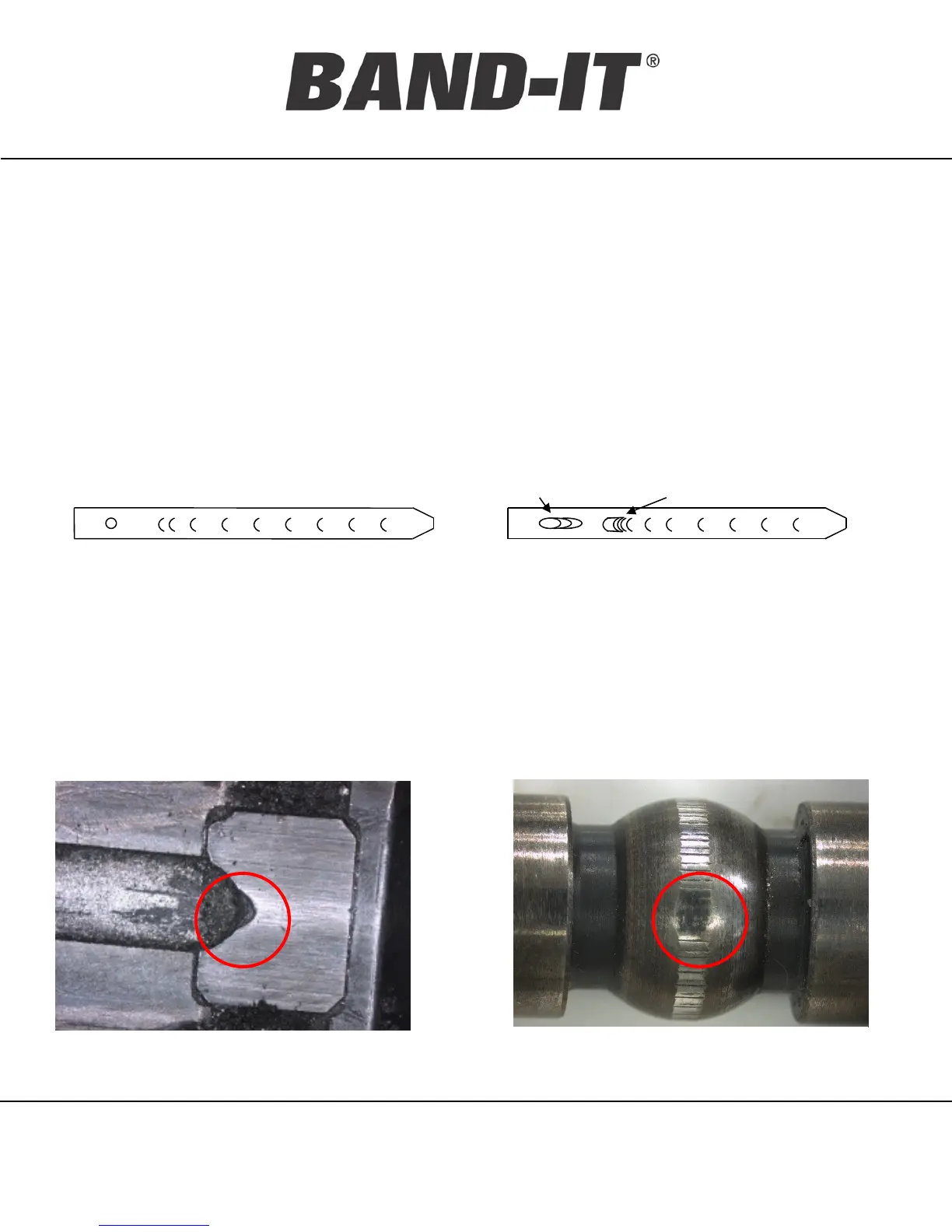
• Evaluate the clamp tail dimple pattern. If elongated dimples are present, the problem
may be with the Tension Block or Front Gripper.
• If a problem is indicated, follow the instructions in the “Maintenance” section to remove
and inspect the tension block assembly and the front gripper.
• Examine the Tension Block and Tension Gripper for damage or wear.
• Examine the Front Gripper area for foreign debris and/ or buildup of metal shavings.
• Ensure that the four cutter blade screws are tightened.
• If excessive damage or wear is determined, replace the worn parts.
Normal clamp tail dimple
pattern.
Front Gripper Tension Block
A worn out tension block:
Edge is no longer sharp, or is chipped
Clamp tail dimple pattern
indicates a problem
Trouble Shooting Guide: Unable to Achieve Tension
A worn out tension gripper:
Ridges are worn off in some sections


 To Next Page
 Loading...