
 Need help?
Do you have a question about the BANGGOOD EN8829A and is the answer not in the manual?
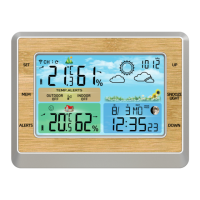
Details the LCD features and labels like temperature, humidity, and battery signals.
Illustrates the back of the weather station, showing ports and battery compartment.
Details the wireless outdoor sensor, its buttons, display, and battery compartment.
Explains the function of each button (SET, MEM, ALERTS, UP, SNOOZE/LIGHT, DOWN) in different modes.
Guides through initial setup, connecting the outdoor sensor, and establishing communication with the main unit.
Details the sequence for setting time, date, 12/24 hour format, and other calendar-related options.
Provides instructions on how to set the hour, minute, and snooze time for the daily alarm.
Explains how to turn the alarm signal on/off, silence it, and stop it.
Describes how the station calculates weather forecasts and the meaning of forecast symbols.
Details how to set the barometric unit (hPa/mb or inHg) and understand pressure values.
Instructions for changing the temperature display between Celsius and Fahrenheit.
Explains the icons indicating rising, falling, or stable temperature trends.
Explains the icons indicating rising, falling, or stable humidity trends.
Details the comfort display icons representing comfortable, cool, or hot conditions.
How to view and clear maximum and minimum temperature and humidity data.
Guide on setting HIGH/LOW temperature alerts for outdoor and indoor sensors.
Explains how alerts are triggered when temperature limits are exceeded and how to stop them.
Details automatic connection, manual connection, and channel selection for multiple sensors.
Instructions for using the USB charger and power requirements.
Explanation of the low battery icon and when to replace batteries.
Warnings regarding device usage by children and handling swallowed batteries.
Guidelines on cleaning contacts, removing batteries, and professional repairs.
Information on FCC rules, interference limits, and user guidance.
 General
| Brand | BANGGOOD |
|---|---|
| Model | EN8829A |
| Category | Weather Station |
| Language | English |

 To Next Page