Banner Engineering Corp. • Minneapolis, MN U.S.A.
www.bannerengineering.com • Tel: 763.544.3164
page 4
system
configuration
system
configuration
PPCTL
Default IP Address
192.168.0.1
Typical IP Address:
192.168.0.2
step 4
step 4
PC Configuration
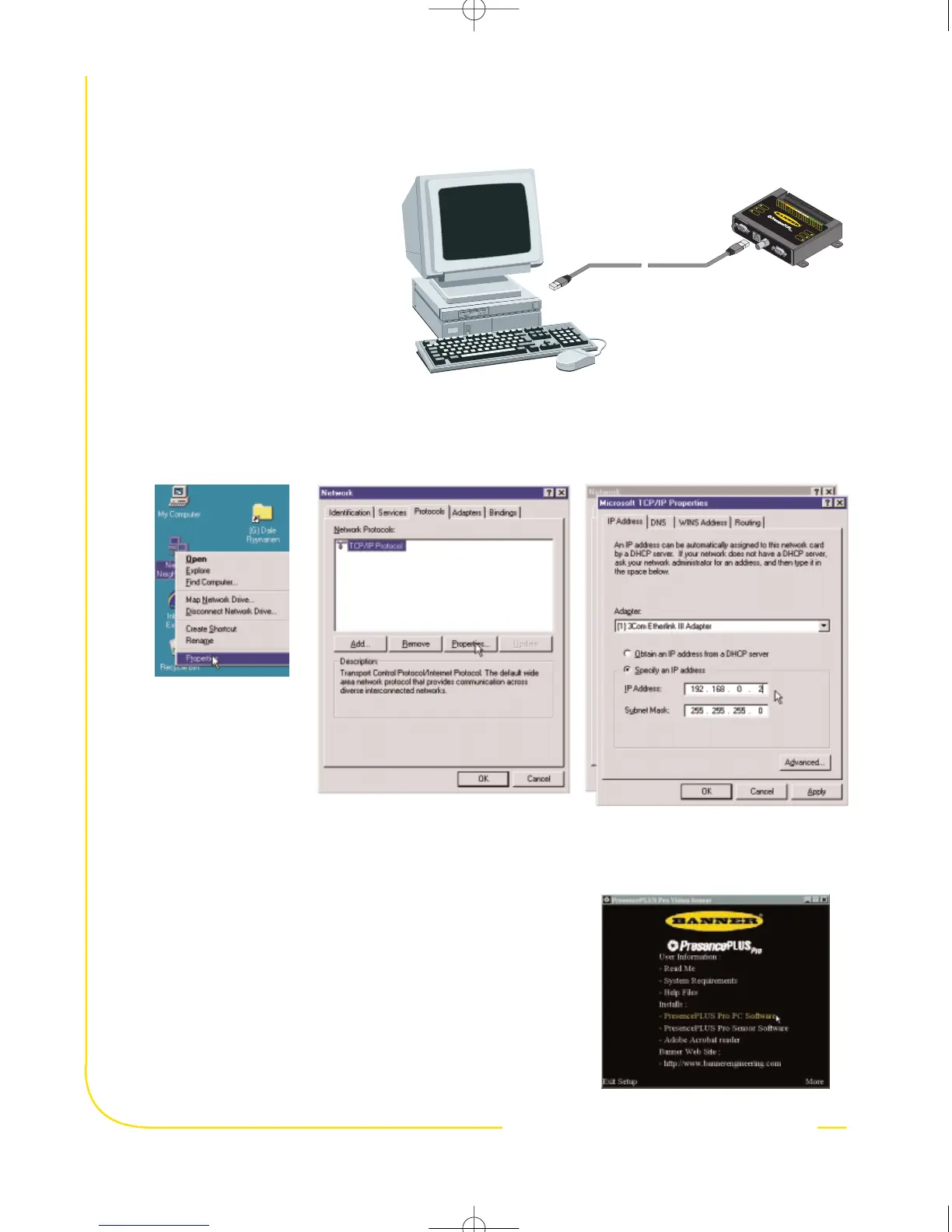
1. To use ethernet communication,
configure the IP address of your
computer.
2. Install the PresencePLUS Pro software
a. Insert the Installation CD
b. Click Install PresencePLUS Pro PC Software
a. Right mouse-
click on Network
Neighborhood
and select
Properties
b. Open the TCP/IP Properties
under the Protocols tab
c. Change the IP address to
192.168.0.2 and subnet
mask to 255.255.255.0
Write down the existing address of your PC before changing it: _ _ _ • _ _ _ • _ _ _ • _ _ _
To change the IP address of your PC, do the following:
(The following screen captures are from Windows NT; other Windows versions vary.)


 To Next Page