step 1
step 1
step 2
step 2
step 3
step 3
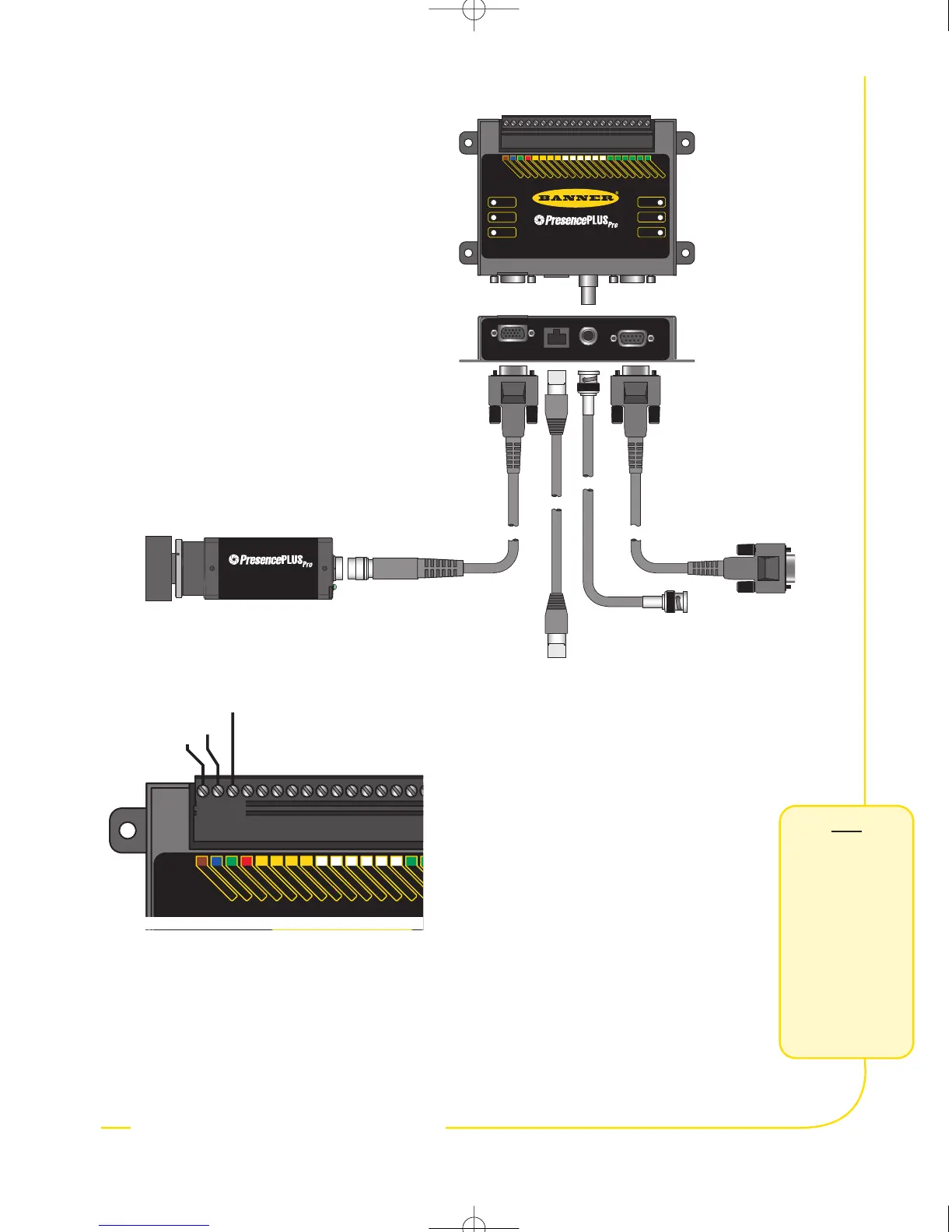
Cable Connections
1.Thread the c-mount lens onto the camera
(PPCAM).
2.Connect the camera cable (PPC..) to the
camera (PPCAM) and controller (PPCTL).
3.Connect the controller to a Windows
®
PC
using either an ethernet cable or a serial
cable (DB9D..). Use crossover ethernet
cable (STPX..) for a direct connection,
and a straight ethernet cable (STP..) for
network connection.
4.Optional: Connect an NTSC video monitor
using a BNC cable.
Electrical Connections
Connect the following to the controller’s
terminal block
• +V to Pin 1 (10-30V dc)
• –V to Pin 2 (dc common)
•Trigger device to Pin 3 (Trigger In)
• Additional connections (Pin 4 - Pin 20)
Lighting
Install the dedicated light source, according
to the instructions included with the light
source.
PPCAM
Camera
to
PC
to
Monitor
to PC (Crossover)
or Network (Straight)
STPX..
Ethernet
Connection
PPC..
Camera
Cable
Video
Connection
(Optional)
DB9D..
Serial
Connection
PPCTL
Controller


 To Next Page