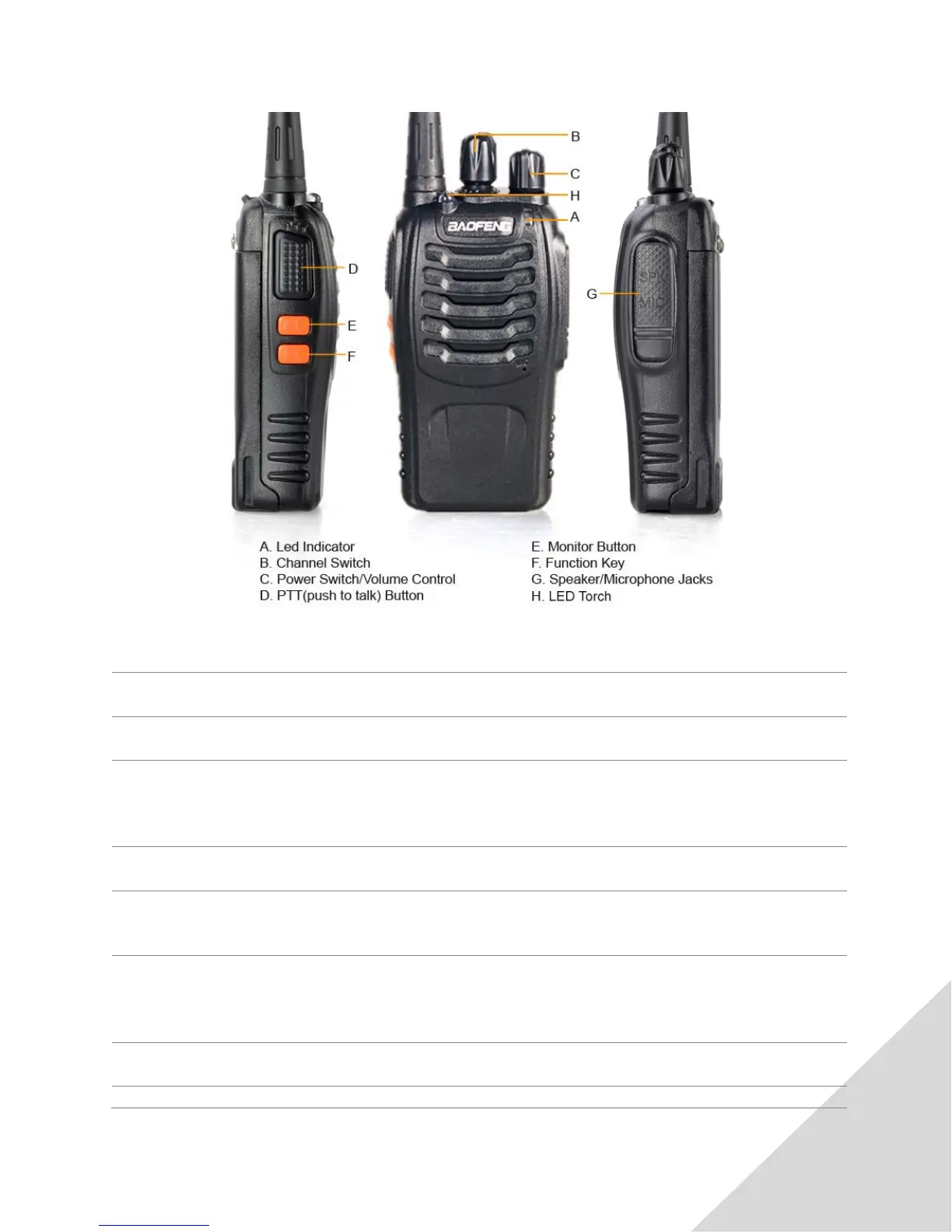
BUTTONS AND CONTROLS
LED Indicator
Lights red during transmit, green when receiving a signal
Channel Switch
Rotate to select a channel. Ch. 16 is for channel scanning (see Scanning, pg. 5)
Power Switch/Volume Control
Turn clockwise to switch ON the transceiver.
Turn counter-clockwise to switch OFF transceiver.
PTT (push to talk) Button
Push button to transmit, release to receive (see Transmitting and Receiving, pg. 4)
Press and Hold (Squelch OFF) to hear background noise. (see Squelch, pg. 5)
Release to return to normal operation.
Press to activate LED torch function.
Note: this button is programmable through the Baofeng or CHIRP software.
Programming cable sold separately.
Speaker/Microphone Jacks
Can be used to plug in programming cable, and various speaker/mic accessories.













 To Next Page