EasyManua.ls Logo

Baofeng BF-88ST PRO - Using the Weather Radio;Scan Weather Channel; Working the MENU System

Baofeng BF-88ST PRO
23 pages
Print Icon
To Next Page IconTo Next Page
To Previous Page IconTo Previous Page
Loading...
HAOFENLG
08
10.
Using
the
Weather
Radio/Scan
Weather
Channel
Your
radio
has
a
NOAA
Weather
Radio
function,
to
enable
the
user
to
receive
weather
reports
from
designated
NOAA
stations.
Your
radio
also
has
a
NOAA
Weather
Scan
function,
to
enable
the
user
to
scan
all
12
channels
of
the
NOAA
Weather
Radio.
While
using
the
Weather
Radio,
you
are
not
able
to
receive
FRS
communications.
(1)
To
tum
the
NOAA
Weather
Scan
on,
press
and
hold
the
[LAMP/Weather]
button
for
5
seconds
while
in
FRS
mode,
&
icon
appears.
The
radio
will
go
to
Weather
band
mode
and
start
scanning
all
12
channels
and
stop
on
any
active
channel.
When
the
channel
becomes
inactive
for
10
seconds
the
radio
will
resume
scanning.
(2)
To
stop
the
NOAA
WEATHER
(WX)
SCAN
and
set
the
channel
manually
on the
Weather
band,
press
the
[SCAN]
button
during
NOAA
weather
scan.
The
radio
will
stop
scanning
and
the
display
will
show
the
current
Weather
band
channel
setting
and
the
&
icon.
(3)
While
in
Weather
band
mode,
press
the
2
or
[
button
to
increase
or
decrease
the
number
to
the
desired
weather
channel,
select
one
of
the
12
NOAA
weather
band
channels.
(4)
To
exit
the
Weather
Radio
broadcast
mode,
press
and
hold
[LAMP/Weather]
button
or
[PTT]
button.
&>
icon
disappears.
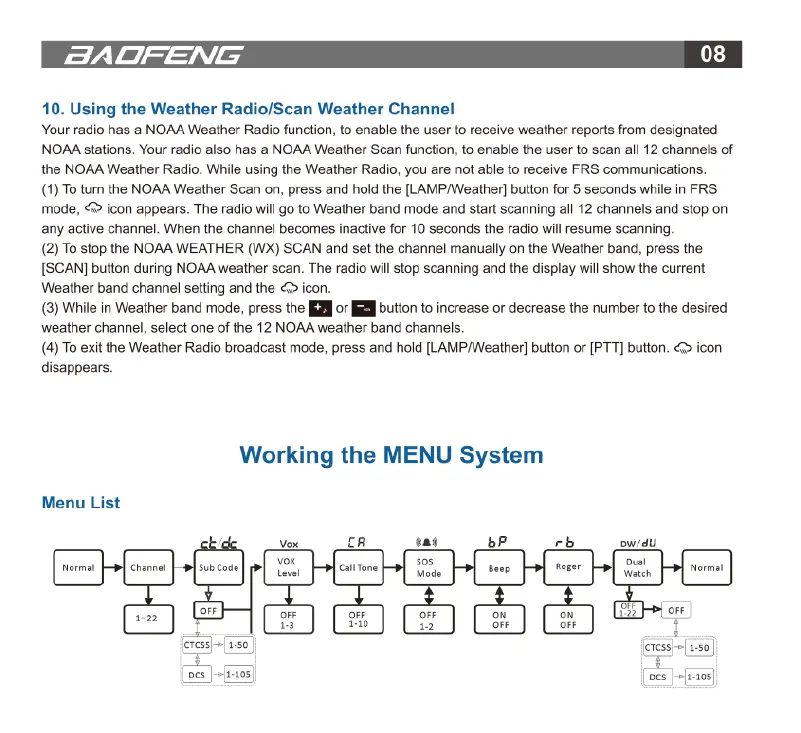
Working
the
MENU
System
Menu
List
Vox
LR
ay
bP rb
ow/dU
[
e
e
e
e
e
|
M;
e
o
P
o
(e
[amn)
]
[oes
|
+fa-105;
ocs
|
+fi-103]

Related product manuals