EasyManua.ls Logo

Barber Burn Unit - User Manual

Barber Burn Unit
2 pages
Print Icon
To Next Page IconTo Next Page
Loading...
Congratulations and thank you for purchasing a Burn Unit. We hope this
manual will help you get started using this very versatile lead instrument.
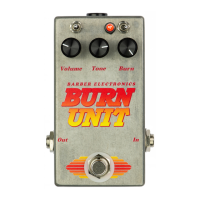
The 3-way toggle on the upper left controls midrange, set to the left is lightly enhanced mids, to the
middle is thick mids, and to the right is a more neutral setting. Depending on your pickups, and associated
electronics any of these three setting might be perfect for you.
The 3-way toggle on the upper right is for dynamics, this allows you to set how the Burn Unit will
respond to pick attack, and how it breaks into overdrive. Set to the left the dynamics are moderate with a
slight sweet sag when you dig in, to the middle, you get a louder, stiffer dynamic sound like you would
expect from a high power tube amp with solid state rectifier. Pick hard, and the Burn Unit gets louder, pick
softer and the output drops. The right setting is compressed like a nice old smaller Tweed era amp but turns
to into explosive pick attack with every touch of the strings when using higher gain settings.
The volume control sets your output level. You will need to adjust when changing toggles.
The Tone control is somewhat subtle and is great for dialing in the exact amount of detail you need for
your guitar to sound lively or silky smooth. Think of it as a way to soften the top or add definition.
The Burn control sets the sustain and distortion levels. Lots of range, it's all good from off to max.
Suggested setting for the Burn Unit
Many guitars will work well with a treble bleed kit using a 680p cap in parallel with a 220k
resistor across the wiper and left leg of the volume pot. This helps when using OD to cleanup and
make highs clear. The suggested tone knob values are .01-.02uf when using humbuckers or
soapbars, and .047-.1uf with single coils, and appropriate pot values by manufacture.
Set your amp's clean sound to a balanced and dynamic tone, turn off your amp's bright switch if it
has one.
Medium power Tweed: both toggles set to right, volume 12 o clock, tone at 3-5 o clock, Burn at
11-12 o clock. Guitar's tone between 3-full, roll back volume when using neck pickup. Works
with Humbuckers and soaps!
Edge of breakup blackface: left toggle set to left, right toggle set middle. Volume at 10 o clock,
tone at 4-5 o clock, Burn at 9-10 o clock. Great with singles or humbuckers.
Clean boost: Left toggle set to right, Right toggle set to middle. Volume at 1:30 or higher, tone
to max, Burn 7-8:30 o clock. Best with single coils, but works great with humbuckers backing off
on the guitar's volume knob a bit.
70's studio cat: left toggle set right or left, right toggle set right or left. Volume 11 o clock, tone
set 2-5 o clock, Burn at 2-4 o clock. bridge humbucker, guitar's tone knob on 3-6.
Thick n' woody: left toggle set middle, right toggle set left. Volume at 11, tone at 3 o clock,
Burn at max.
Fat singles with sustain: left toggle middle, right toggle middle, volume 10:30, tone at 3, Burn at
11-1.
Please use a 9-18 volt DC negative tip adaptor to power the Burn Unit. And yes, there is a bass trim pot
inside, but only adjust it if you really like having this feature. Remember where it was set before you start.
We are a word of mouth company, if you like your Barber pedal, please, spread the word.
Email us at david@barberelectronics.com
Question and Answer IconNeed help?

Do you have a question about the Barber Burn Unit and is the answer not in the manual?

Summary

Understanding the Burn Unit Controls

Midrange Toggle

Controls midrange, offering enhanced, thick, or neutral settings for pickup response.

Dynamics Toggle

Sets response to pick attack, affecting overdrive dynamics, sag, and attack explosiveness.

Volume Control

Sets the overall output level of the pedal.

Tone Control

Subtly adjusts detail, offering a way to soften top end or add definition.

Burn Control

Adjusts sustain and distortion levels across a wide range.

Suggested Settings for the Burn Unit

Medium Power Tweed

Settings for a Tweed-like tone with humbuckers or soapbars.

Edge of Breakup Blackface

Settings for a clean to edge-of-breakup sound with singles or humbuckers.

Clean Boost

Settings for a clean boost, ideal for single coils.

70 s Studio Cat

Settings for a vintage 70s studio tone, particularly with bridge humbuckers.

Thick n Woody

Settings for a thick, resonant tone.

Fat Singles with Sustain

Settings for a fat, sustained tone, especially with single coil pickups.

Overview

The Burn Unit is a versatile lead instrument designed to enhance guitar tone and dynamics. It offers a range of controls and settings to shape midrange, dynamics, output level, tone, and sustain/distortion.

Function Description:

The Burn Unit serves as a guitar effects pedal, providing various tonal characteristics from subtle enhancements to aggressive distortion. It allows musicians to sculpt their sound to suit different playing styles and musical genres.

Usage Features:

The Burn Unit features several controls and toggles that allow for extensive sound customization:

  • 3-way toggle on the upper left (Midrange Control):

    • Left: Lightly enhanced mids.
    • Middle: Thick mids.
    • Right: More neutral setting. This control allows users to adjust the midrange character of their sound, which can significantly impact the overall presence and warmth of the guitar tone. The optimal setting may vary depending on the guitar's pickups and associated electronics.
  • 3-way toggle on the upper right (Dynamics Control):

    • Left (Moderate Dynamics): Provides a slight sweet sag when digging in. This setting offers a more forgiving and expressive response, ideal for players who appreciate a nuanced touch.
    • Middle (Louder, Stiffer Dynamic Sound): Emulates the response of a high-power tube amp with a solid-state rectifier. This setting delivers a more immediate and aggressive sound, where pick attack directly correlates with output volume (harder pick, louder sound; softer pick, lower output).
    • Right (Compressed): Offers a compressed sound reminiscent of a smaller Tweed-era amp. This setting transforms into an explosive pick attack with higher gain settings, providing a punchy and dynamic response. This control is crucial for defining how the Burn Unit reacts to pick attack and how it transitions into overdrive, offering a wide spectrum of dynamic responses.
  • Volume Control:

    • Sets the overall output level of the Burn Unit. This control needs to be adjusted whenever the toggle settings are changed to maintain a consistent output.
  • Tone Control:

    • A subtle control designed to dial in the exact amount of detail needed for the guitar sound. It can make the guitar sound lively or silky smooth, effectively softening the top end or adding definition.
  • Burn Control:

    • Manages the sustain and distortion levels. This control offers a wide range, from off to maximum, allowing for everything from mild overdrive to heavy distortion.

Suggested Settings for the Burn Unit:

The manual provides several suggested settings to help users explore the Burn Unit's capabilities:

  • Medium Power Tweed:

    • Both toggles set to the right.
    • Volume: 12 o'clock.
    • Tone: 3-5 o'clock.
    • Burn: 11-12 o'clock.
    • Guitar's tone: Between 3 and full.
    • Roll back volume when using the neck pickup.
    • Works well with Humbuckers and soapbars.
  • Edge of Breakup Blackface:

    • Left toggle: Set to the left.
    • Right toggle: Set to the middle.
    • Volume: 10 o'clock.
    • Tone: 4-5 o'clock.
    • Burn: 9-10 o'clock.
    • Great with singles or humbuckers.
  • Clean Boost:

    • Left toggle: Set to the right.
    • Right toggle: Set to the middle.
    • Volume: 1:30 or higher.
    • Tone: To max.
    • Burn: 7-8:30 o'clock.
    • Best with single coils, but also works with humbuckers by backing off the guitar's volume knob slightly.
  • 70's Studio Cat:

    • Left toggle: Set right or left.
    • Right toggle: Set right or left.
    • Volume: 11 o'clock.
    • Tone: Set 2-5 o'clock.
    • Burn: 2-4 o'clock.
    • Bridge humbucker, guitar's tone knob on 3-6.
  • Thick n' Woody:

    • Left toggle: Set middle.
    • Right toggle: Set left.
    • Volume: 11 o'clock.
    • Tone: 3 o'clock.
    • Burn: At max.
  • Fat Singles with Sustain:

    • Left toggle: Middle.
    • Right toggle: Middle.
    • Volume: 10:30.
    • Tone: 3.
    • Burn: 11-1.

Important Technical Specifications:

  • Power Requirement: The Burn Unit requires a 9-18 volt DC negative tip adaptor for power.

Maintenance Features:

  • Internal Bass Trim Pot: The Burn Unit includes an internal bass trim pot. Users are advised to only adjust this if they truly desire this feature and to remember its original setting before making any changes. This suggests that the trim pot is a fine-tuning control that might not be necessary for all users and could potentially alter the pedal's default sound if adjusted carelessly.

General Recommendations:

  • Treble Bleed Kit: For optimal performance, especially when using overdrive for cleanup and clear highs, the manual suggests using a treble bleed kit with a 680p cap in parallel with a 220k resistor across the wiper and left leg of the volume pot.
  • Tone Knob Values: Recommended tone knob values are .01-.02uf for humbuckers or soapbars, and .047-.1uf for single coils, along with appropriate pot values as specified by the manufacturer.
  • Amp Settings: It is recommended to set the amplifier's clean sound to a balanced and dynamic tone and to turn off the amp's bright switch if it has one, to allow the Burn Unit to shape the tone effectively.

The Burn Unit is presented as a product that relies on word-of-mouth promotion, encouraging satisfied users to spread the word about Barber pedals. For support or inquiries, users can contact david@barberelectronics.com.

Barber Burn Unit Specifications

General IconGeneral
BrandBarber
ModelBurn Unit
CategoryMusic Pedal
LanguageEnglish