EasyManua.ls Logo

Barbie Hello Dreamhouse - User Manual

Barbie Hello Dreamhouse
16 pages
Print Icon
To Next Page IconTo Next Page
Loading...
OWNERS MANUAL
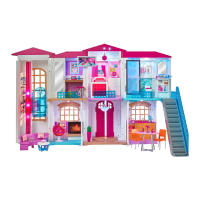
Welcome home, I'm Hello Dreamhouse™!
CHOKING HAZARD – Small parts.
Not for children under 3 years.
WARNING:
Mattel, Inc., 636 Girard Avenue, East Aurora, NY 14052, U.S.A. Consumer Services
1-800-524-8697. Mattel U.K. Ltd., Vanwall Business Park, Maidenhead SL6 4UB.
Helpline 01628 500303. Mattel Australia Pty., Ltd., Richmond, Victoria. 3121.
Consumer Advisory Service - 1300 135 312. Mattel East Asia Ltd., Room 503-09,
North Tower, World Finance Centre, Harbour City, Tsimshatsui, HK, China. Tel.: (852)
3185-6500. Diimport & Diedarkan Oleh: Mattel Southeast Asia Pte. Ltd. , No 19-1, Tower 3 Avenue 7, Bangsar South City,
No 8, Jalan Kerinchi, 59200 Kuala Lumpur, Malaysia. Tel: 03-78803817, Fax: 03-78803867.
CONSUMER INFORMATION
SERVICE.MATTEL.COM
Need Assistance? Visit service.mattel.com or call 1-800-524-8697
(US and Canada only).
©2016 Mattel. All Rights Reserved.
CAUTION - Risk of Electric Shock - Dry location use only.
CAUTION - ELECTRIC TOY:
Not recommended for children under 6 years of age. As with all
electric products, precautions should be observed during handling and use to prevent electric shock.
• This toy must only be used with a transformer for toys.
• The transformer is not a toy.
• Toys liable to be cleaned with liquids are to be disconnected from the transformer before cleaning.
• This toy is not to be connected to more than the recommended number of power supplies.
This product is not recommended for use on loose dirt or wet surfaces.
Do not immerse in water.

Questions and Answers

Summary

Hello Dreamhouse Companion App

System Requirements

Details the necessary hardware and software for the companion app.

App Download and Usage

Instructions for downloading and using the companion app.

Privacy Policy

Explains data collection and privacy practices for the app and toy.

Setting Up the Dreamhouse

Power Connection

Guide to connecting the power adapter and ensuring safe electrical use.

Initial Setup Steps

Steps for connecting the power adapter and plugging it into an outlet.

Ways to Play

Voice Command Play

How to activate and use voice commands with Hello Dreamhouse.

Command Examples

Lists sample voice commands for interacting with the toy.

Controlling Lights and Sounds

Customizing Sounds

How to use the companion app to customize house sounds via Wi-Fi.

Resetting the Dreamhouse

Soft Reset Procedure

How to perform a soft reset using the reset switch.

Factory Reset Procedure

Guide to factory reset for clearing settings and account info.

Troubleshooting Guide

Companion App Issues

Solutions for problems related to the companion app.

General Operation Issues

Troubleshooting for common problems like Wi-Fi signal and voice commands.

Error Code Solutions

Explanation of error codes and their solutions.

Barbie Hello Dreamhouse Specifications

General IconGeneral
TypeDollhouse
Number of Pieces70+
Material TypePlastic
BrandBarbie
ManufacturerMattel
FeaturesInteractive lights, sounds

Related product manuals