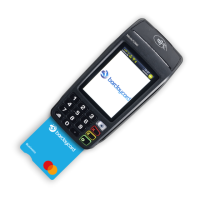
Need help?
Do you have a question about the barclaycard iWL250 and is the answer not in the manual?
Provides the web address for assistance with card machine installation.
Lists key phone numbers for customer services, authorisation, and chargebacks.
Information on ordering consumables like till rolls and chargers.
Provides telephone and web details for ordering card machine supplies.
Securely store merchant copy receipts containing card numbers.
Monitor machine access to prevent fraud by disguised individuals.
Securely store any manual imprint devices as backup.
How to charge the lithium-ion battery for optimal performance.
Protect the card machine from liquid damage using a thermal wipe.
Keep terminals powered on for security updates and compliance.
Enter the transaction amount and press ENTER.
Instruct the customer to insert their card into the terminal.
Customer enters PIN; confirm with ENTER.
Machine seeks authorisation from Barclaycard for the transaction.
Print customer and merchant receipts after successful authorisation.
Enter the transaction amount and press ENTER.
Customer taps card/device on terminal with contactless symbol.
Terminal signals transaction acknowledgment with sound and lights.
Only a merchant copy receipt is printed for contactless transactions.
Press ENTER to print a customer receipt if requested.
Enter the transaction amount and press ENTER.
Insert customer's card when prompted for chip and signature.
Print merchant receipt and get cardholder signature.
Verify the signature matches the card.
Continue following on-screen prompts to finalize the payment.
Enter the transaction amount and press ENTER.
Swipe card's magnetic stripe through the terminal.
Follow on-screen instructions to finalize the payment.
Enter the transaction amount and press ENTER.
Enter the full card number from the card's front.
Enter the card's expiry date and press ENTER.
Enter the CV2 code from the card's back and press ENTER.
Enter postcode to verify customer address if prompted.
Enter address details if required for verification.
Access the refund function via the MENU and ENTER buttons.
Enter the refund amount and confirm with ENTER.
Process the customer's card for the refund transaction.
Respond to prompts regarding gratuities during refund processing.
Authenticate refund with supervisor card or code.
Machine processes refund via Barclaycard and prints receipt.
Navigate to the system menu using the MENU button.
Authenticate with supervisor card or code for banking.
Confirm the end-of-day banking process.
Choose between banking all acquirers or by acquirer separately.
Machine connects and prints the end-of-day banking report.
Access the system menu using the MENU button.
Enter function code '16' to print transaction logs.
Authenticate with supervisor card or code.
Select the acquirer for which to print the log.
Transaction log prints for the selected acquirer.
Repeat process for logs of other acquirers.
Open the printer cover by lifting the release mechanism.
Insert the new till roll, leaving the end free.
Close the printer cover firmly until it locks.
Press and hold CLEAR to test paper feed.
Access the system menu using the MENU button.
Enter function code '40' for waiter setup.
Authenticate with supervisor card or code.
Confirm entry into the waiter setup menu.
Select the 'add' option to create a new waiter ID.
Enter the waiter's name, which is allocated an ID.
Navigate to the system menu and highlight 'totals'.
Select the 'waiter totals' option.
Authenticate with supervisor card or code.
Print the waiter totals report.
Option to reset waiter totals after printing.
Contact authorisation centre for 'CALL AUTH CENTRE' prompt.
Contact helpdesk for 'CALL HELPDESK' prompt.
Re-insert or re-swipe card for 'FAULTY CARD' prompt.
Press Clear for 'NOT AUTHORISED' prompt.
Quote referral B when calling authorisation centre.
Process card as Chip and PIN for 'ROUTINE CHECK'.
Restart terminal for 'Unable to connect' issue.
Disconnect the power supply adapter from the mains.
Internal lithium cell accessible only by qualified technicians.
Use correct chargers/batteries, do not short-circuit or disassemble.
Outlet must be near, accessible, meet standards, and have 20A protection.
Phone jack must comply with local standards and regulations.
Ensure trapdoor is in place during operation.
Switch off handset and remove battery pack on aircraft.
Comply with regulations in explosion-risk areas; use certified cover.
Device may interfere with health appliances; consult doctor.
Check for tampering signs; alert irruption message requires help desk contact.
How to get a dial tone quickly when the line is occupied.
Device operation limits for RF radiation exposure.
Indicates compliance with European directives for health, safety, and EMC.
Dispose of batteries at appropriate collection points.
 General
| Brand | barclaycard |
|---|---|
| Model | iWL250 |
| Category | Card Reader |
| Language | English |

 To Next Page