1
1 2 3 4 5 6
DESTINATIONS
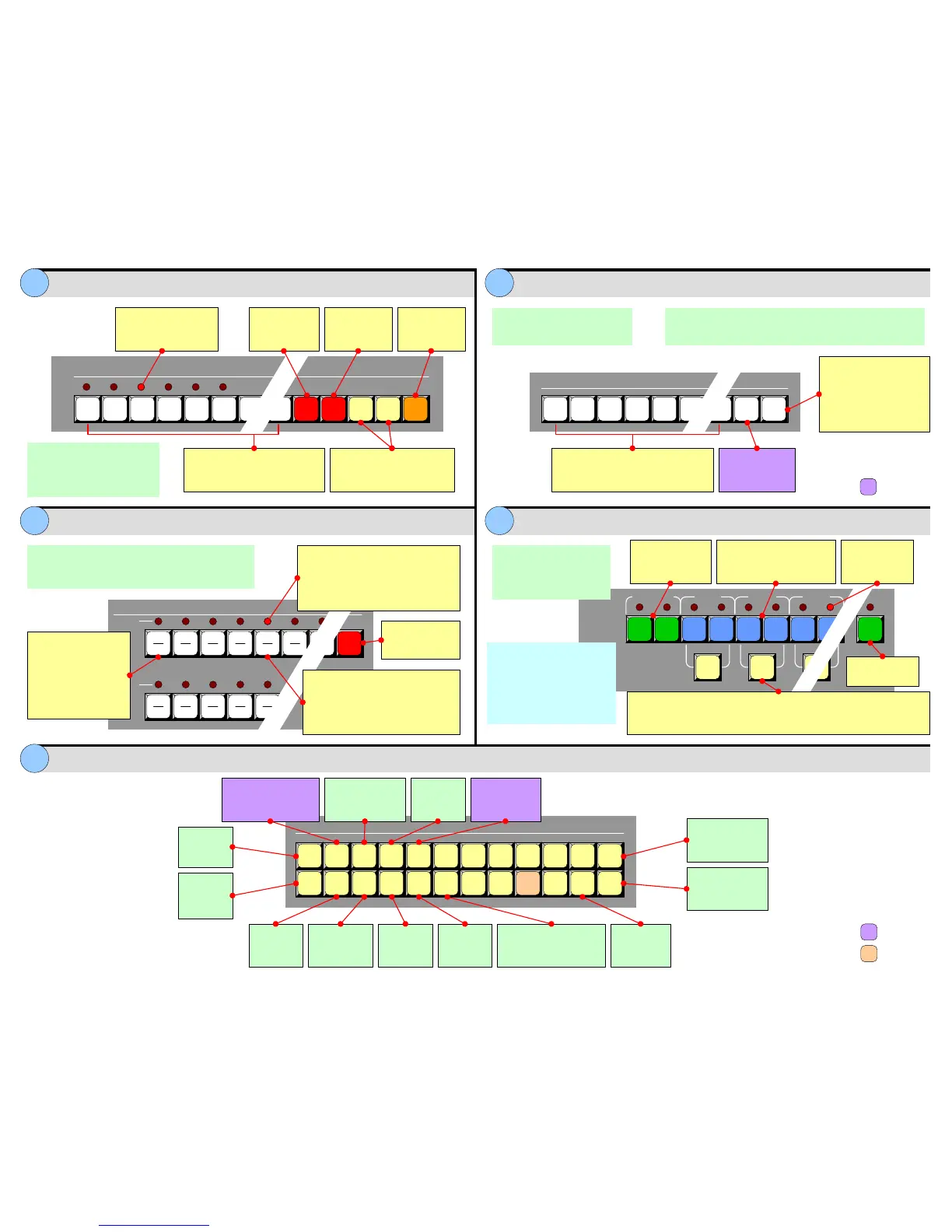
All Clear
Hold and press
Preset # to
delete
Hold and press
Preset # to
select page
1
1 2 3 4 5 6 Next
Previous
Page
PRESETS
Page
Learn Delete
Preset Section Destination Bus
Source Selection Bus Layer Control Section
Layer Functions Section
7 8
9 10
11
Red LED
When lit, indicates
current “page” of Presets
Press to recall a complete
Controller setup to Preview. Each
button represents a single “look”
Jump to next or previous valid
Preset. Function includes
ability to “wrap” pages
Controller SC: 64 Presets
(8 pages of 8 Presets each)
Controller LC: 900 Presets
(30 pages of 30 Presets each)
Hold and press
Preset # to
learn
Controller
LC only
Press to enable the desired destination.
Any combination can be selected —
buttons are not mutually exclusive.
Controller SC: 6 Destinations
Controller LC: 32 Destinations
Press to enable
all valid
destinations
• Transitions are only performed on enabled destinations.
• Source selections only apply to enabled destinations.
• Hold and press
Destination # to disable
selected destination
•PressClear + All to
disable all enabled
destinations
Press to access
all shifted sources
Controller SC: Sources 1 – 12 (direct), 13 – 24 (shifted)
Controller LC: Sources 1 – 32 (direct), 33 – 64 (shifted)
Top # (direct), bottom # (shifted)
#
#
#
#
#
#
#
#
#
#
#
#
#
#
SHIFT
SOURCE SELECTION
Program
1
#
2
#
3
#
4
#
5
#
Program
Red LEDs
•Solid: Source is on Program,
associated destination is enabled
• Blinking: Split is Off. Layer is on
Program, opposite Layer on Preview
Source Buttons
• Blinking: Source on Preview,
blinking layer active for modification
• Solid: Source on Preview, layer
not active for modification
Each source button is
an input that can be
assigned to a PIP, Key
or Aux destination.
Note: Top and bottom
rows change functions
in “Live Switch” modes.
Red LEDs
Indicate layers
on Program
Select unscaled
background A or B
on Preview
Within a mixer, select scaled
layer A or B on Preview, to
assign as PIP or Key
BG
A
BG
B
DSK
1
A
1
B
Program
Background
Layer
Split
Mixer 1
2
A
2
B
Split
Mixer 2
3
A
Mixer 3
Select any combination of
layers on Preview:
• Blinking: Layer is selected
and active for adjustment
• Solid: Layer is selected on
Preview, but is not active for
adjustment
Controller SC:
• Up to 6 layers, 3 mixers
Controller LC:
• Up to 12 layers, 6 mixers
Take active
layer to full
screen
Set up a “Move” on active
layer. Double-punch to
delete the Move setup
Change layer
priority (Split
mode only)
Not
Implemented
Controller
LC only
PIP Border Clone Copy
User
Copy
Freeze
LAYER FUNCTIONS
Key
Full
Screen
Swap
Z-order
Source
Preview
Frame
Grab
Move
Setup
Preview
OSD
Clear
Layer
All
Change
active layer
to a PIP
Change
active layer
to a Key
Access the Border
Menu. Double-punch
to turn border on or off
Copy layer to
opposite screen
(wide screen only)
Isolate a
layer for
adjustment
Access the
Frame
Grab Menu
Copy PIP
or Key
properties
Hold and press
User Key # to
store attributes
Freeze the active
layer on Preview
and/or Program
Remove
active layer
from Preview
Clear Layer + All
removes all layers
from Preview
• Changes mixer’s mode: Split mode (on), Mix mode (off)
• With layer button blinking, hold Split and press other layer to Join layers
•IfSplit blinks (after Preset recall), mixer changes mode after next trans
Select unscaled
DSK on Preview


 To Next Page
 Loading...


