Barracuda Load Balancer ADC
Barracuda Load Balancer ADC - Quick Start Guide
Determine Your Deployment
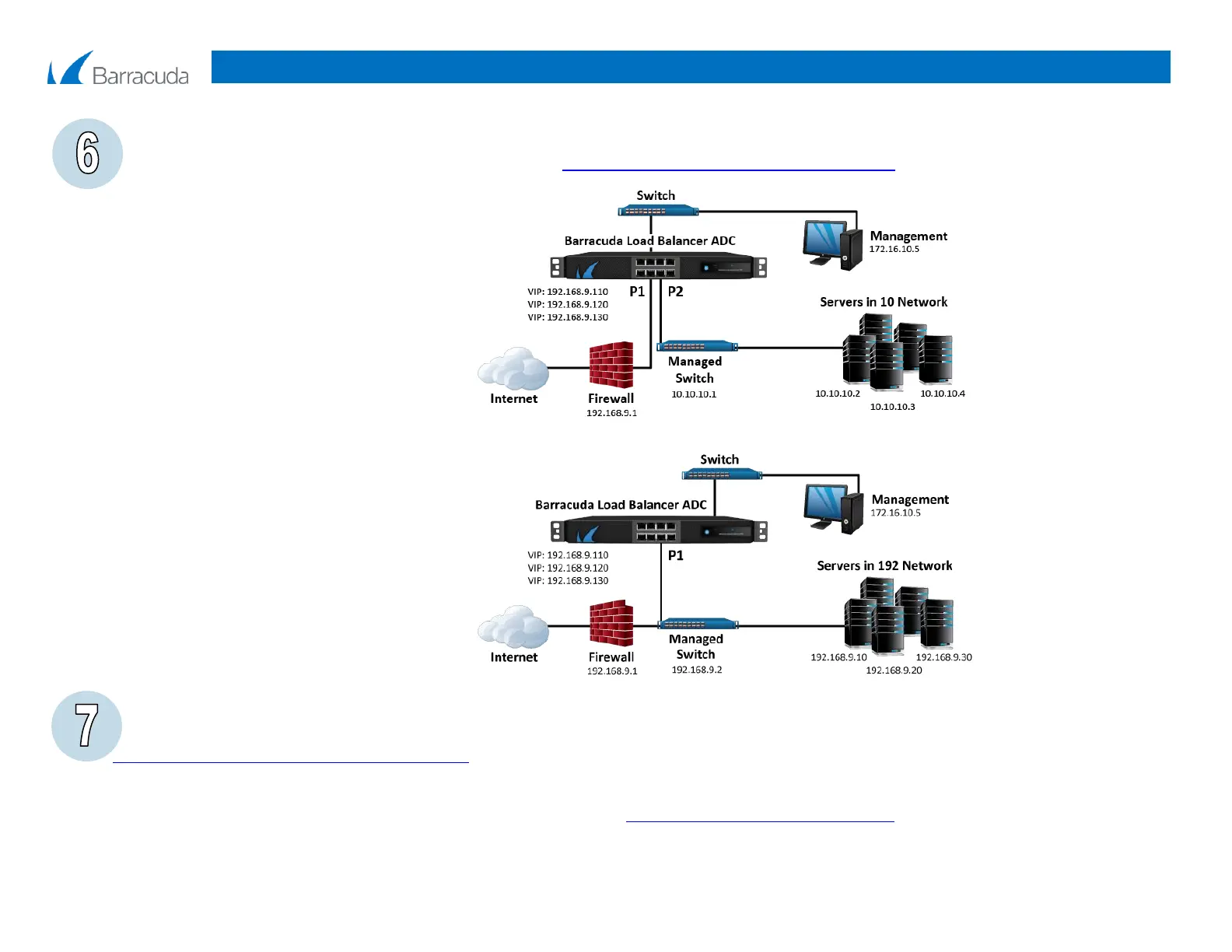
Determine the network layout that best suits your environment. Figures 1 and 2 illustrate two options. Additional deployment options and application deployment guides are
available in the Barracuda TechLibrary. For deployment options, refer to http://techlib.barracuda.com/ADC/DeploymentOptions. On the front of the appliance, connect the
data ports based on your deployment.
Figure 1. Two-Armed Deployment.
Figure 2. One-Armed Deployment.
Configure Network and Services
You can now use the web interface to configure network settings and create services. To complete your installation, go to
http://techlib.barracuda.com/ADC/ConfigNetworkServices.
For more information
Barracuda Load Balancer ADC documentation is available on the Barracuda TechLibrary at http://techlib.barracuda.com/ADC/Overview.
Contact and Copyright Information
Barracuda Networks, Inc. 3175 S. Winchester Blvd, Campbell, CA 95008 USA phone: 408.342.5400 fax: 408.342.1061 www.barracuda.com
Copyright 2004-2014 Barracuda Networks, Inc. All rights reserved. Use of this product and this manual is subject to license. Information in this document
is subject to change without notice. Barracuda Load Balancer ADC and Barracuda are trademarks of Barracuda Networks, Inc. All other brand and product names mentioned in this document are registered trademarks or trademarks of their respective holders. The Software supplied with this Product is provided under license from Barracuda Networks, Inc. and other licensors, and certain of the programs
included in the Software may be provided under the GNU General Public License (GPL) or the Lesser General Public License (LGPL). In accordance with the terms of the GPL and LGPL, you may request a copy of the relevant source code. This offer is valid for up to three years from the date of original purchase of the Product. For terms of use for this product, please visit
http://techlib.barracuda.com/x/zgEnAQ (Limited Warranty and License) in the Barracuda TechLibrary. v5.1-140127-0205-mb


 To Previous Page
 Loading...