EasyManua.ls Logo

Barracuda Load Balancer ADC - Page 8

Default Icon
60 pages
Print Icon
To Next Page IconTo Next Page
To Previous Page IconTo Previous Page
Loading...
5 Setup
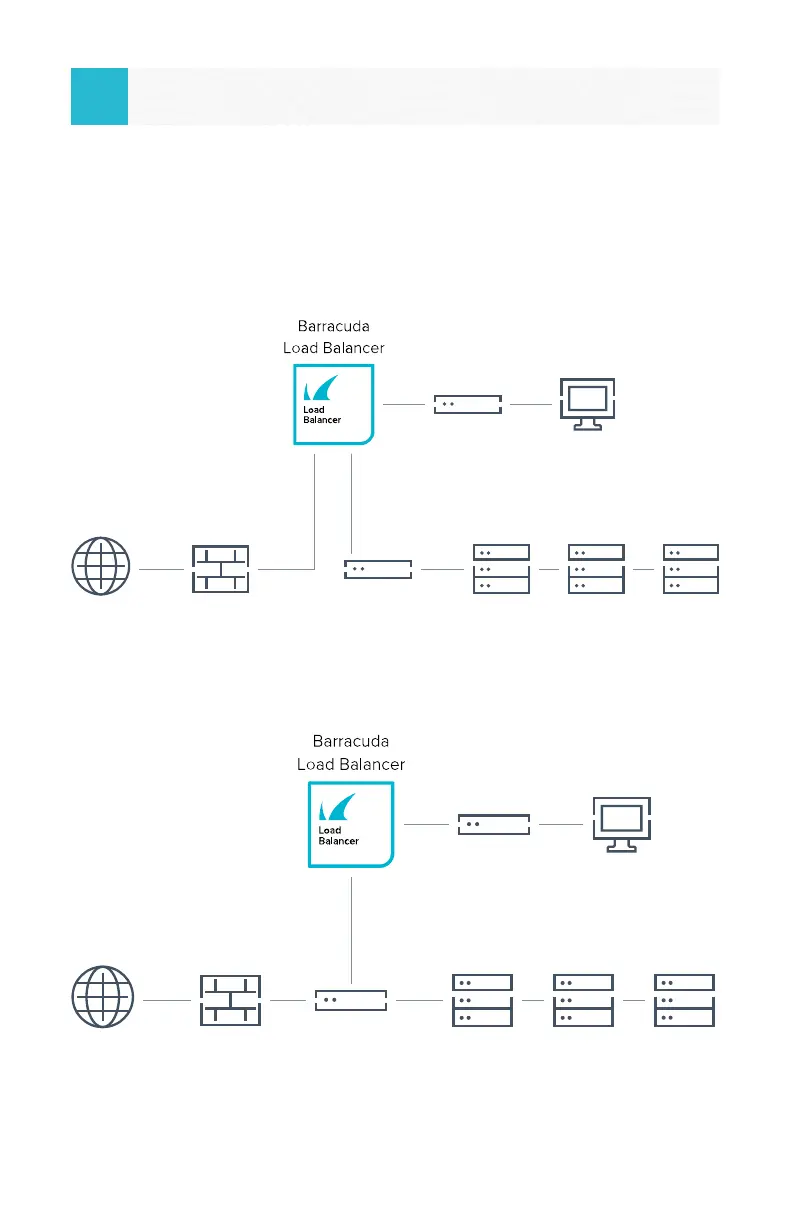
Determine the network layout that best suits your environment.
Deployments 1 and 2 illustrate two options. On the front of the appliance,
connect the data ports based on your deployment.
8
Determine Your Deployment
Switch
P1 P2
Servers in 10 Network
Management
172.16.10.5
VIP: 192.168.9.110
VIP: 192.168.9.120
VIP: 192.168.9.130
Managed Switch
10.10.10.1
Firewall
192.168.9.1
10.10.10.2
10.10.10.3
10.10.10.4Internet
Switch
Managed Switch
192.168.9.2
Firewall
192.168.9.1
P1
Servers in 192 Network
Management
172.16.10.5
VIP: 192.168.9.110
VIP: 192.168.9.120
VIP: 192.168.9.130
192.168.9.10
192.168.9.20
192.168.9.30
Internet
Two-Armed1
One-Armed2