4 5
1
2
4
5
6
3
A
B
D
E
C
How To Use The Digital Tripod
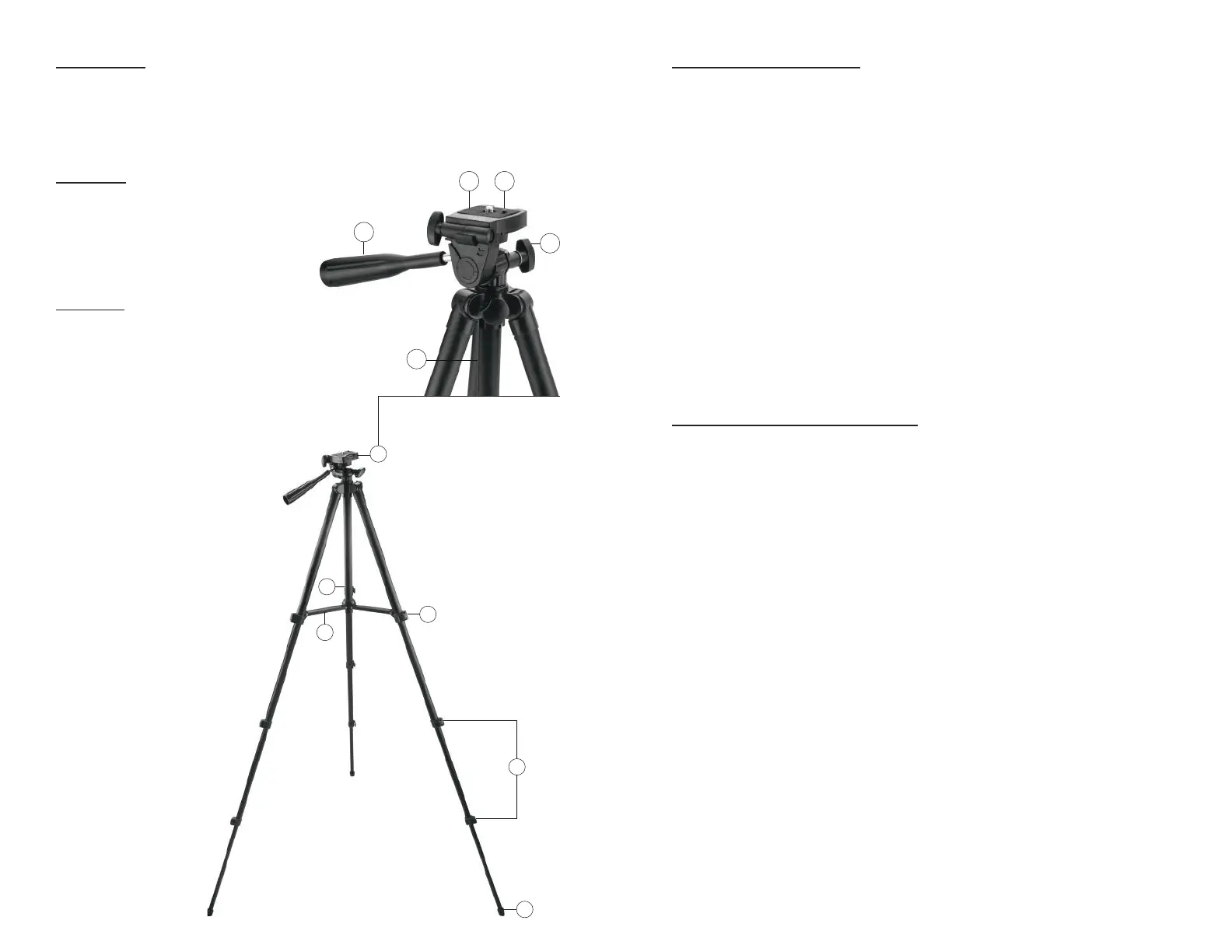
1. To adjust height and angle of legs release upper and lower leg locks (2 and 3).
Extend legs to desired height and lock upper and lower leg locks.
2. To adjust center column height, loosen center column height knob (D). Gently
pull head of tripod (1). Center column will ascend in height. Once desired
height is achieved tighten center column height knob (D).
3. Make sure locks/knobs are locked/tight (2,3,and D), and the tripod is on a
stable surface.
4. Under mounting platform will be a knob. Attach mounting platform to the
bottom of devices and tighten into place.
5. With mounted item securely in place, point the objective lens at the object, look
through the eyepiece and slowly move pan and tilt control handle (A) to
desired position. Tighten the pan knob (E) to secure your viewing angle.
6. The tripod leveling bubble is used to level the tripod (B) allowing for optimum
viewing and picture taking. The tripod is level when the bubble is centered
between the black lines.
How To Take Care Of The Digital Tripod
1. When not in use, lower tripod legs to minimum height with upper and lower
locks (2 and 3), lower center column to minimum height (D) and secure
in place.
2. Place tripod in carrying case (included) and store your tripod in a cool dry area.
Digital Tripod
This compact lightweight tripod features an easy-to-use tilt and panning head
allowing the head to be leveled without adjusting the tripod legs. This tripod is
perfect for digital camcorders, cameras and compact binoculars in outdoor and
indoor conditions.
Head Parts
A - Pan and Tilt Control Handle
B - Tripod Leveling Bubble
C - Mounting Platform
D - Center Column Height Knob
E - Pan Knob
Body Parts
1 - Head
2 - Upper Leg Locks
3 - Lower Leg Locks
4 - Feet
5 - Leg Brace
6 - Center Column



 To Next Page
 Loading...