BARTHE www.barthe-audio.com
Technology to Advance Education
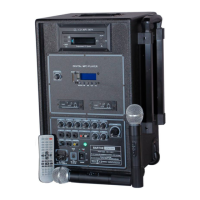
- Accessories supplied with the device
1. Power cable
2. Remote control
3. Emitter : HH : micro handheld (depending on model)
2 batteries AA depending on model
4. User guide
VI QUESTIONS
Double check the following points before concluding that your system is down.
1- Are all connections correct ?
2- Is the system used in accordance with the instruction manual ?
If the system is not working properly, perform the check list below. If any of these checks does not resolve the
problem, the system may be defective. Then immediately unplug the power cord and contact your dealer.
The device does not turn on
when you press the power
switch.
- The power cord is not properly
plugged into the wall outlet.
- The main plug is not working
- The mains voltage does not
match the device’s specification.
- Blown fuse.
- Plug the power cord into the wall
outlet.
- Call an electrician.
- Obtain an adapter.
- Replace the fuse (see section
« cleaning »).
The device does not react to the
action of keys.
- The switch is in the Off
position.
- The device is not connected.
- Turn the switch On.
- Disconnected and reconnected
the device.
- The level of the command of the
general volume is insufficient.
- The level of the volume control
of the source is insufficient.
- Adjust the volume control on the
right position.
- Adjust the volume control on the
right position.
The wireless microphone is not
working.
- The battery is installed in the
wrong direction.
- The battery is too low.
- Replace the battery in the right
direction.
- Put a new battery with a proper
voltage.
The wire microphone is not
working.
- The microphone is in position
« off ».
- The microphone is not
connected.
- Press the key « on »..
- Disconnect and reconnect the
microphone input « micro » of
the device.



 To Next Page