EasyManua.ls Logo

Basalte MIRO - User Manual

Basalte MIRO
2 pages
Print Icon
To Next Page IconTo Next Page
Loading...
Installation Manual
MIRO
© 2021
basalte v1.0
Before operating the unit, please read this manual
thoroughly and retain it for future reference.
Model No. 0731-03
You are cautioned that any changes or
modifications not expressly approved in this
manual could void your authority to operate this
equipment.
Description
The Basalte Miro puts the power of your Basalte intelligent home in the palm of your hand. Miro controls
television, movies, music and all Basalte Home comfort functions including lights, shades and thermostats. Miro
makes it easier than ever to get to what you want to see, hear or feel at home.
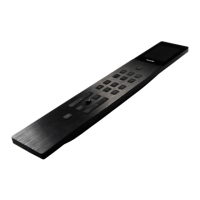
The slim and ergonomic design, precision machined out of one piece of brushed black aluminium reduces the
number of laser engraved buttons to the bare minimum. The buttons combined with the 2” touch sensitive
screen bring you right where you need to be.
Charge Miro wirlessly with any Qi compatible wireless charger or the Basalte Miro Base (0730-02-XX not
included).
Miro connects to the Basalte Core server over the Basalte Beam network (accessories not included).
basalte bv | hundelgemsesteenweg 1A | 9820 merelbeke | belgium
t +32 (0)9 385 78 38 | f +32 (0)9 329 66 95 | www.basalte.be | info@basalte.be
Technical data
Wireless charger (not included): Qi charging 5W
(USB port for service only)
Ambient temperature:
Operation: -5°C to 45°C
Storage: -15°C to 55°C
Transport: -15°C to 5C
Max. humidity: 93% relative humidity, no moisture
condensation
Protection class: II
Type of protection: IP 20
Certification: CE
2. Pair Miro
a. Wake Miro (push standby button 20s)
b. Select “Pair new devices...” in Basalte Studio
c. “Pair Miro (within 120s)
d. Add Miro to the project in the desired room
e. push to server
How to start up
After initial power-up, Miro needs to be paired and configured using Basalte Studio:
3. Check if Miro is running on the latest software. Go to its “about” page by pressing the home button for 3
seconds. Update if necessary.
For more information and programming, please refer to basalte.world.
1. Prepare the Basalte Core server for Beam
a. Core S4 - connect Beam.link with USB
Core Mini - make sure antenna is mounted
b. Open the Basalte Home project in Basalte Studio
c. enable Basalte Beam in the Beam tab
d. push to server
Question and Answer IconNeed help?

Do you have a question about the Basalte MIRO and is the answer not in the manual?

Overview

The Basalte Miro (Model No. 0731-03) is an intelligent home control device designed to put the power of a Basalte smart home in the palm of your hand. This device allows users to control various aspects of their home environment, including television, movies, music, lights, shades, and thermostats, making it easier to manage comfort functions.

Function Description:

The Miro serves as a central remote control for Basalte intelligent home systems. It enables users to:

  • Control Entertainment: Manage TV, movies, and music playback.
  • Manage Home Comfort: Operate lights, shades, and thermostats.
  • Access Presets: Control up to three customizable presets, which can vary depending on the room and software configuration.
  • Utilize Favorites: Display and access favorite functions or scenes when available, as configured in the software.
  • Access Additional Controls: The "Grid button" reveals extra controls when available, offering expanded functionality.
  • Input Numerically: The "Keypad button" brings up a numerical keypad for specific inputs.
  • Control Transport Functions: Dedicated buttons for "Previous," "Play/Pause," and "Next" facilitate media control.
  • Adjust Volume and Channels: Separate buttons are provided for volume up/down and channel up/down.
  • Navigate Menus: A "Menu button" and a "Joystick" allow for intuitive navigation within the device's interface.
  • Go Back: A "Back button" simplifies navigation by returning to the previous screen.
  • Access Device Information: A long press (3 seconds) of the "Home button" opens the device's "about" page, where software information can be found and updates initiated.

Design and Interface:

The Miro features a slim and ergonomic design, crafted from a single piece of precision-machined, brushed black aluminum. It minimizes the number of physical buttons, relying on laser-engraved controls combined with a 2-inch touch-sensitive screen for a streamlined user experience.

Important Technical Specifications:

  • Wireless Charging: Supports Qi-compatible wireless charging at 5W.
  • USB Port: Includes a Micro USB port, intended for service only.
  • Ambient Temperature:
    • Operation: -5°C to 45°C
    • Storage: -15°C to 55°C
    • Transport: -15°C to 55°C
  • Max. Humidity: 93% relative humidity, non-condensing.
  • Protection Class: II
  • Type of Protection: IP 20
  • Certification: CE

Usage Features:

  • Wireless Charging: The Miro can be charged wirelessly using any Qi-compatible charger or the Basalte Miro Base (sold separately).
  • Connectivity: It connects to the Basalte Core server via the Basalte Beam network (accessories not included).
  • Standby Button: This multi-functional button allows users to turn off TV or music, turn on/off lights, and perform a "room all-off" function with a long press. A 20-second press is used for wake-up and initial pairing.
  • Home Automation Functions: Dedicated buttons for TV, Music, and Comfort functions (lights/shades/thermostats) provide quick access to common controls.
  • Pairing Process:
    1. Prepare Basalte Core Server: Connect Beam.link with USB (for Core S4) or ensure the antenna is mounted (for Core Mini). Open the Basalte Home project in Basalte Studio, enable Basalte Beam in the Beam tab, and push the configuration to the server.
    2. Pair Miro: Wake the Miro by pressing the standby button for 20 seconds. In Basalte Studio, select "Pair new devices..." and then "Pair" Miro within 120 seconds. Add the Miro to the desired room in the project and push the configuration to the server.
  • Software Updates: Users should regularly check if the Miro is running the latest software by pressing the home button for 3 seconds to access the "about" page and updating if necessary.

Maintenance Features:

  • Software Updates: The device supports software updates, which can be initiated from the "about" page, ensuring the Miro remains current with the latest features and improvements.
  • Wireless Charging: The use of wireless charging simplifies the charging process, reducing wear and tear on physical connectors.
  • Service Port: The Micro USB port is specifically designated for service, indicating that professional assistance may be required for certain maintenance or diagnostic tasks.

Important Considerations:

Users are cautioned that any changes or modifications not expressly approved in the manual could void their authority to operate the equipment. It is essential to read the manual thoroughly before operating the unit and retain it for future reference. For more detailed information and programming instructions, users should refer to basalte.world.

Basalte MIRO Specifications

General IconGeneral
BrandBasalte
ModelMIRO
CategoryRemote Control
LanguageEnglish