2
5
3
4
6
7
8
9
10 12
11
13
14
16
1
a b c
a b c
1
Miro button layout
2
3
4
5
6
7
8
9
10
11
12
13
14
15
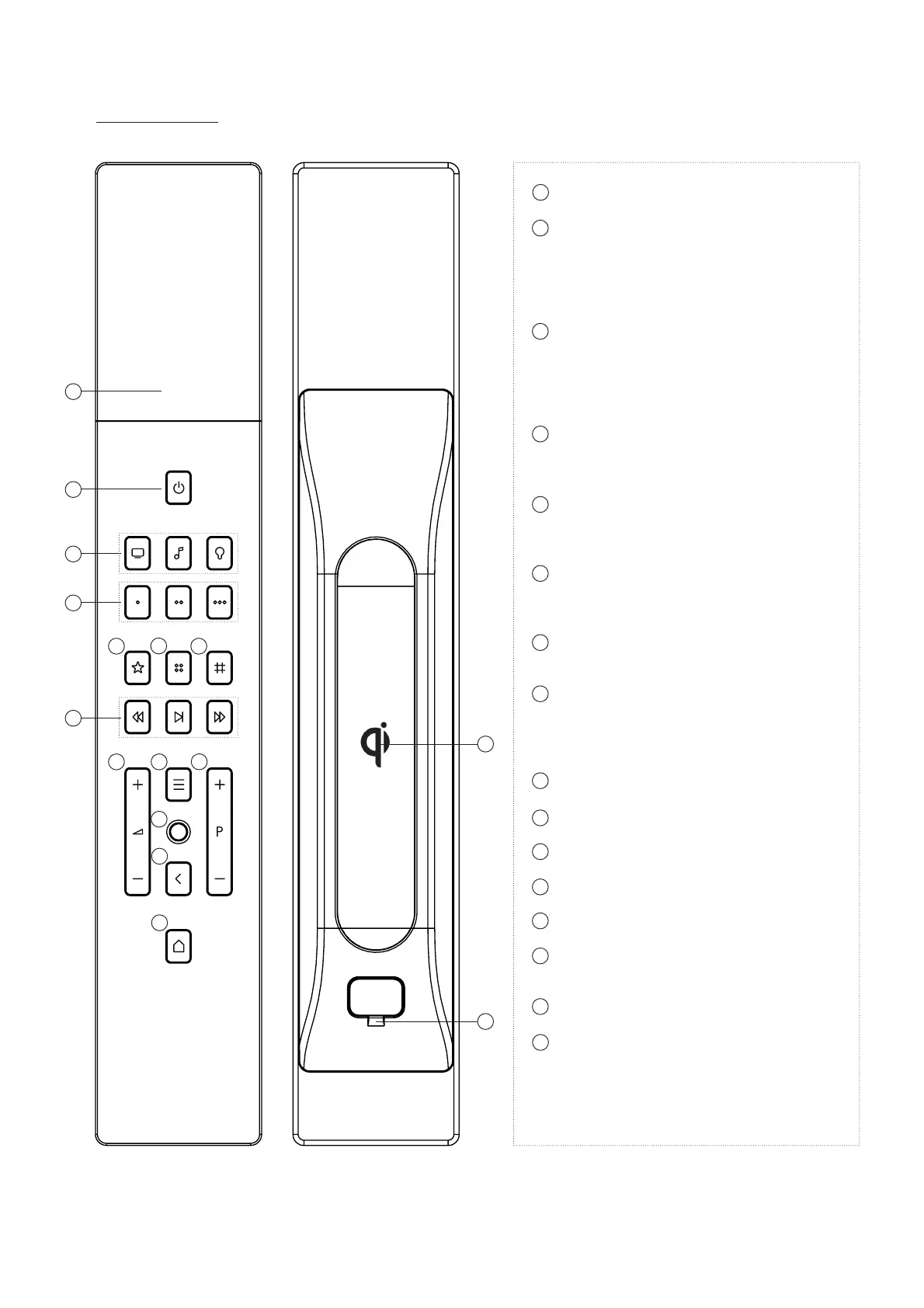
2” TFT touch display
Standby button
• turn o TV or music
• turn on/o lights
• room all-o (long press)
• (press 20” for wake-up and initial pairing)
Home automation functions
a. TV functions
b. Music functions
c. Comfort functions
(lights/shades/thermostats/…)
Preset buttons
• to control 3 presets (depending on room)
(see software manual)
Favourite button
• will show favourites when available
(please refer to software manual)
Grid button
• will show extra controls when available
(please refer to software manual)
Keypad button
• will show numerical keypad when available
Transport functions
• Previous
• Play/Pause
• Next
Volume up/down
Menu button
Joystick
Channel up/down
Back button
Home button
• press 3” to open “about” page
Qi Wireless Charging
Micro USB port
• for service only
scale 1:1
charge
15
16


 To Previous Page
 Loading...