This document is an installation manual for Bascom security cameras, covering models XD10, PD20, XD50, PB30, PB40, and XB40. It provides instructions in English, German, French, and Dutch for the installation, operation, and maintenance of these devices.
Function Description
The Bascom security cameras are designed for surveillance purposes, offering various features suitable for both indoor and outdoor use. The manual details the physical installation process for each camera model, including mounting, adjusting the camera's position and angle, and focusing the lens. The cameras are intended to be integrated into a larger security system, with zoom and focus adjustments managed via a smartphone app or the recorder menu.
Important Technical Specifications
The manual includes a specifications table detailing key technical aspects for each camera model:
- Focus:
- XD10, PB30: 2.8mm
- PD20, PB40, XD50, XB40: 2.8-12mm (indicating a varifocal lens for these models)
- Vandal-proof: All models (XD10, PB30, PD20, PB40, XD50, XB40) are listed as vandal-proof.
- Outdoor suitability: All models are suitable for outdoor use.
- Night vision: All models are equipped with night vision capabilities.
- Connection: All models use UTP (Unshielded Twisted Pair) for connection.
- PoE (Power over Ethernet): All models support PoE.
- Size in mm:
- XD10: 100 x 100
- PB30: 200 x 100
- PD20: 150 x 115
- PB40: 210 x 100
- XD50: 150 x 115
- XB40: 250 x 100
These specifications indicate a range of dome and bullet-style cameras with varying focal lengths, suggesting suitability for different surveillance needs, from wide-angle coverage (2.8mm) to more detailed, adjustable views (2.8-12mm). The inclusion of vandal-proof design, outdoor suitability, night vision, UTP connection, and PoE across all models highlights their robust and versatile nature for professional security applications.
Usage Features
The installation process for the dome cameras (XD10, PD20, XD50) involves several steps:
- Ring/Front Cover Removal: The outer ring (XD10) or front cover (PD20, XD50) is removed by rotating or loosening screws with a provided Torx tool.
- Camera and Bracket Separation: The camera unit is separated from its mounting bracket.
- Mounting Sticker Application: A sticker is used to mark the drilling positions on the mounting surface.
- Bracket Installation: The bracket is fastened to the surface using screws and expansion bolts. For PD20 and XD50, specific drill sizes are recommended for locking holes (6mm) and cable connection (20mm).
- Camera Positioning: The camera is placed into the bracket and adjusted for the desired position. For PD20 and XD50, this involves turning the camera left or right and loosening side screws to adjust height.
- Ring/Bracket Tightening: The outer ring (XD10) or front cover (PD20, XD50) is tightened to secure the camera.
- Protection Cover Removal/Replacement: For PD20 and XD50, an inner protection cover is removed before adjustment and replaced afterward.
- Zoom and Focus Adjustment: For models with varifocal lenses (PD20, PB40, XD50, XB40), zoom and focus are adjusted via a smartphone app or the recorder menu.
- Fingerprint Removal: After installation, any fingerprints on the lens or dome are to be removed.
For bullet cameras (PB30, PB40, XB40), the installation is simpler:
- Bracket Mounting: The bracket is mounted to the desired surface.
- Camera Adjustment: The camera is adjusted to the correct position.
- Zoom and Focus Adjustment: For PB40 and XB40, zoom and focus are adjusted via a smartphone app or the recorder menu.
The manual emphasizes following operating instructions carefully, especially during connection. It also highlights the importance of using the provided power supply units and preventing overload of electrical outlets.
Maintenance Features
The manual provides general safety and maintenance guidelines:
- Cleaning: Only the exterior of the product should be cleaned with a soft, dry cloth.
- Chemicals: Aggressive chemicals, solvents, or strong detergents should not be used for cleaning.
- Power Disconnection: The product should be disconnected from the power source before cleaning.
- Physical Handling: The product should not be dropped or shaken, as rough treatment can damage internal electronic components.
- Troubleshooting: Users are advised to contact their supplier if they have doubts about connecting the product, product safety, or operation.
Safety Instructions
Bascom products are designed and tested to meet strict safety requirements. Key safety instructions include:
- Carefully follow operating instructions during connection.
- Keep all parts out of reach of children.
- Avoid dropping or shaking the product.
- Always use the included power supply units.
- Prevent overload of wall sockets and extension cords.
- Clean only the exterior with a soft, dry cloth; disconnect from power before cleaning.
- Do not use aggressive chemicals for cleaning.
- Contact the supplier for any doubts regarding connection, safety, or operation.
Warranty and Disposal
All Bascom products come with a 2-year warranty. In case of defects within this period, customers should contact their supplier.
The manual also includes important information regarding the disposal of old electrical and electronic equipment (WEEE) for both private households and professional users, emphasizing proper recycling to conserve resources and prevent environmental harm. This symbol indicates that the product should not be mixed with general household waste and should be taken to designated collection points. For countries outside the EU, local authorities or dealers should be consulted for proper disposal methods.

 Need help?
 General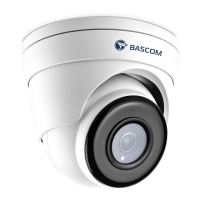

 To Next Page