Need help?
Do you have a question about the Baseus Encok W04 and is the answer not in the manual?
Instructions for initial pairing of earphones with a mobile device via Bluetooth.
Details on touch controls for music playback, call management, and voice assistant.
Explanation of LED indicators that show the battery charge status of the earbuds.
Steps to restore the earphones to their original factory default settings.
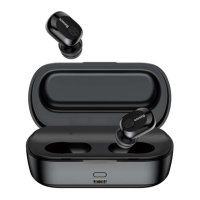
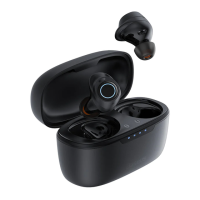
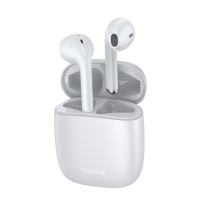
The Baseus Encok W04 TWS Bluetooth Earphones are a pair of true wireless stereo earbuds designed for convenient audio playback and hands-free calling. These earphones come with a sleek charging case that not only protects them but also provides additional battery life, ensuring they are ready for use whenever you need them. The design emphasizes ease of use and portability, making them suitable for various daily activities.
The primary function of the Baseus Encok W04 earphones is to provide a wireless audio experience. They connect to your mobile phone or other Bluetooth-enabled devices, allowing you to listen to music, podcasts, audiobooks, and other audio content without the hassle of tangled wires. The "TWS" (True Wireless Stereo) aspect means that the left and right earbuds operate independently, communicating with each other wirelessly to deliver a stereo sound experience. This also allows for flexible usage, as you can choose to use both earbuds for immersive stereo sound or just one earbud for mono audio, which is particularly useful for calls or when you need to stay aware of your surroundings.
Beyond audio playback, these earphones are fully equipped for communication. They feature an integrated microphone, enabling you to make and receive phone calls hands-free. The touch-sensitive areas on each earbud allow for intuitive control over various functions, including managing calls and music playback, without needing to interact directly with your connected device. This makes them a practical accessory for busy individuals who need to manage their audio and communications on the go.
The Baseus Encok W04 earphones are designed with user convenience in mind, offering a straightforward pairing process and intuitive controls.
For the first-time setup, the earphones need to be within a close range of your mobile phone. The pairing process is initiated by simply opening the cover of the charging case. Upon opening, the left and right earbuds automatically connect to each other. They then enter a wireless pairing mode, making them discoverable by your phone. To complete the connection, you activate the Bluetooth function on your phone, search for the Baseus Encok W04 in the list of available devices, and select it to connect. While some phones might prompt for a pairing password, the default "0000" is typically used, though many modern devices connect without requiring one. If the initial pairing attempt fails, the process can be easily repeated. Once successfully paired, an indicator light on the earphones will turn off, confirming the connection. For subsequent uses, the earphones will typically reconnect automatically to the last paired device when removed from the charging case.
The earphones offer flexible power management. To power them on for dual earphone use, you can either open the charging case cover or press and hold the touch area on both the left and right earphones for three seconds. To power them off, simply place them back into the charging case. Alternatively, you can manually power them off by holding the touch area on both earphones for three seconds.
For situations where you prefer to use only one earbud, the Baseus Encok W04 supports a single earphone mode. To activate this, open the charging case cover and remove just one of the earbuds. The earphone will automatically enter single earphone mode, allowing you to listen to audio or take calls using only one earbud. To turn off a single earbud, simply place it back into the charging case.
Controlling your music is intuitive with the touch-sensitive areas on the earbuds:
The earphones also provide comprehensive controls for managing phone calls:
For quick access to your device's voice assistant (e.g., Siri, Google Assistant), a double-click on the left earbud will activate it, allowing you to issue commands hands-free.
Maintaining the Baseus Encok W04 earphones primarily involves understanding their charging behavior and how to reset them if needed.
The charging case plays a crucial role in maintaining the earphones' battery life. When the earbuds are placed inside the charging case, they begin to charge. During this process, the far left and far right LEDs on the charging case will illuminate. As the charging case itself charges, all the LEDs on the case will light up, providing a visual indication of the charging progress.
The LEDs on the charging case also serve as a battery life indicator for the case itself, allowing you to quickly check the remaining power:
This visual feedback helps you know when to recharge the case, ensuring your earphones are always powered up and ready for use.
In situations where you might experience connectivity issues or wish to clear all previous pairing information, the earphones offer a factory reset option. To perform a factory reset:
This reset function is a valuable troubleshooting tool, helping to resolve potential software glitches or connectivity problems by restoring the earphones to a clean state.
 General
| Bluetooth Version | 5.0 |
|---|---|
| Frequency Response | 20Hz-20kHz |
| Connectivity | Bluetooth |
| Microphone | Yes |
| Charging Time | 1.5 hours |
| Type | Wireless Earbuds |

 To Next Page