
 Need help?
Do you have a question about the Baseus Bowie WX5 and is the answer not in the manual?
Earphones automatically power on when the charging case lid is opened.
Enable wireless mode, search, and select "Baseus Bowie WX5" to pair.
Download and link the earphones to the dedicated Baseus application.
Place earbuds into the charging case and close the lid to power them off.
Controls for play/pause, next/previous song, and voice assistant activation.
Manage calls (answer/hang up/reject) and activate BISA mode via touch controls.
Toggle low latency mode on/off using the Baseus mobile application.
White indicator blinks and turns off after 1-2 minutes when earphones are charging.
Red indicator blinks when charging the case; steady white when fully charged.
Red light for <20% battery, white for 21%-100% battery on the charging case.
Reset earphones to default settings by opening lid and holding case button for 5 seconds.
Customize gestures, locate missing earphones, and use alarm function cautiously.
Avoid extreme temperatures, physical damage, water, and unauthorized disassembly.
Technical details including model, material, wireless version, playtime, and battery capacity.
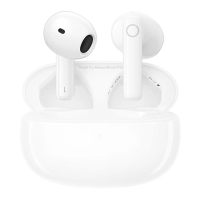
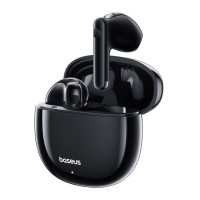
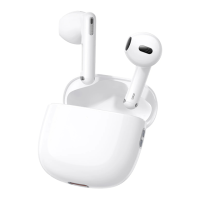
This document serves as a user manual for the Baseus True Wireless Earphones, model Baseus Bowie WX5, providing instructions for pairing, operation, and maintenance, along with important safety warnings and environmental information.
The Baseus Bowie WX5 earphones are designed for wireless audio playback and communication. They automatically power on when the charging case lid is opened, simplifying the initial setup process. For wireless connection, users need to enable wireless mode on their phone and select "Baseus Bowie WX5" from the available devices. The earphones can also be linked to a dedicated app for enhanced functionality and customization. To power off, the earbuds are simply placed back into the charging case, and the lid is closed.
The earphones offer intuitive touch controls for various functions. In music mode, a double-tap on either the left or right earphone will play or pause the audio. For navigating between songs, previous and next track functions are managed through gesture settings within the companion app. A triple-tap on either earphone activates the voice assistant, providing hands-free control.
In call mode, the earphones allow users to answer or hang up calls with a double-tap on either earphone. To reject an incoming call, a long-tap (1.5 seconds) on either earphone is required. The earphones also feature a BISA mode, which can be activated or deactivated by a 1.5-second tap and hold on either earphone. This mode is off by default when the earphones are first used, and its sequence cycles through Music mode, Theater mode, and Normal mode.
The charging case includes a Type-C charging port and a charging case button. An indicator light on the charging case provides feedback on the charging status and battery level.
The Baseus Bowie WX5 earphones are designed for ease of use with several practical features. The charging case acts as a portable power source for the earphones. When the earphones are placed in the charging case, a white indicator light blinks for 1-2 minutes before turning off, indicating that the earphones are charging. To charge the case itself, it must be connected to a power supply, at which point a red indicator light will blink. Once fully charged, the indicator light will turn steady white.
To check the current battery level of the charging case when it's not charging, users can press the charging case button. If the battery level is below 20%, a red indicator light will turn on and off every 5 seconds. For battery levels between 21% and 100%, the white indicator light will turn on and off every 5 seconds.
A low latency mode is available, which can be manually toggled on or off through the Baseus app, enhancing the experience for activities like gaming where minimal audio delay is crucial.
The companion app offers extensive customization options. Users can personalize the gestures for various controls, tailoring the earphone experience to their preferences. The app also includes a "searching function" to help locate misplaced earphones, which has an effective duration of approximately 35 hours. When this function is activated, the earphones will emit an alarm sound. Users are advised to ensure they are not wearing the earbuds when using this feature to prevent hearing damage. The manual also provides instructions for ensuring the Baseus app can run in the background for optimal functionality, by allowing auto-launch and secondary launch in the device settings.
To restore the earphones to their default settings, users can open the charging case lid, then press and hold the button on the charging case for 5 seconds. The red and white indicators will blink three times simultaneously, confirming the reset.
Proper maintenance is crucial for the longevity and optimal performance of the Baseus Bowie WX5 earphones. The manual emphasizes several key points for care and safety.
Users are advised to regularly clean the charging contacts of the earphones with a clean cotton cloth. This prevents issues such as failure to charge or turn on, which can be caused by accumulated dirt or debris.
The product is not designed to be submerged in water or placed in a washing machine. If water accidentally enters the product, it should be allowed to dry naturally before further use.
The earphones contain internal batteries, and as such, they should not be exposed to direct sunlight, electric heaters, or similar overheating environments. Storing the product in high temperatures, strong lighting, or high-intensity magnetic fields should be avoided. Similarly, the product should not be kept near fire sources or in harsh environments.
Physical abuse, such as bashing, throwing, trampling, squeezing, or putting the product into fire, must be avoided. If the product appears swollen, it should not be used. The recommended ambient temperature for operation is between 0-45°C.
Improper use, particularly ignoring the warnings in the user manual, can lead to damage to the product or endanger personal and property safety. The manufacturer explicitly states that consumers will bear all consequences of such misuse.
Dismantling the product by non-professionals is strictly prohibited, as this could lead to fire or damage. Furthermore, the product should not be used with electrical loads that exceed its output current, as a built-in circuit protection mechanism will automatically stop operation if loads are excessive.
 General
| Bluetooth Version | 5.3 |
|---|---|
| Charging Case | Yes |
| Impedance | 32Ω |
| Frequency Range | 20Hz-20kHz |
| Driver Size | 13mm |
| Microphone | Yes |
| Foldable Design | No |
| Type | True Wireless |
| Battery Life | Up to 30 hours (with charging case) |
| Battery Capacity | 40mAh (earbuds), 400mAh (charging case) |
| Charging Time | 1.5 hours |
| Talk Time | Up to 5 hours (earbuds), up to 25 hours (with charging case) |

 To Next Page