
 Need help?
Do you have a question about the Basic XL BXL-RC001 and is the answer not in the manual?
Instructions for inserting two AAA batteries into the remote.
Instructions for setting up the remote via direct, quick, or automatic code search.
Procedure to check the 4-digit code currently used by the remote.
Important warnings regarding product use and environmental conditions.
Guidance on cleaning the remote and warranty information.
Details on design, specifications, trademarks, and future reference.
Procedure to read the 4-digit code by pressing specific buttons.
Do not expose the product to water or moisture.
Clean only with a dry cloth. Do not use cleaning solvents.
Changes or modifications void the warranty.
Design and specifications subject to change without notice.
Open compartment, insert two AAA batteries, do not mix old/new.
Set device, brand, code. Press SET+Device button, type code.
Press and hold SET+Device, then SET, then POWER step-by-step.
Press SET(green)+POWER(red) until LED flashes, aim, press POWER.
Press SET and '1' for first digit, '2' for second, etc.
Do not expose to water; clean with a dry cloth only.
No guarantee for modifications; design/specs may change.
Open battery compartment and insert two AAA batteries.
Select device, brand, code. Press SET+Device, type code.
Press SET+Device, then SET, then POWER step-by-step.
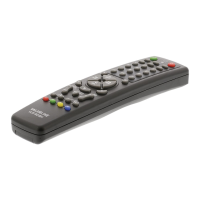
Details on brand, model, and description of the universal remote control.
List of harmonized standards the product conforms to.
Indicates conformity with relevant EU directives.
Information about the company and signatory for the declaration.
 General
| Brand | Basic XL |
|---|---|
| Model | BXL-RC001 |
| Battery Type | 2 x AAA |
| Operating Range | Up to 10 meters |
| Material | Plastic |
| Type | Remote Control |
| Compatibility | Universal |

 To Next Page