5-2 BE1-51 Tests and Adjustments 9137200997 Rev D
(d) Sensing Input Type I or X (Two-Phase with Neutral Sensing). Refer to Figure 5-4.
Ensure that the timed output terminals 1 and 10 are connected. Also, verify that either A,
B, or C current sense terminals are connected initially (N terminals will be connected later
in the test).
Step 2. Remove the relay front cover.
Step 3. Set the front panel TIME DIAL selector and, if present, the front panel TIME DIAL (NEUTRAL)
selector to 99.
Step 4. Adjust the front panel INST 1 and INST 2 controls, if present, fully clockwise (CW).
Step 5. Adjust the front panel TAP CAL control, and if present, the front panel TAP (NEUTRAL) control
fully CW.
Step 6. Ensure that the relay front panel TARGETS, if present, are reset.
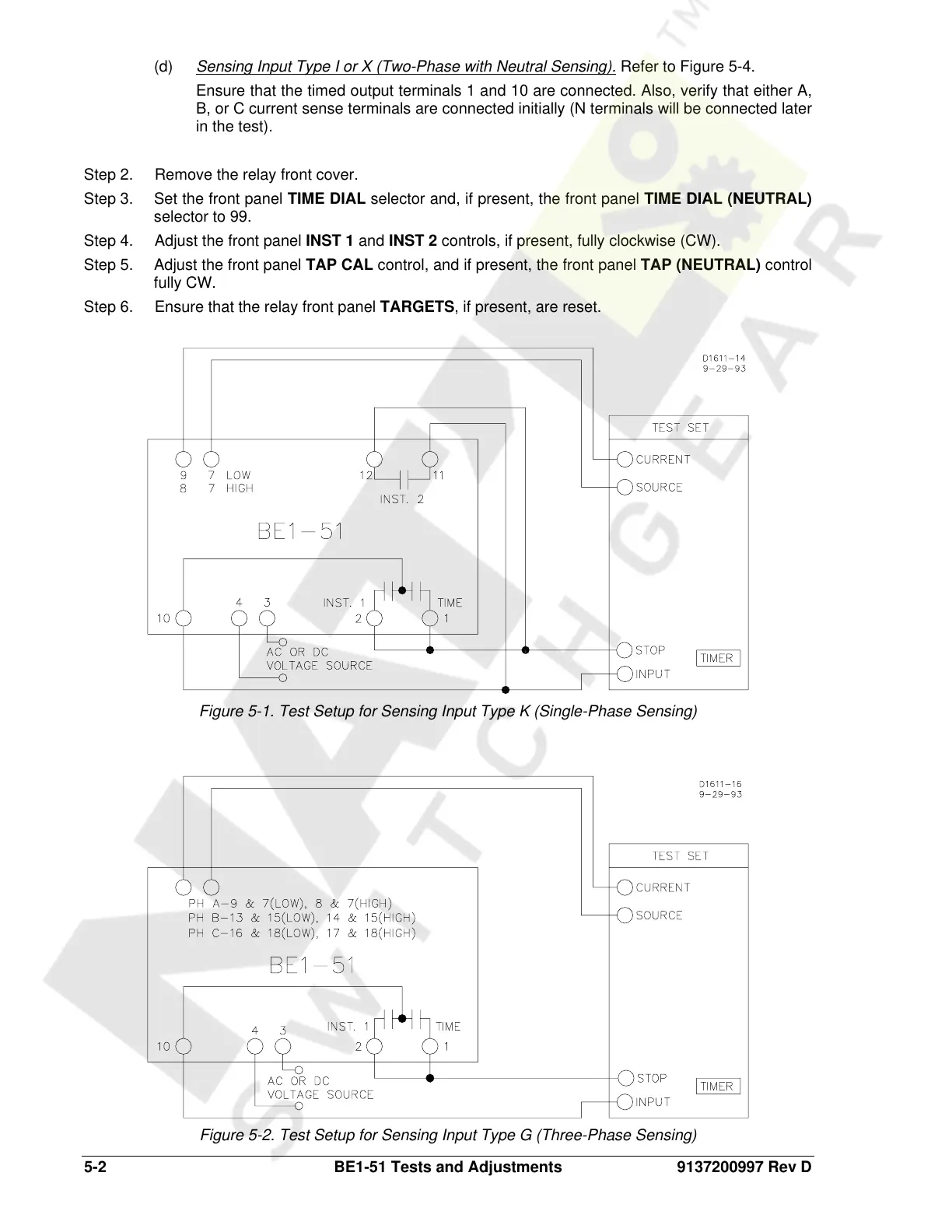
Figure 5-1. Test Setup for Sensing Input Type K (Single-Phase Sensing)
Figure 5-2. Test Setup for Sensing Input Type G (Three-Phase Sensing)
Courtesy of NationalSwitchgear.com



 To Next Page