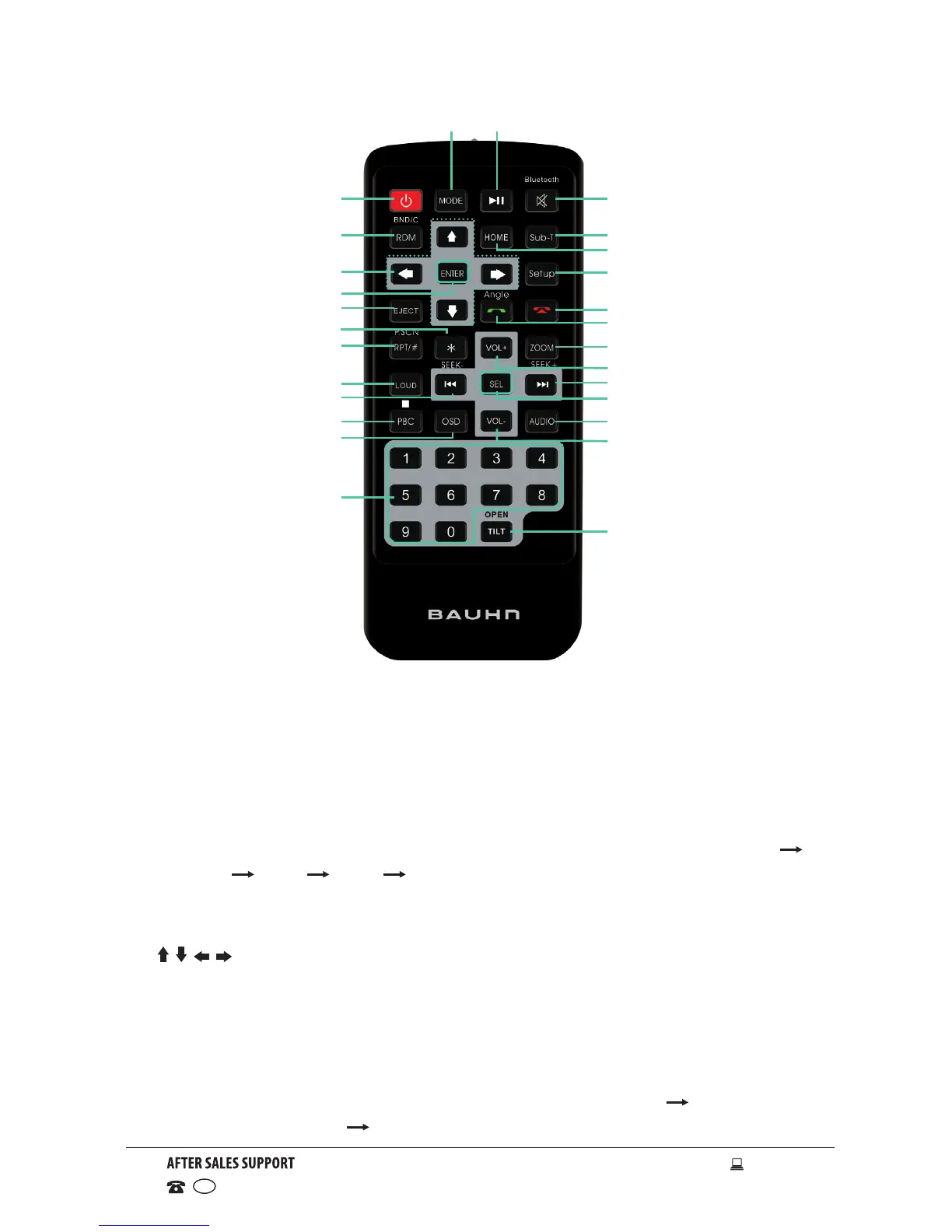
Remote Control
1 MODE: Press to select different input modes: Radio, Disc (if there is a
disc in the unit), USB (if there is a USB device in the unit), Bluetooth and
AV IN.
2 POWER: Power on or off.
3 RDM/BAND/C:
• In Radio mode, press to change radio band in sequence of FM1
FM2 FM3 AM1 AM2.
• In Disc mode, press to play randomly.
• In Bluetooth mode, press it to clear a single phone number.
4 / / / : Use to navigate through menu sesttings.
5 ENTER: Press to confirm selection or setting.
6 EJECT: Press to eject the disc.
7 *: In Bluetooth mode, press to enter a * symbol.
8 RPT/#/P.SCN/ :
• In SD/USB mode, press to REP 1 (repeat one track) REP DIR
(repeat directory) REP ALL (repeat all).
2
3
4
6
5
8
7
9
10
11
12
13
14
15
16
17
18
19
21
22
23
24
25
26
20
1 27


 To Next Page