19
o Lift the ice maker up (1) and then pull the storage case (2) to
remove it from the freezer.
o To put the ice maker back into position, locate it into the side
grooves of the cabinet and push it back into place.
Water filter change icon
o the water filter needs to be replaced approximately
every 6 months. The WATER FILTER icon will come on
to show when the filter needs to be replaced.
o After changing the water filter (see below for details), unlock the
control panel and press the FILTER RESET button for 3 seconds
or until water filter icon switches off.
o If you change the water filter before the FILTER CHANGE icon
comes on, then you should still press the FILTER RESET button
to reset the countdown.
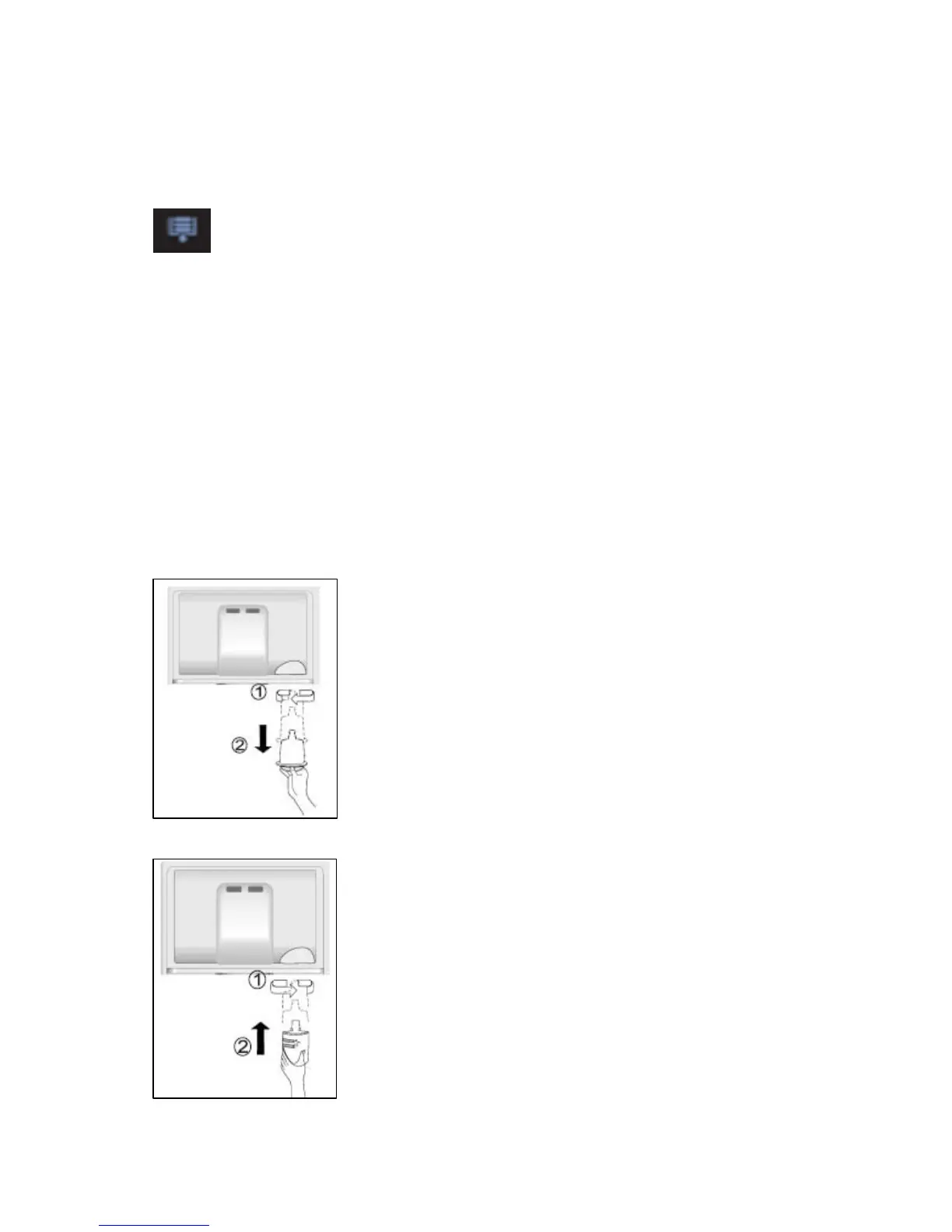
Replacing the water filter
o IMPORTANT: Before commencing this process, please
disconnect your appliance from the mains supply.
o Open the fridge door and look in the top
right hand corner to locate the water filter.
o Carefully unscrew the water filter by
turning it left (1) and remove it from the
appliance (2).
o You may want to remove the top
safety glass shelf for easier access to
the water filter.
o Replace with a new filter. Insert the filter
into the correct position and turn it right
to fix it into place.
o A replacement water filter is available
from the Baumatic Spares Department.
o The water filter should be replaced
approximately every 6 months or when
the water filter icon lights.


 To Next Page