AUTO MENU
cooking
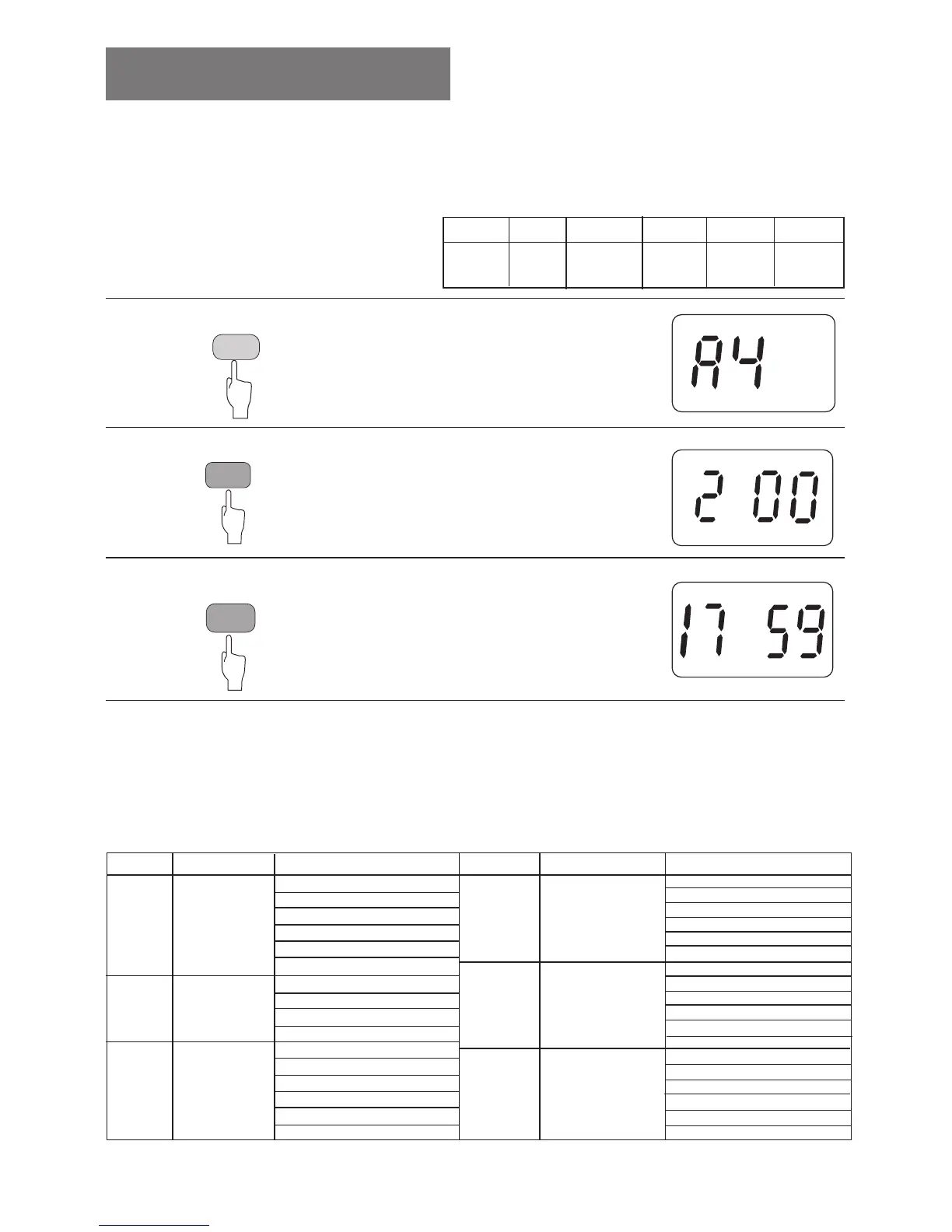
With the AUTO MENU cooking function, you only need
set the type and weight of the food then start the oven
to do cooking, without setting the cooking time.
Menu types:
Cook
meat
1. Push the “AUTO MENU” button four times.
LED display
Remarks:
1. The AUTO MENU uses a circulating display, i.e.with each push, it will change in
following manner: A1-A2-A3-A4-A5-A6, then A6-A1.
2. The weight grade for one certain menu, the display is also circulating.
3. The weight grade offered by the AUTO MENU is only for reference.
4. Reference for the food with AUTO MENU cooking.
^N
Auto
reheat
^O
Heat
milk
^P
^Q
Cook
fish
^R
^S
Cook
chicken
Cook
vegetable
Recipe Type Weight(g) reference
NQM
ONM
OUM
PRM
QOM
RMM
^N
Auto
turnover
^O
Heat
milk
RM
NMM
OMM
PMM
NMM
OMM
PMM
QMM
RMM
SMM
^P
^Q
^R
^S
Cook
meat
Cook
fish
Cook
chicken
NMM
OMM
PMM
PRM
QMM
QRM
NMM
OMM
PMM
PRM
QMM
QRM
NMM
OMM
QMM
RMM
SMM
UMM
AUTO MENU
WEIGHT
START
Usage
For instance
To cook 200g mutton with AUTO
MENU function.
2. Push the “WEIGHT” button twice.
3. Push the “START” button.
LED display
LED display
Recipe Type Weight(g) reference
Cook
vegetable
8










 To Next Page