o Thawed foods must not be frozen for a second time.
Fast freeze function
o Your appliance is fitted with a fast freeze setting, which you should use when
freezing fresh food.
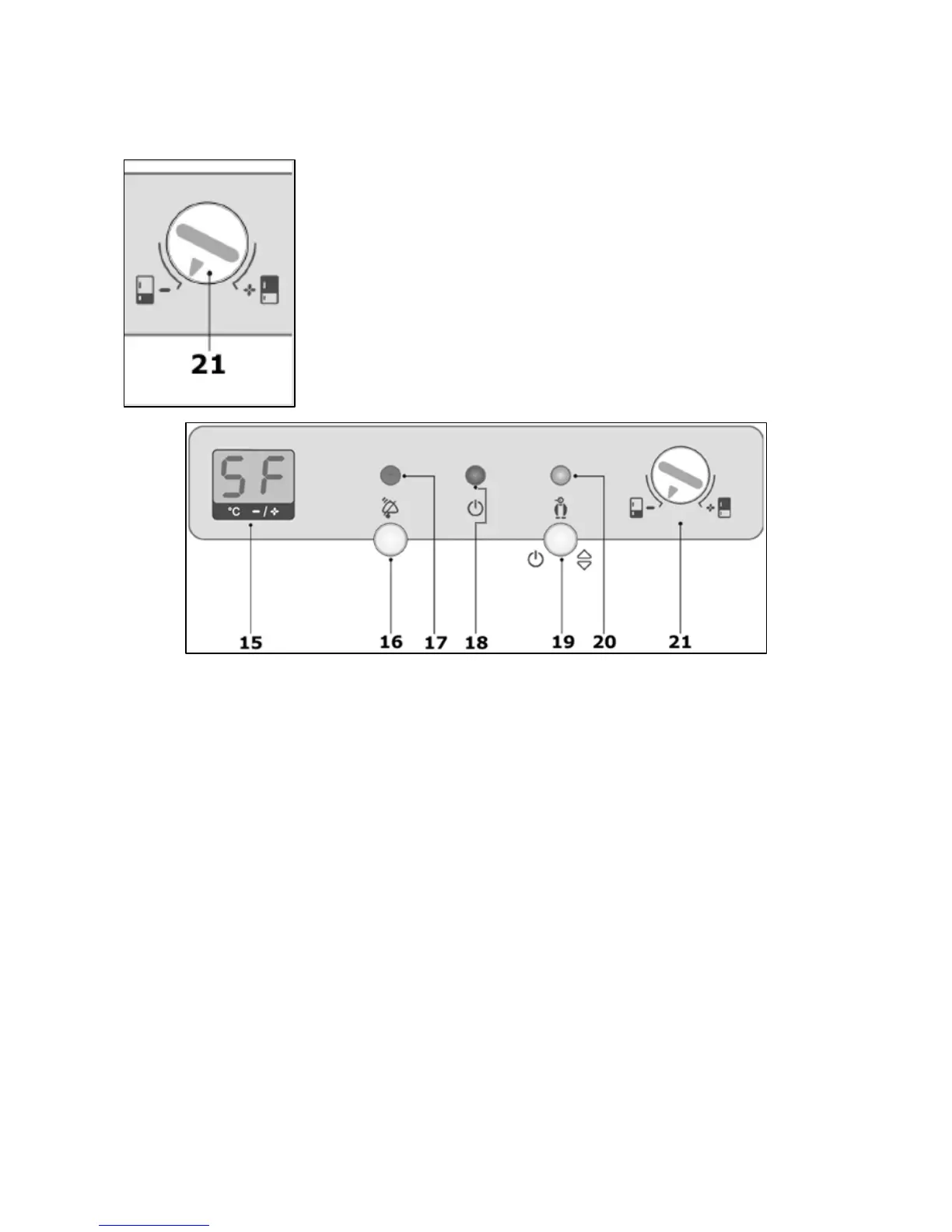
o Turn the fridge/freezer section selector dial (21) to the freezer symbol.
o Press the temperature setting button (19) until SF appears on the LED display. Whilst you are setting the
temperature, the LED display (15) will flash.
o When SF appears on the LED display (15), you should stop pushing the temperature setting button (19).
o After approximately 5 seconds, the LED display (15) will stop flashing and the fast freeze function will be
active.
o The fast freeze function neon (20) will light to confirm that the fast freeze function is active.
o To turn off the fast freeze function, turn the fridge/freezer section selector dial (21) to the freezer symbol.
o Press the temperature setting button (19) until your usual freezer section temperature appears on the LED
display (15).
o If the fast freeze function is not switched off, then it will do so automatically after approximately 2 days.
o IMPORTANT: The fast freeze function should not be switched on for prolonged periods of time; otherwise it
may cause the appliance to overwork. It could also cause the fridge and freezer section to freeze over.
Freezing fresh food
o To freeze the maximum amount of fresh food specified on page 11, you should switch on the fast freeze
function.
o For more detailed information on the fast freeze function, see the previous section. This should be done at
least 3 hours prior to attempting freezing.
12


 To Next Page