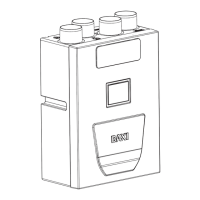
This document describes the operation and maintenance of the Baxi HP40-XX-MB Mono 2 AWHP 4-16MR Heat Pump air/water "inverter" wired controller.
Function Description
The Baxi wired controller serves as the primary user interface for the Baxi HP40-XX-MB Mono 2 AWHP 4-16MR heat pump system. It allows users to monitor, configure, and control various aspects of the heat pump's operation for space heating, cooling, and domestic hot water (DHW) production. The controller features a clear display with status icons and a menu-driven structure for accessing advanced settings. It supports different system layouts, including those focused on water flow temperature, room temperature, or a combination of both, along with DHW.
Key functions include:
- Operation Mode Selection: Users can choose between Heat, Cool, and Auto modes for space conditioning.
- Temperature Adjustment: Allows setting desired water flow, room, and DHW temperatures.
- Scheduling: Features a TIMER and WEEKLY SCHEDULE function to program specific operating times and temperatures, optimizing energy consumption.
- DHW Management: Provides dedicated controls for Domestic Hot Water, including DISINFECT (legionella prevention), FAST DHW (rapid heating), TANK HEATER (backup heating), and DHW PUMP functions.
- Energy Saving Modes: Includes an ECO MODE for energy efficiency and a SILENT MODE to reduce noise levels, with two adjustable levels.
- Holiday Modes: Offers HOLIDAY AWAY to prevent frost during extended absences and HOLIDAY HOME to maintain comfort while deviating from normal schedules.
- Child Lock: A security feature to prevent unauthorized operation of the unit.
- Service Information: Provides access to service call details, error codes, operational parameters, and display settings for troubleshooting and maintenance.
- Network Configuration: Enables intelligent control via a built-in WLAN module, allowing remote management through an application.
- SN View: Displays reference numbers for the HMI, IDU (Indoor Unit), and ODU (Outdoor Unit).
Important Technical Specifications
While specific numerical technical specifications like power consumption or temperature ranges are often dependent on the heat pump model itself and system configuration, the manual highlights several adjustable parameters and settings:
- Temperature Settings:
- Water flow desired temperature (e.g., 35°C).
- Room desired temperature (e.g., 23.5°C).
- DHW tank temperature (e.g., 38°C).
- Preset temperatures for different time periods (up to six periods).
- Weather-dependent temperature settings, allowing for personalized heating curves based on outdoor ambient temperature (T4). The manual provides tables for low and high temperature settings for cooling and heating, illustrating how T1S (desired water flow temperature) varies with T4 (outdoor ambient temperature). For example, in low temperature cooling, T1S can range from 16°C at -10≤T4<15 to 5°C at 30≤T4. For high temperature cooling, T1S can range from 20°C at -10≤T4<15 to 16°C at 30≤T4.
- DHW Disinfect Function: Forces tank temperature to 65-70°C to kill legionella bacteria.
- Silent Mode Levels: Two levels (Level 1 and Level 2) are available, with Level 2 being more silent but with reduced heating/cooling capacity.
- Timer/Schedule: Allows setting up to six time periods with corresponding modes (HEAT, COOL, DHW) and temperatures.
- ECO Mode Timer: Configurable start and end times (e.g., 08:00 to 19:00).
- Holiday Away/Home Dates: Configurable FROM and UNTIL dates (e.g., 00-00-2000).
- Child Lock Password: A default password (234) is mentioned for accessing serviceman settings.
- Screen Lock Time: Adjustable (e.g., 120 seconds).
- Language Settings: Multiple languages supported (EN, FR, IT, ES, PL, PT, GE, NL, RO, RU, TR, GR).
- Operational Parameters (for serviceman): Includes detailed system status such as online units number, operate mode, SV states, pump status, gas boiler status, leaving water temperature, water flow, heat pump capacity, power consumption, room temperature, water tank temperature, circuit temperatures, and software versions (ODU and HMI).
Usage Features
The controller is designed for intuitive daily use and advanced configuration:
- Home Pages: Provide quick access to read and change daily settings like desired temperatures. Different home pages are displayed based on the system layout (e.g., water flow temp, room temp, DHW temp).
- Menu Structure: A hierarchical menu allows access to more detailed settings. Navigation is done using arrow keys and an "ENTER" button.
- Screen Unlock/Lock: The interface automatically locks after a period of inactivity (default 120 seconds) and can be manually locked/unlocked with a long press.
- ON/OFF Controls:
- Space Heating/Cooling: Can be turned ON/OFF via the interface or controlled by a room thermostat, depending on the system configuration.
- DHW: Can be turned ON/OFF independently.
- Temperature Adjustment: Desired temperatures can be easily adjusted using the arrow keys when the cursor is on the temperature display.
- Operation Mode Adjustment: Users can select HEAT, COOL, or AUTO mode either directly through the interface or, if configured, via a room thermostat.
- Preset Temperature Function: Allows setting different temperatures for specific times, overriding the main temperature setting. This function is automatically off in AUTO mode or when a timer/schedule is running.
- Weather Temp. Set: Configures the desired water flow temperature based on outdoor ambient temperature, promoting energy savings. Users can select from predefined curves or personalize their own.
- ECO Mode: Activates an energy-saving operation, with an optional timer for specific periods.
- DHW Functions:
- Disinfect: Initiates a high-temperature cycle for legionella prevention.
- Fast DHW: Forces the system to prioritize DHW production at 60°C, engaging both the heat pump and backup heaters.
- Tank Heater: Forces the backup heater to heat the DHW tank, useful when the heat pump is busy with space conditioning or in case of heat pump failure.
- DHW Pump: Controls the DHW circulation pump.
- Schedule (Timer/Weekly Schedule): Enables programming of daily or weekly operating schedules with specific start/end times, modes, and temperatures. This allows for automated control tailored to user routines.
- Holiday Away/Home: Special modes to manage heating/cooling during user absences or when staying at home during holidays, ensuring comfort and energy efficiency.
- Child Lock: A password-protected feature to prevent children from changing settings.
- WLAN Setting: Allows connecting the controller to a wireless network for remote control via an application.
Maintenance Features
The controller provides several features to assist with system maintenance and troubleshooting:
- Service Information Menu:
- Service Call: Displays contact information for service personnel (phone and mobile numbers can be input by the installer).
- Error Code: Shows a list of recorded fault codes (up to eight) with timestamps and descriptions, aiding in diagnosing system issues.
- Parameter: Displays real-time operational parameters of the heat pump system, including temperatures, pressures, flow rates, power consumption, and component statuses (e.g., fan speed, compressor current, run time). This is crucial for installers and service engineers to monitor system health and performance.
- Display: Allows configuration of display settings such as time, date, language, backlight, buzzer, and screen lock time.
- For Serviceman Menu: A password-protected section (default password: 234) for installers and service engineers to:
- Set and adjust various system functions and parameters, including DHW mode, cool mode, heat mode, auto mode, temperature type, room thermostat settings, other heating sources, holiday settings, and network configurations.
- Perform test runs and access special functions.
- Restore factory settings.
- SN View: Provides serial numbers for the HMI, IDU, and ODU, which are essential for product identification and service records.
- Information Messages: The display provides useful tips and information, such as when certain functions are invalid (e.g., preset temp off in AUTO mode, weather temp. set active).
The comprehensive nature of this wired controller ensures both user-friendly operation for daily comfort and detailed access for professional maintenance and system optimization.

 Need help?
 General

 To Next Page