EasyManua.ls Logo

BBE 862 - Page 5

BBE 862
22 pages
Print Icon
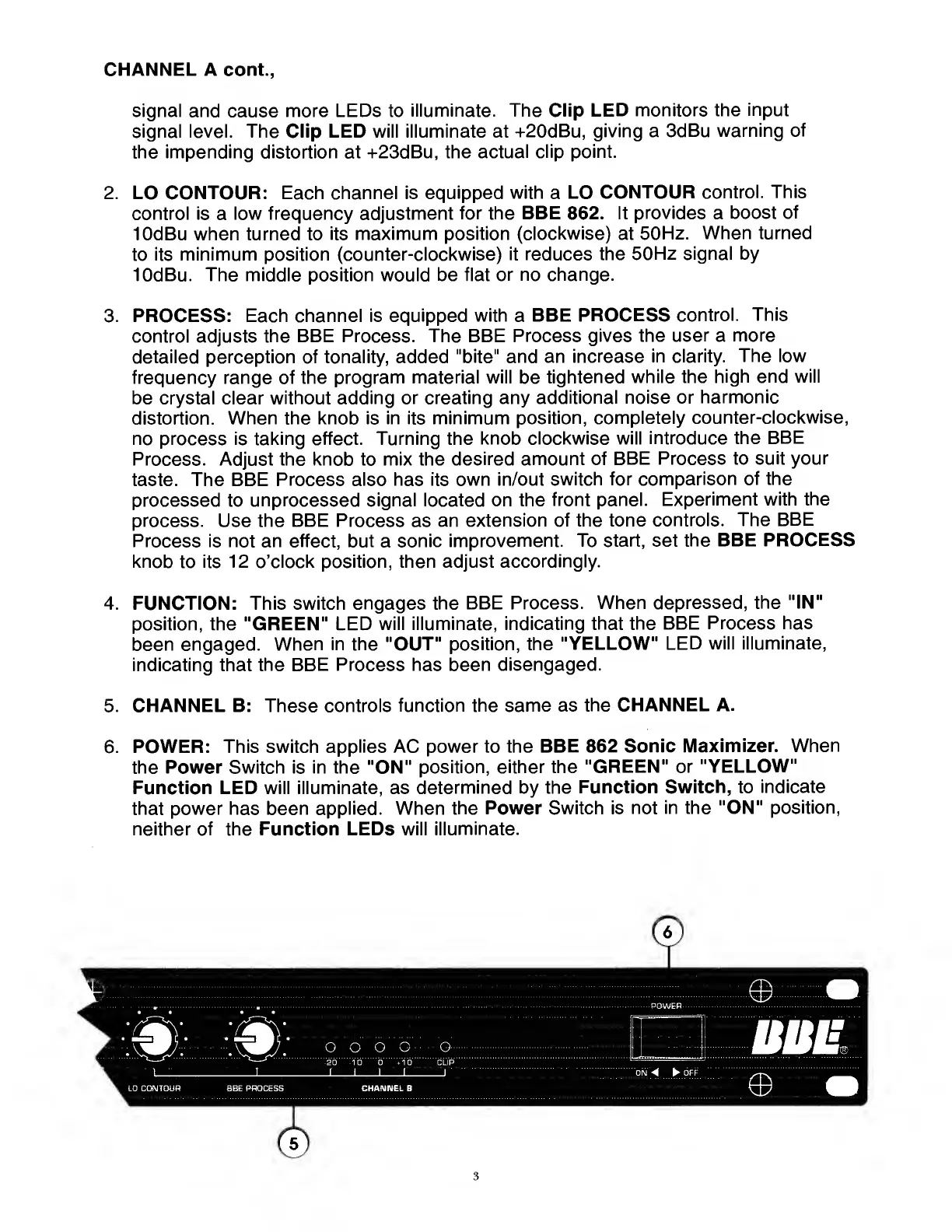
To Next Page IconTo Next Page
To Previous Page IconTo Previous Page
Loading...
CHANNEL
A
cont.,
signal
and
cause
more
LEDs
to
illuminate.
The
Clip
LED
monitors
the
input
signal
level.
The
Clip
LED
will
illuminate
at
+20dBu,
giving
a
3dBu
warning
of
the
impending
distortion
at
+23dBu,
the
actual
clip
point.
2.
LO
CONTOUR:
Each
channel
is
equipped
with
a
LO
CONTOUR
control.
This
control
is
a
low
frequency
adjustment
for
the
BBE
862.
It
provides
a
boost
of
lOdBu
when
turned
to
its
maximum
position
(clockwise)
at
50Hz.
When
turned
to
its
minimum
position
(counter-clockwise)
it
reduces
the
50Hz
signal
by
lOdBu.
The
middle
position
would
be
flat
or
no
change.
3.
PROCESS:
Each
channel
is
equipped
with
a
BBE
PROCESS
control.
This
control
adjusts
the
BBE
Process.
The
BBE
Process
gives
the
user
a
more
detailed
perception
of
tonality,
added
"bite"
and
an
increase
in
clarity.
The
low
frequency
range
of
the
program
material
will
be
tightened
while
the
high
end
will
be
crystal
clear
without
adding
or
creating
any
additional
noise
or
harmonic
distortion.
When
the
knob
is
in
its
minimum
position,
completely
counter-clockwise,
no
process
is
taking
effect.
Turning
the
knob
clockwise
will
introduce
the
BBE
Process.
Adjust
the
knob
to
mix
the
desired
amount
of
BBE
Process
to
suit
your
taste.
The
BBE
Process
also
has
its
own
in/out
switch
for
comparison
of
the
processed
to
unprocessed
signal
located
on
the
front
panel.
Experiment
with
the
process.
Use
the
BBE
Process
as
an
extension
of
the
tone
controls.
The
BBE
Process
is
not
an
effect,
but
a
sonic
improvement.
To
start,
set
the
BBE
PROCESS
knob
to
its
12
o’clock
position,
then
adjust
accordingly.
4.
FUNCTION:
This
switch
engages
the
BBE
Process.
When
depressed,
the
"IN"
position,
the
"GREEN"
LED
will
illuminate,
indicating
that
the
BBE
Process
has
been
engaged.
When
in
the
"OUT"
position,
the
"YELLOW"
LED
will
illuminate,
indicating
that
the
BBE
Process
has
been
disengaged.
5.
CHANNEL
B:
These
controls
function
the
same
as
the
CHANNEL
A.
6.
POWER:
This
switch
applies
AC
power
to
the
BBE
862
Sonic
Maximizer.
When
the
Power
Switch
is
in
the
"ON"
position,
either
the
"GREEN"
or
"YELLOW"
Function
LED
will
illuminate,
as
determined
by
the
Function
Switch,
to
indicate
that
power
has
been
applied.
When
the
Power
Switch
is
not
in
the
"ON"
position,
neither
of
the
Function
LEDs
will
illuminate.
3

Related product manuals