ENGLISH
1716
Operating Instructions
Isolating multiple victims: Complex multiple burials are rare in
recreational settings and usually can be treated as a series of single burials
performed in normal search mode. The only time multiple burials can
become truly complex is when it’s not possible to turn o the rst victim’s
transceiver, when the victims are in close proximity (≤10 m) to each other,
or if there are three or more victims.
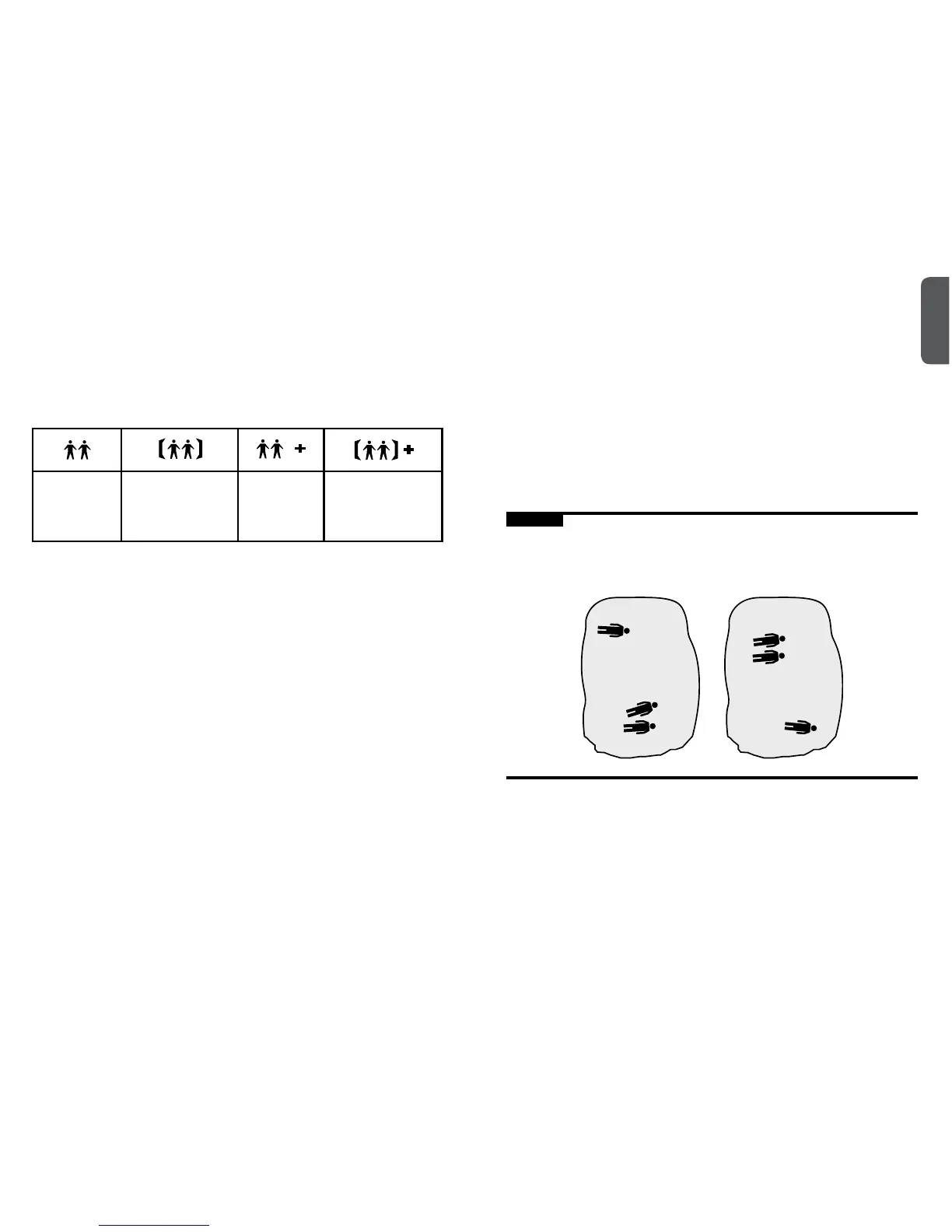
The following icons help to determine how many buried victims are within
range of the rescuer and whether they are in close proximity to each other:
More than
one signal
within range.
Two victims both
within six meters
of the searcher.
More than
two signals
within range.
More than two sig-
nals within range
and at least two
within six meters.
If it’s not possible to turn o a victim’s transceiver, use Signal Suppression
to nd the next closest victim. Press and immediately release the
Options button (6). “SS” will be shown in the display and the icons in the
multiple burial indicator will ash back and forth. Follow the distance and
direction to the next victim. Remember that the rst victim’s signal will be
suppressed for one minute, at which time the icons in the multiple burial
indicator will stop ashing. To go back to normal search mode before one
minute has elapsed, simply press the Options button.
It is important to note that Signal Suppression, marking, and other forms
of signal isolation are not 100 percent reliable, especially when searching
for older analog transceivers. This is due to the possibility of overlapping
signals, especially when more than two transmit signals are within range.
Due to their imprecise transmit signals, analog transceivers can sometimes
trigger multiple burial indications. For these reasons, it’s important to learn
some of the backup techniques found in our Tracker3 Advanced Manual at
www.backcountryaccess.com.
Operating Instructions
Using Big Picture Mode: Big Picture mode is a valuable feature that can
be used to gain an overview of the scenario and optimize the eciency
of your search. It can be used at the beginning of a scenario to assign
rescuers to each displayed signal. It is also valuable in situations involving
more than two signals within range.
Remember, Tracker3 suppresses only one signal at a time. When you
suppress a second signal, it will then show you the next closest signal–
even if that victim’s signal was suppressed earlier. If victim #3 is closer
to victim #2 than victim #1 (scenario A, below), then suppressing victim
#2’s signal will take you to victim #3 automatically. However, if victim #1 is
closer than victim #3, (scenario B), Tracker3 will bring you back to victim
#1. If this is the case, use Big Picture mode to nd the general direction to
the third signal. After moving closer to the third signal, release the Options
button and Tracker3 will automatically isolate that third signal.
Figure K
Tracker3 suppresses one signal at a time. When suppressing victim #2’s
signal, if victim #3 is further away from victim #2 than #1 (scenario B), then
use Big Picture mode to move toward #3.
Scenario A
#1
#1
#2
#2
#3
#3
Scenario B


 To Next Page