• Only use the provided power adapter.
• Do not disassemble the instrument or modify internal parts. If it malfunctions, discontinue use until repairs
have been made.
• Turn o power before connecting this instrument to other devices.
• Do not play the instrument at maximum volume or at an uncomfortable level for an extended period of
time.
• Be aware that excessive sound pressure from headphones can cause hearing loss.
• Overheating the instrument may cause damage; keep all parts of the instrument o heat sources.
• Prevent liquid, dust, particles, and other foreign matter from entering the instrument because it may cause
corrosion or short-circuit the components.
• Unplug the instrument before cleaning it. Do not insert or pull the plug out with wet hands.
• Use dry, soft cloth to clean the instrument. Do not use alcohol or other chemical solvents to wipe the
instrument. Using these substances may damage the instrument surface.
• Turn o the power supply and unplug the instrument when not in use or if instrument breaks.
• To reduce risk of fire or electric shock, do not expose instrument to rain or humidity.
• Do not expose instrument to dripping or splashing liquid. Do not place objects filled with liquid on the
instrument.
• Maximum Operating Temperature: 104° F
• Do not install this instrument in a confined space such as a book case or similar unit. Keep instrument in
a well-ventilated area.
• To prevent possible harm to the environment, recycle this responsibly to promote the sustainable reuse of
material resources.
WARNING
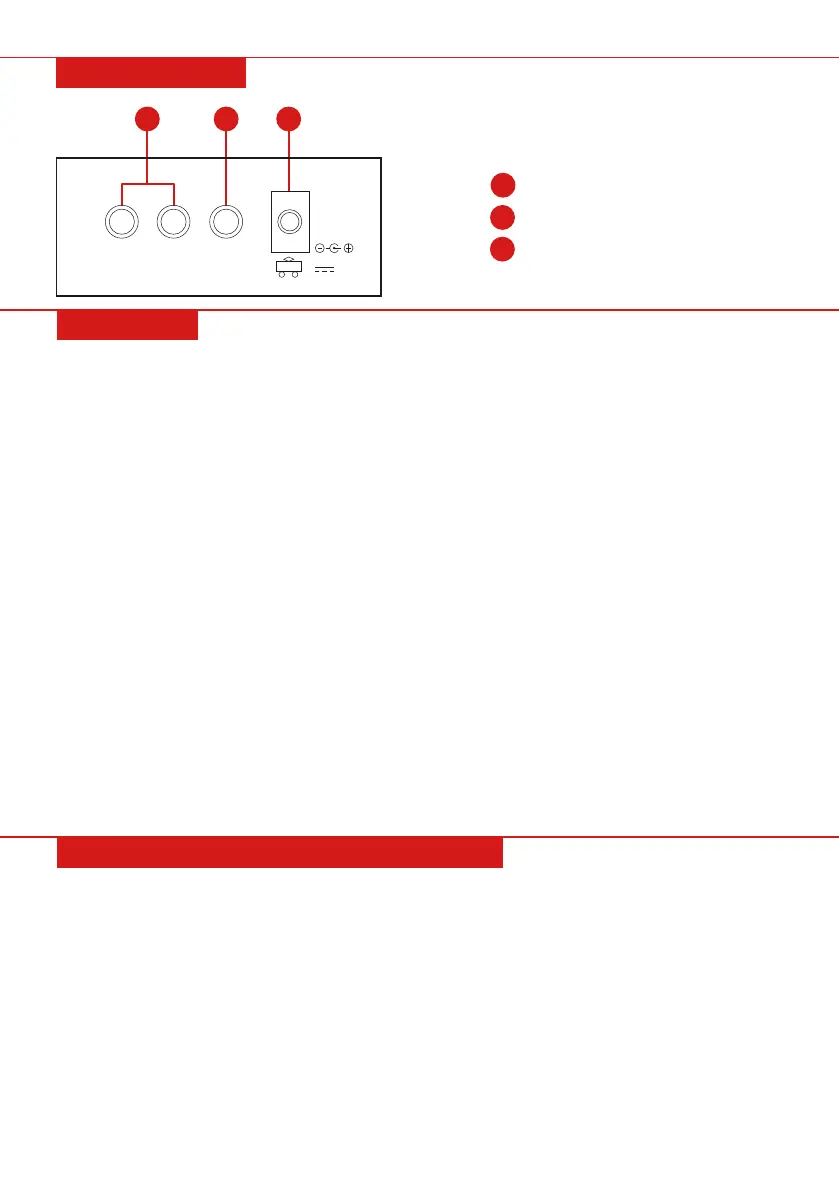
Using AC/DC Power Supply Adaptor
• Do not use any other AC/DC power supply adaptor other than the one supplied with this unit. Please
connect one side to the power supply socket on the back-panel and the other side to an outlet. Note: the
input voltage should be the same as the outlet power.
Headphone Input
• Insert headphones (not included) into the “PHONES” jack on the back of the instrument. The speaker will
automatically turn o when headphones are in use. WARNING: Hearing loss can occur if headphones are
used at too high of a volume.
Connection with Amplifiers or Acoustics
• The instrument can be connected to external amplifiers or speakers. To do so, first shut o the instrument.
Then, insert the stereo frequency cable into the “OUT L/R” on the back-panel and the other end into the
“LINE IN” or “AUX IN” input jack of external speakers.
PREPERATION FOR PERFORMANCE
REAR PANEL
36
37
38
36
L/R Output
37
Headphone Input
38
DC 12V Input
R OUT L PHONES
12V
Pg. 7


 To Next Page