Using Power Adapter
Do not use any other power supply adapter other than the one supplied with this unit. Connect one side to
the power supply socket on the back-panel and the other side to an outlet. Note: the input voltage should be
compatible with the outlet power.
Headphone Jack
• Turn o keyboard before connecting external speakers or audio devices to keyboard. Connect these
devices via the “PHONES/OUTPUT” port on the back of the keyboard.
• Insert headphones (not included) into the “PHONES/OUTPUT” jack on the back of the instrument. The
speaker will automatically turn o when headphones are in use. WARNING: Hearing loss can occur if
headphones are used at too high of a volume.
Mic Input and Audio Input
• You can connect a microphone (not included) via the “MIC” port to use with the keyboard.
• You can play audio through the computer speakers. To do so, first turn o the keyboard. Plug in your device
to the keyboard via the “AUDIO INPUT” jack. Then, turn on the keyboard.
Playing Music from an External Device
• Insert a USB flash drive into the “UDISK” port behind the keyboard. The keyboard only supports USB drives
up to 32GB.
• Press to adjust the volume.
• Press to go to the previous track, press to go to the next track, press to play/pause a track, press
to stop the audio. Press / / to cycle through continuous, random, or single playback.
1
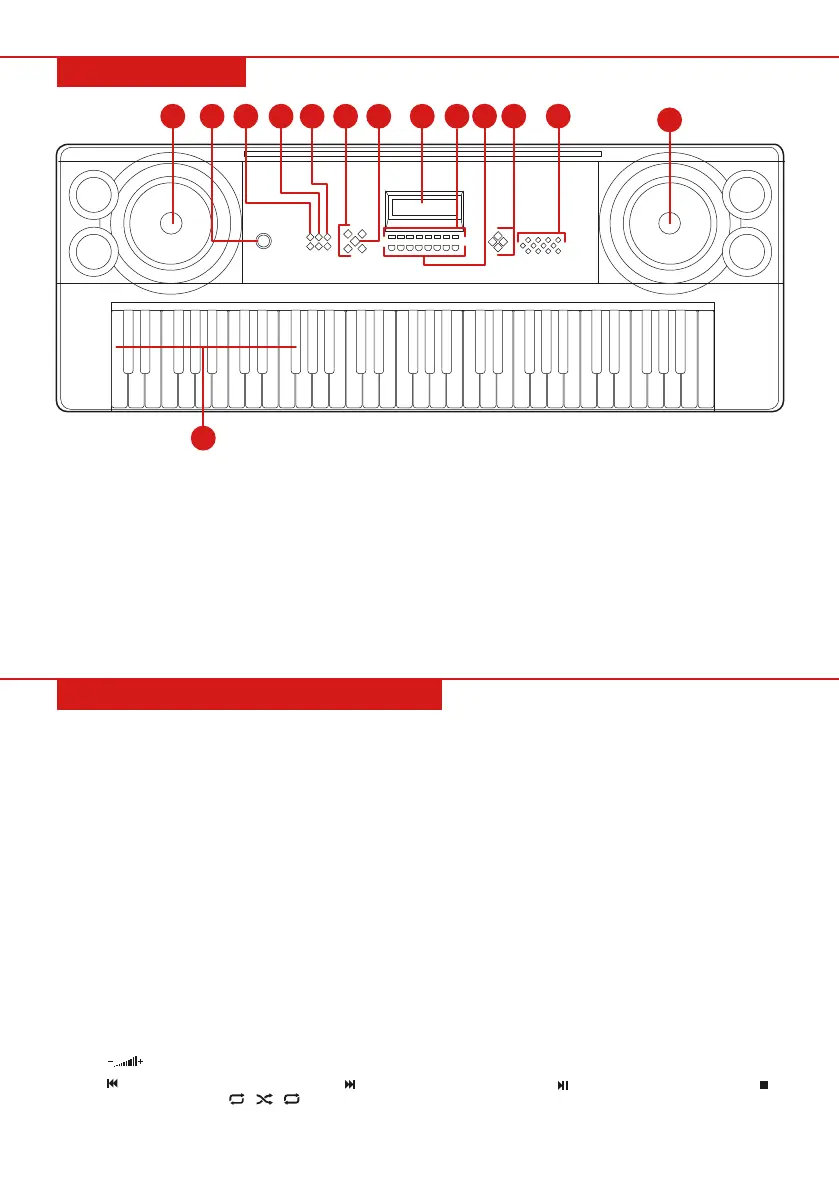
FRONT PANEL
1 2 3
4
5
6
7 98
10
11
1
12
13
PERFORMANCE PREPARATION
Pg. 4
1. Speaker
2. Power Switch
3. Master Volume
4. Accompaniment
Volume
5. Tempo
6. Clockwise:
• Single
• Fingered
• Fill-In
• Synch
7. Start/Stop
8. LED Display
9. • Record
• Programming
• Play
• Sustain
• Vibrato
• One-Key
• Follow
• Ensemble
10. • Volume Down
• Volume Up
• Previous
• Next
• Play/Pause
• Stop
• Continous/Random/
Single/Playback
• Key Lighting
11. Clockwise from top
• Timbre
• Demo Song
• Rhythm
• Keyboard
Percussion
12. Numbers
13. Chord Keyboard (for
use with single-finger
chords)


 To Next Page