Pg. 14
REMOTE CONTROL DIAGRAM
LED LIGHT
TURN RIGHT
TURN LEFT
REVERSE
/CONNECT
FORWARD
PARK
TOGGLE SPEED
• Insert 2 AAA batteries into the remote control
• After 10 seconds of non-operation, the remote will go into power-saving mode.
Linking the remote control:
1. Press and hold the reverse button for 2 to 4 seconds. The light will flash.
2. Turn the vehicle on. The light will turn solid to indicate a successful link.
3. If the light continues to flash (indicating an unsuccessful link), remove and reinsert the batteries and
repeat steps 1 and 2.
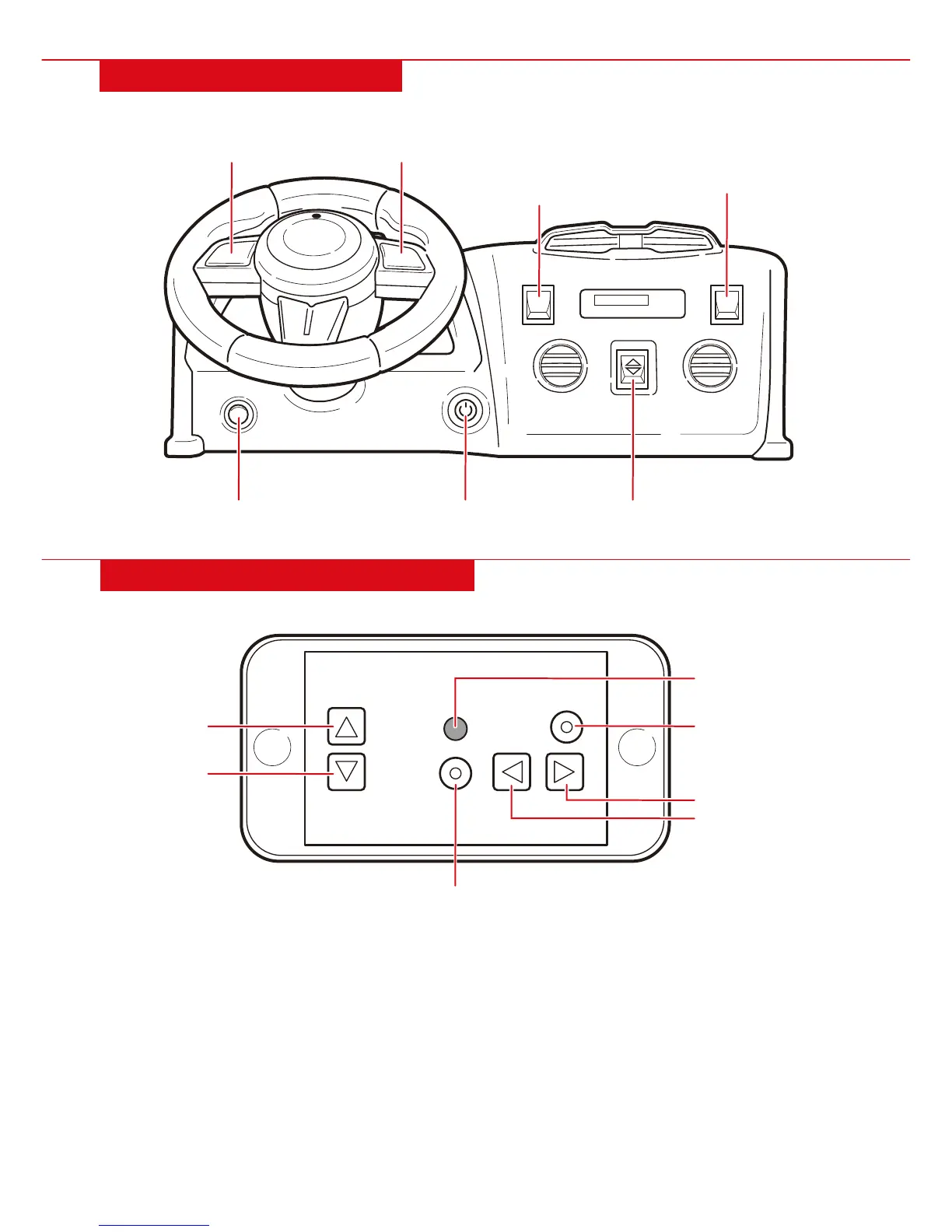
DASHBOARD DIAGRAM
• Push down on the pedal to drive forward/reverse. Release the pedal to slow down and stop.
POWER SWITCH FORWARD/REVERSE
HIGH/LOW SPEED
REMOTE/
MANUAL CONTROL
HORN ENGINE SOUNDS
LIGHTS


 To Next Page