EasyManua.ls Logo

BCP SKY5386 - User Manual

BCP SKY5386
12 pages
Print Icon
To Next Page IconTo Next Page
Loading...
SKY5386 + SKY5387 + SKY5388
Ver. 1
INSTRUCTION
MANUAL
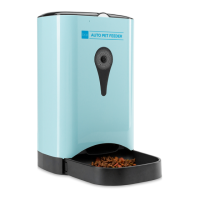
Automatic Pet Feeder
with App Control
Question and Answer IconNeed help?

Do you have a question about the BCP SKY5386 and is the answer not in the manual?

Summary

Specifications

Diagram and Components

Getting Started and Usage

Setting Up the Appliance

Follow step-by-step instructions for initial setup and placement of the automatic pet feeder.

Usage Tips

Essential advice for optimal operation, including food compatibility and placement.

Download the App

Instructions for downloading and finding the 'PetFun' mobile application.

App Connectivity and Management

Login and Account Creation

Guide to registering a new account or logging into an existing one for app access.

Connecting the Feeder to Wi-Fi

Step-by-step process to connect your automatic pet feeder to your home Wi-Fi network.

Managing Your Devices

Overview of the 'My Devices' section for monitoring and controlling connected feeders.

Feeding and Monitoring Features

My Account Settings

Access and manage account details, including push notifications and password.

Automatic Feeding Setup

Configure scheduled meals, portions, and audio recordings for automatic food dispensing.

Manual Feeding

Manually dispense food portions on demand via the app interface.

Camera Features

Utilize the camera for live feed, snapshots, and audio communication with your pet.

App Settings and Configuration

Customize device name, recording settings, pet profiles, and event lists.

Troubleshooting and Support

Troubleshooting Common Issues

Solutions for common problems such as connectivity errors and dispensing issues.

Frequently Asked Questions (FAQ)

Answers to common user queries regarding app updates, time zones, and device operation.

Product Warranty Information

Details regarding the return policy, warranty, and procedures for product issues.

Summary

Specifications

Diagram and Components

Getting Started and Usage

Setting Up the Appliance

Follow step-by-step instructions for initial setup and placement of the automatic pet feeder.

Usage Tips

Essential advice for optimal operation, including food compatibility and placement.

Download the App

Instructions for downloading and finding the 'PetFun' mobile application.

App Connectivity and Management

Login and Account Creation

Guide to registering a new account or logging into an existing one for app access.

Connecting the Feeder to Wi-Fi

Step-by-step process to connect your automatic pet feeder to your home Wi-Fi network.

Managing Your Devices

Overview of the 'My Devices' section for monitoring and controlling connected feeders.

Feeding and Monitoring Features

My Account Settings

Access and manage account details, including push notifications and password.

Automatic Feeding Setup

Configure scheduled meals, portions, and audio recordings for automatic food dispensing.

Manual Feeding

Manually dispense food portions on demand via the app interface.

Camera Features

Utilize the camera for live feed, snapshots, and audio communication with your pet.

App Settings and Configuration

Customize device name, recording settings, pet profiles, and event lists.

Troubleshooting and Support

Troubleshooting Common Issues

Solutions for common problems such as connectivity errors and dispensing issues.

Frequently Asked Questions (FAQ)

Answers to common user queries regarding app updates, time zones, and device operation.

Product Warranty Information

Details regarding the return policy, warranty, and procedures for product issues.

BCP SKY5386 Specifications

General IconGeneral
BrandBCP
ModelSKY5386
CategoryPet Care Product
LanguageEnglish

Related product manuals