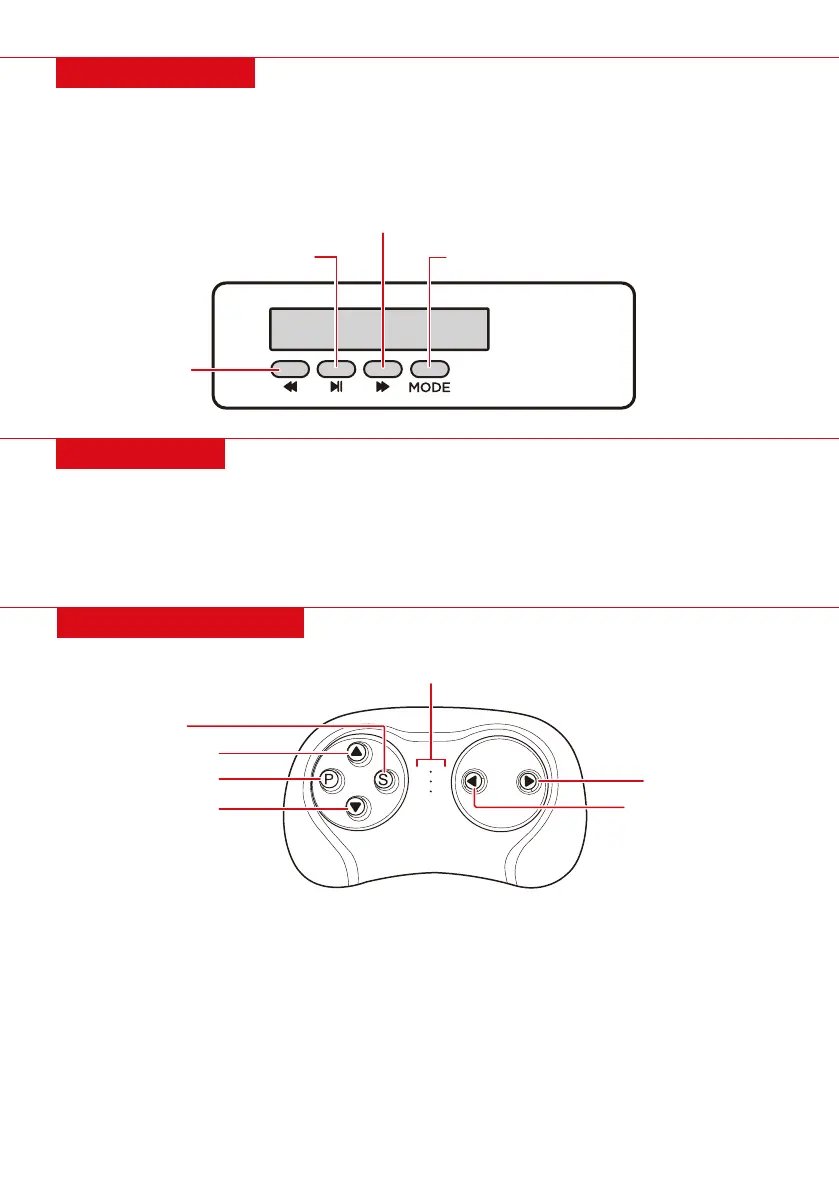
PLAY/PAUSE/SEEK
FORWARD/VOLUME+
BACK/VOLUME
MUSIC MODE
MEDIA PLAYER
BLUETOOTH
• Back/Volume-: Short press to play the previous song/radio station, long press to decrease volume
• Play/Pause/Seek: Play/pause music, seek radio stations
• Forward/Volume+: Short press to play the next song/radio station, long press to increase volume
• Mode: Press to toggle between music and FM radio
1. Place your desired audio device near the media player and power the car on.
2. Press Mode on the media player and wait until you hear “Bluetooth device is ready to pair.”
3. On your desire audio device, locate the Bluetooth setting and select the device named “Best Choice
Products Ride On.”
4. When the device says “Your Bluetooth device is connected successfully,” select the desired song.
| 15
REMOTE CONTROL
• Remote control operation will OVERIDE manual operation; the pedal will not work when operating
the remote control.
• After a period of non-operation, the remote will go into power-saving mode.
Linking the remote control:
1. Turn the vehicle o.
2. Install 2 AAA batteries into the remote control and the indicator lights will flash.
3. Turn the vehicle on. The indicator lights will turn solid indicating a successful link.
4. If the indicator lights continue to flash (indicating an unsuccessful link), remove and reinsert
batteries and repeat steps 1 to 3.
FORWARD
PARK / STOP
SPEED SELECT
INDICATOR LIGHTS
REVERSE
TURN LEFT
TURN RIGHT


 To Next Page